
Share this tool:
 |
Description:
- Introduction
- What Vista Social Actually Is
- Strong Features and Capabilities
- Where Vista Social Is Strongest
- AI Assistant and Knowledge Layer
- Publishing Workflow and Ease of Use
- Engagement, Inbox, and Review Workflow
- Analytics, Listening, and Reporting
- AI Image Generation and Creative Support
- Best Use Cases
- Where Vista Social Is Weaker
- Practical Tips
- Final Takeaway
Vista Social is a full social media management platform with AI built into the practical parts of the workflow: writing captions, creating post ideas, generating replies, responding to reviews, training the assistant on brand knowledge, producing images, and automating parts of the inbox. The important thing is that Vista Social is not just an AI caption tool. It is closer to a social operations hub for teams, agencies, and brands that need publishing, approvals, engagement, analytics, social listening, review management, and AI help in the same system.
The easiest way to understand Vista Social is to break it into five layers.
| Layer | What It Does | Why It Matters |
|---|---|---|
| Publishing layer | Schedules, previews, queues, boosts, and customizes posts across major social platforms. | This is the daily planning and posting system. |
| Engagement layer | Centralizes comments, messages, mentions, reviews, and inbox activity. | Teams do not have to jump between every native platform. |
| AI layer | Generates posts, replies, review responses, images, and brand-aware outputs. | The AI is embedded into real social tasks, not isolated in a chat window. |
| Intelligence layer | Handles analytics, reports, listening, sentiment, competitor tracking, and performance review. | Useful for agencies and teams that need proof of results. |
| Operations layer | Adds approvals, roles, permissions, automations, brand safety, white label options, and client workflows. | This is where Vista Social becomes more serious for teams. |
That layered structure is Vista Social’s main advantage. It gives you a broad system rather than a narrow AI tool. The publishing page lists support for planning and publishing across Instagram, Facebook, X/Twitter, Pinterest, TikTok, LinkedIn, Reddit, Snapchat, Threads, Tumblr, and YouTube from one dashboard, while the pricing page also includes inbox, review management, listening, reports, and AI Assistant features across plans.
Generates captions, posts, replies, review responses, and platform-ready content inside the Vista Social workflow.
Lets teams upload or define brand, product, policy, and FAQ context so AI outputs are more grounded and less generic.
Supports visual planning, bulk scheduling, post previews, queues, approval workflows, boosting, and best-time recommendations.
Centralizes messages, comments, reviews, mentions, and engagement so teams can respond from one dashboard.
Provides post, team, competitor, and network-specific reporting with custom reports, white labeling, PDF export, and scheduled delivery.
Tracks conversations and keywords, supports external listening as an add-on, and manages reviews across Facebook, Google, Yelp, Trip Advisor, OpenTable, and TrustPilot.
Vista Social is strongest when a team needs one connected system instead of separate tools for publishing, comments, reporting, and AI writing. A solo creator can use it, but the product feels most valuable when there are multiple profiles, multiple users, client approvals, reporting needs, and ongoing community management. The pricing structure reinforces this: the Professional plan includes 15 social profiles and 3 users, Advanced includes 30 profiles and 6 users, Scale includes 70 profiles and 10 users, and Enterprise is customizable.
The second strength is how deeply AI is placed into normal social tasks. Vista Social’s AI Assistant can help craft captions, replies, and review responses, but the more important upgrade is AI Training & Knowledge. That feature lets the assistant reference specific brand, product, policy, support, or campaign material instead of relying only on a generic prompt. Vista Social says profile groups can have multiple knowledge sources, such as general brand information, product catalogs, and support FAQs.
The third strength is operational control. Brand Voice lets the AI use a profile group’s style in caption generation and inbox replies, while Brand Safety and Compliance policies can warn team members when a draft post or reply fails to meet guidelines. This is especially useful for agencies, multi-location businesses, franchises, healthcare-adjacent brands, finance teams, or any organization where “fast content” is not enough.
Vista Social’s AI Assistant is useful because it sits inside the tasks social teams already repeat. It can generate social posts from prompts or topics, create replies in the inbox, suggest review responses, generate YouTube titles, and help with mobile post creation. That makes it more practical than using a general chatbot beside the platform and manually pasting everything back and forth.
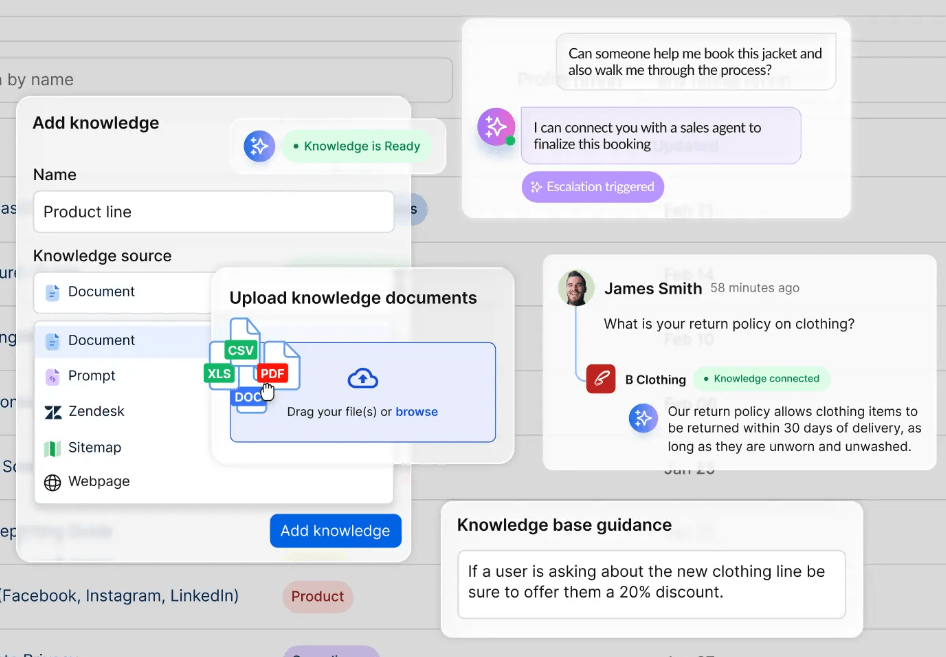
AI Training & Knowledge is the more important feature for serious teams. The basic version starts on Advanced and above, according to Vista Social’s current help article and pricing page. The Scale plan adds premium AI Training & Knowledge features such as escalations, guidance, and Zendesk integrations. That matters because it moves Vista Social from “write a caption” toward “handle social responses using approved business knowledge.”
Brand Voice and Knowledge also work together. Brand Voice controls tone and style, while Knowledge supplies factual context. That split is useful because a brand can sound friendly and still need accurate answers about pricing, policies, availability, product details, or campaign rules. Vista Social’s support material specifically notes that brand voice does not replace Knowledge; both can be used at the same time.
The limitation is that the AI quality depends heavily on setup. If you do not define brand voice, upload useful knowledge, or maintain clear internal information, Vista Social’s AI will behave more like a generic social writing assistant. The strongest version of the product is the configured version, not the default one.
Vista Social’s publishing workflow is built for volume. You can schedule a single post, use bulk publishing, build Smart Publishing flows, find content, use Instagram and TikTok planners, make Twitter/X threads, or publish through browser extensions. The getting-started docs also show a profile-group workflow where users select the right profiles, add captions and media, preview posts per network, and schedule them.
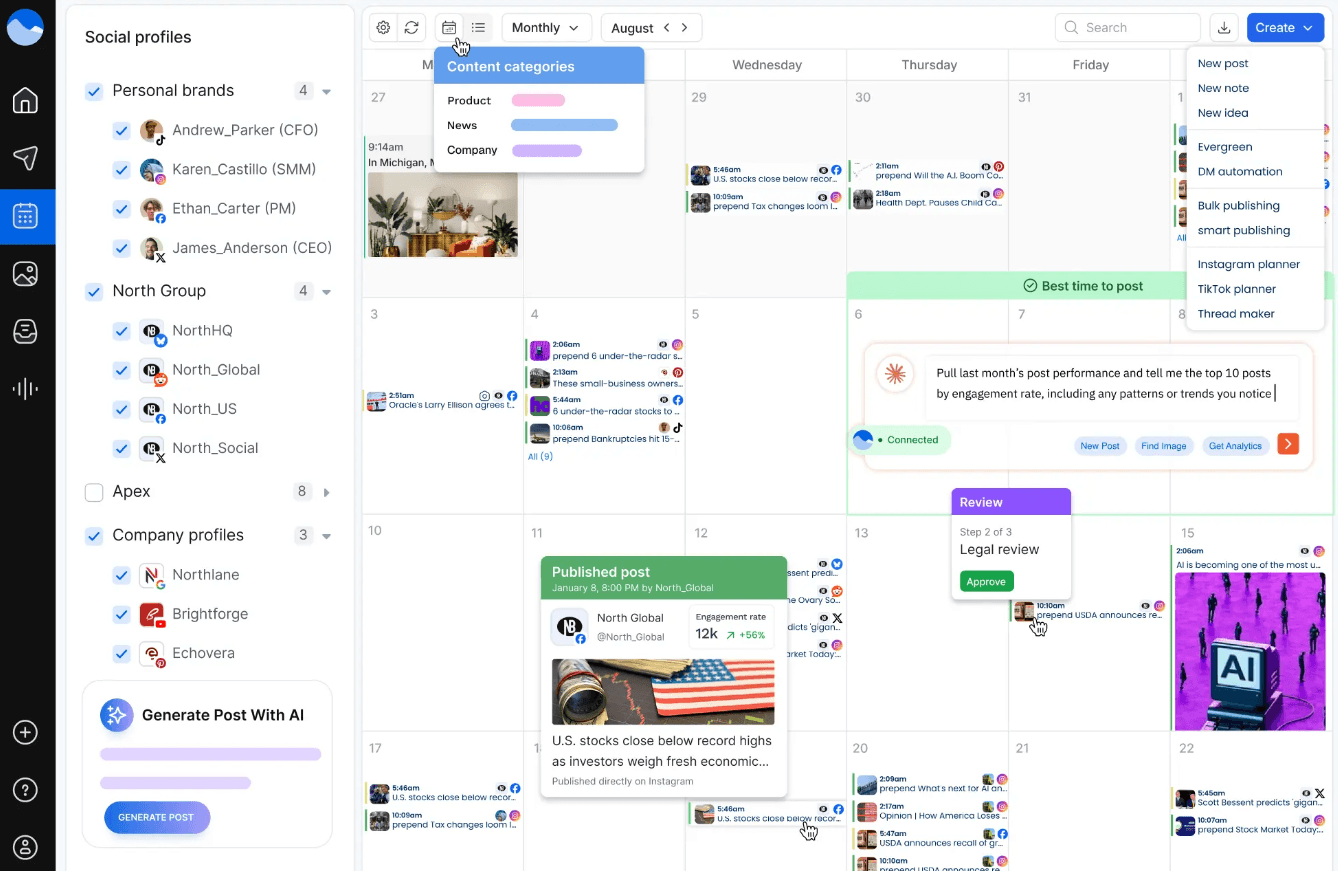
The publishing page is especially strong on network-specific control. It highlights direct TikTok publishing through the official TikTok API, direct Facebook publishing for reels, videos, images, carousels, and slideshows, and post boosting across Facebook, Instagram, LinkedIn, TikTok, and X/Twitter. For teams that manage multiple brands, that breadth is important because platform-native posting rules are usually where social scheduling tools become annoying.
Bulk Publishing is another practical feature. Vista Social supports importing a CSV, importing a blog, importing latest news, importing from Instagram hashtags or users, importing images and videos, repurposing existing posts, and generating with AI. This is especially useful for agencies and franchises that plan weeks of content in batches rather than composing every post one at a time.
Smart Publishing with AI adds another layer. Instead of only pulling from RSS feeds or news categories, the Generate with AI option can create original post ideas and captions from a topic or custom prompt. That is helpful for evergreen content calendars, tips, educational posts, and recurring branded series.
Vista Social’s Social Inbox is one of the clearest reasons to consider the platform over a lighter scheduler. The inbox lets teams view and respond to social messages and comments across connected profiles, with filtering and profile-based organization. The getting-started guide says the inbox can include comments, mentions, messages, reviews, and shares depending on the network.
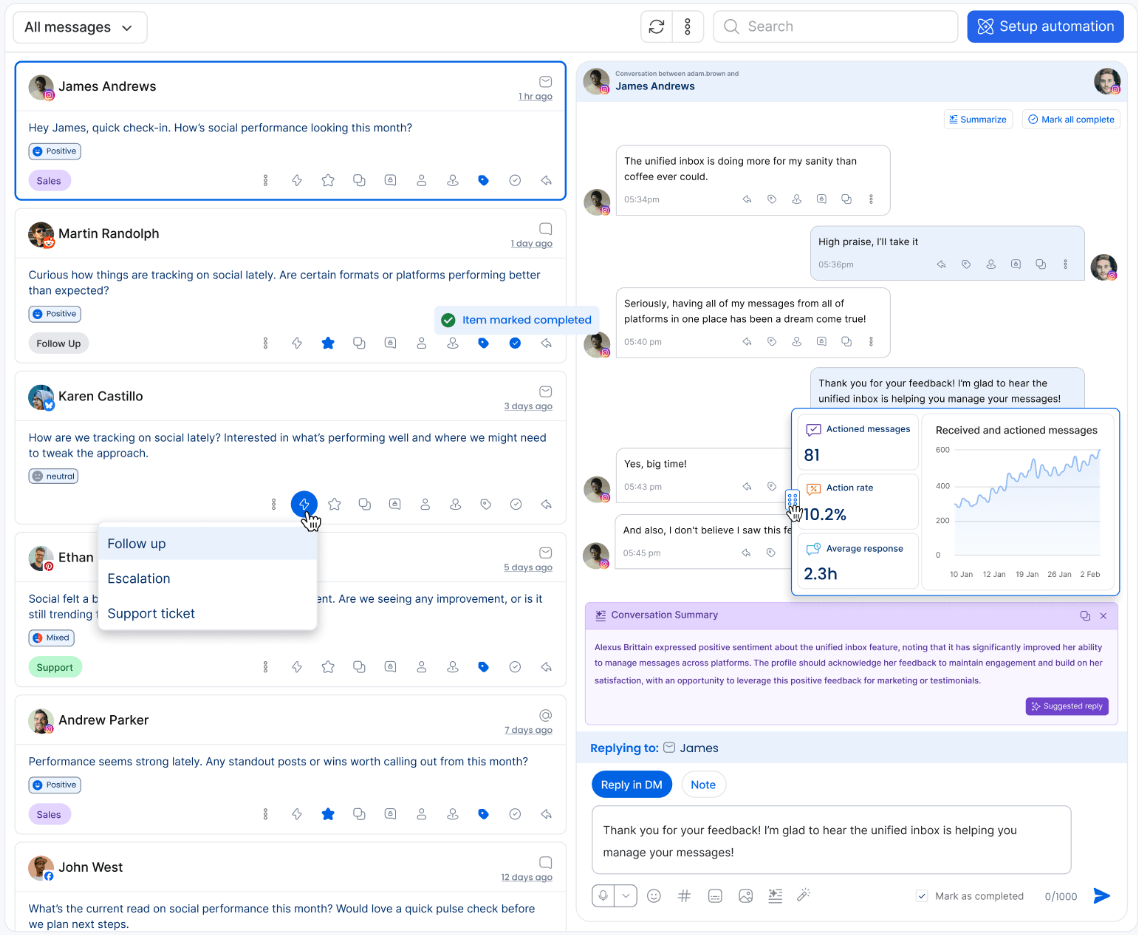
AI replies make that workflow faster. Vista Social’s AI Assistant can generate replies from a prompt, create multiple variations, and use AI Knowledge to produce more accurate, consistent, and brand-aware responses. This is a better fit for social care teams than basic “reply generator” tools because the response can sit inside the same inbox where the conversation is already happening.
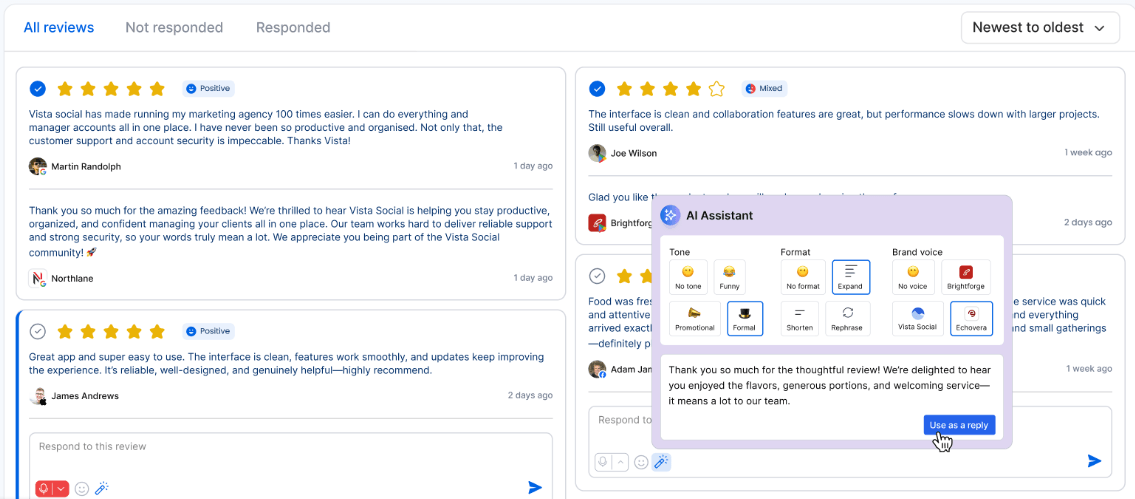
Review management is also built in. Vista Social’s pricing page says it can manage reviews across Facebook, Google, Yelp, Trip Advisor, OpenTable, and TrustPilot, and the AI Assistant can generate review response options from the reviews section. For businesses where customer reviews are part of the social workflow, that makes Vista Social more useful than tools that only schedule posts.
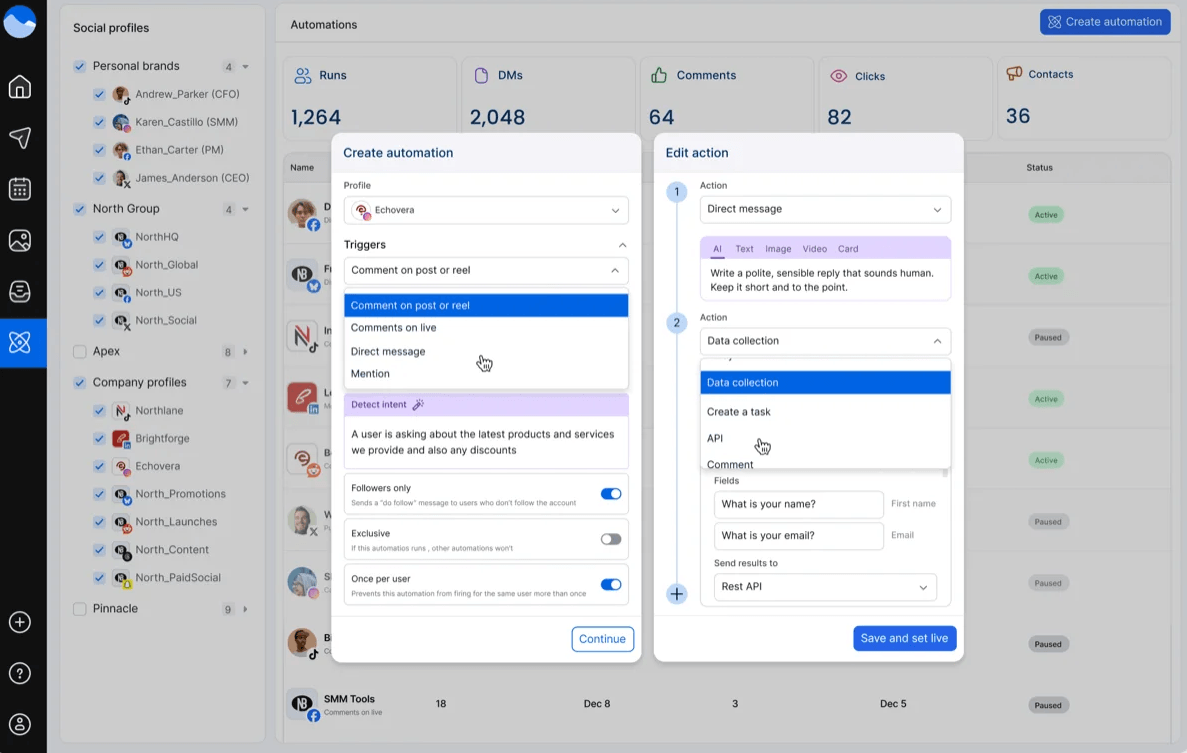
Inbox and review automations are where the platform starts to feel more advanced. Vista Social supports Dynamic AI Reply through custom prompts, AI Intent for categorizing reviews, and AI Prompted Replies for responding to reviews on Google, Yelp, and more. That is valuable, but it also needs careful setup. Automating replies can save time, but it can also create brand risk if tone, escalation rules, and policy guidance are not configured properly.
Vista Social’s analytics stack is built for people who need to explain performance, not just glance at likes. It supports post performance reports, team performance reports, competitor reports, custom reports, white labeling, PDF export, and automated delivery. That makes it especially useful for agencies that need to send recurring client reports or internal teams that need to show leadership what is working.
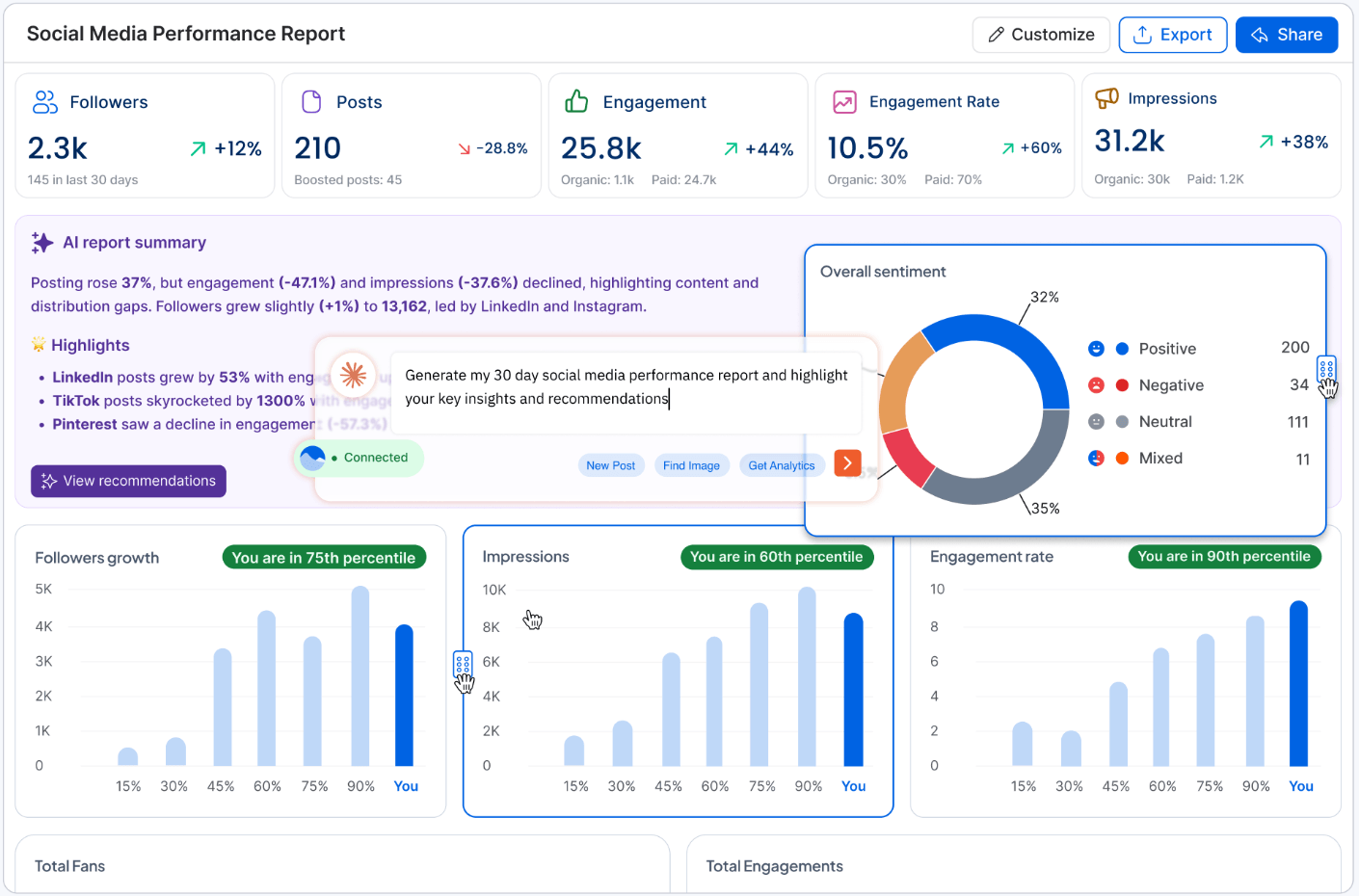
The reporting workflow also supports scheduled PDF delivery. Vista Social’s support docs say reports can be delivered weekly or monthly by email, which is a small but important agency feature because recurring reporting often becomes a time sink.
Listening is available in two layers. Listening for content on your own social profiles is included, while listening across social, web, and news starts as an add-on at $75/month, according to the current pricing page. Vista Social’s listening page says the tool is designed to monitor conversations, extract insights, and improve brand health, with tiers that vary by results volume.
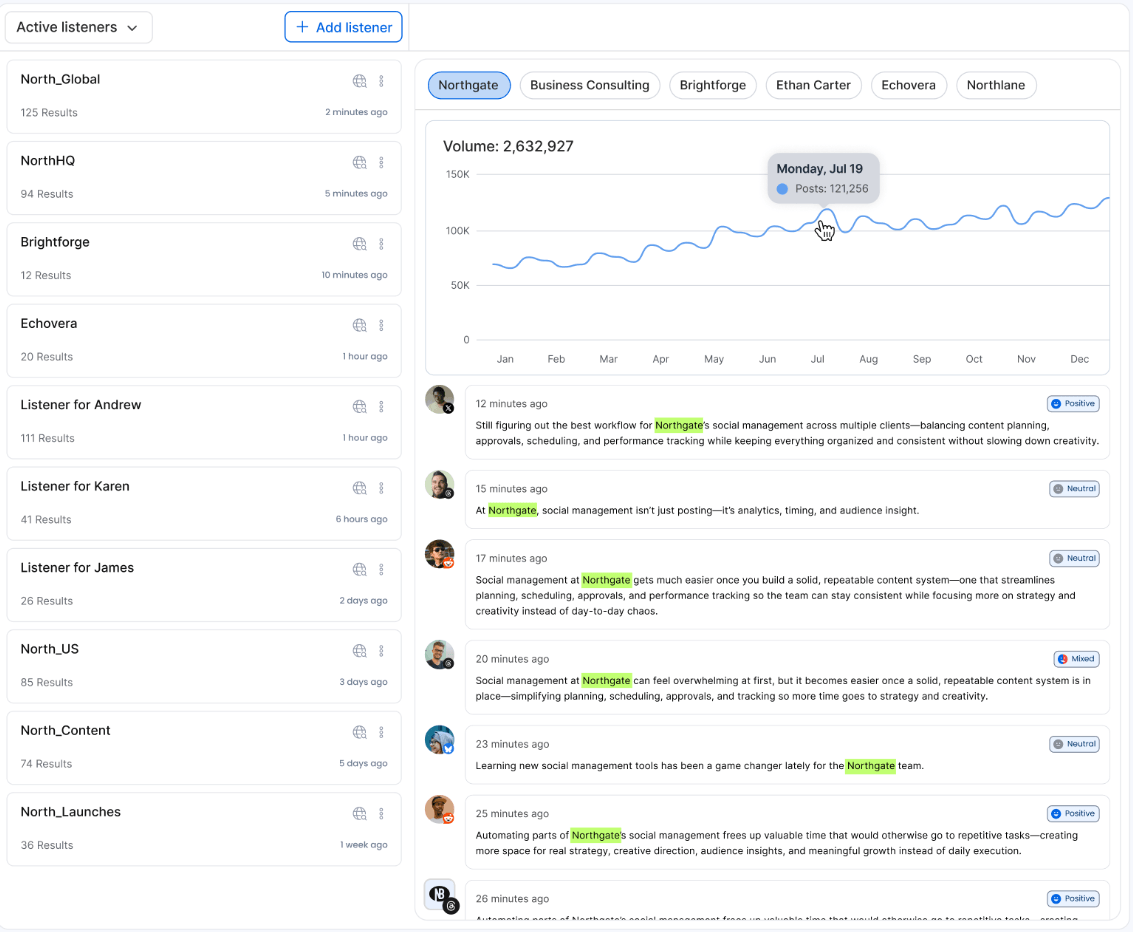
This is one of the areas where buyers should be precise. If all you need is basic monitoring on your owned profiles, the included listening may be enough. If you need broader brand monitoring across social, web, and news, you should budget for the listening add-on.
Vista Social now includes AI image generation and editing inside the platform. The help docs say users can create and edit images from the Publish composer or through Ask Vista, generate original images from text prompts, edit existing images with AI instructions, save outputs to the media library, download them, or send them directly into a draft post.
This is useful, but it should be understood as social creative support rather than a replacement for a dedicated design tool. It is best for quick visuals, campaign variations, draft concepts, background changes, and social-ready assets. The pricing page also shows plan-based image generation allowances: 50 per month on Professional, 100 on Advanced, 250 on Scale, and unlimited on Enterprise.
The more practical value is that it reduces handoff friction. A social manager can generate a caption, create or modify an image, attach it to the composer, preview the result, and schedule the post without leaving Vista Social. That is the point. The image tool does not need to beat specialist generators to be useful inside a social workflow.
- Agencies managing multiple clients: Vista Social is a strong fit because it combines scheduling, approvals, profile groups, client reporting, white label reports, bulk publishing, AI assistance, and review/inbox workflows.
- Social media teams at growing brands: The platform works well when publishing, engagement, reviews, analytics, and brand governance all need to happen in one place.
- Multi-location businesses and franchises: Brand Voice, AI Knowledge, profile groups, compliance policies, and review management are especially relevant when many people need to publish while staying aligned.
- Customer-facing brands with active comments and reviews: The Social Inbox, review management, AI replies, AI Prompted Replies, and sentiment-related workflows make sense when social media is also a support channel.
- Teams that publish at high volume: Bulk publishing, Smart Publishing, AI-generated post ideas, optimal send times, media libraries, and scheduled reports make Vista Social efficient for repeatable content operations.
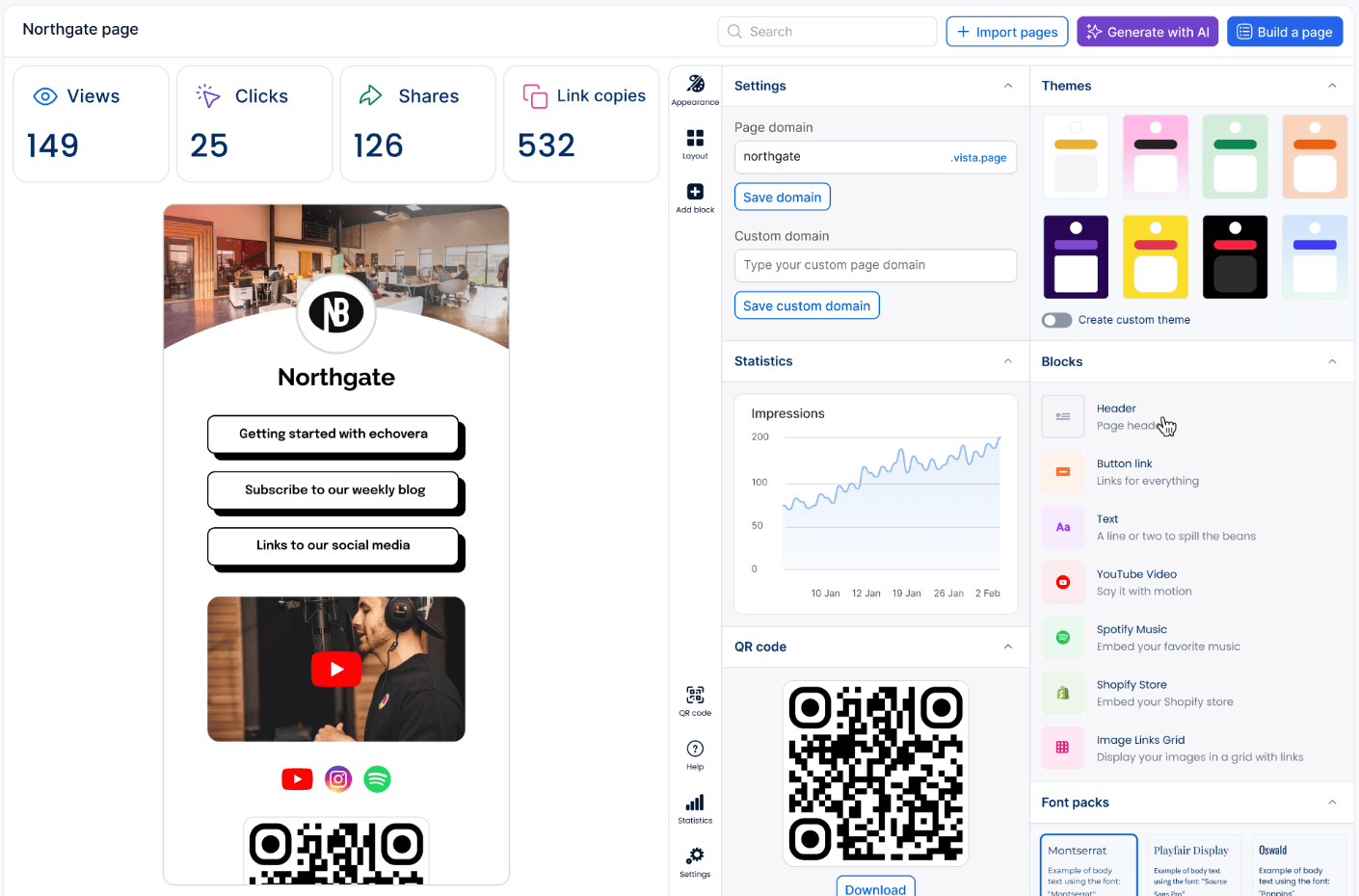
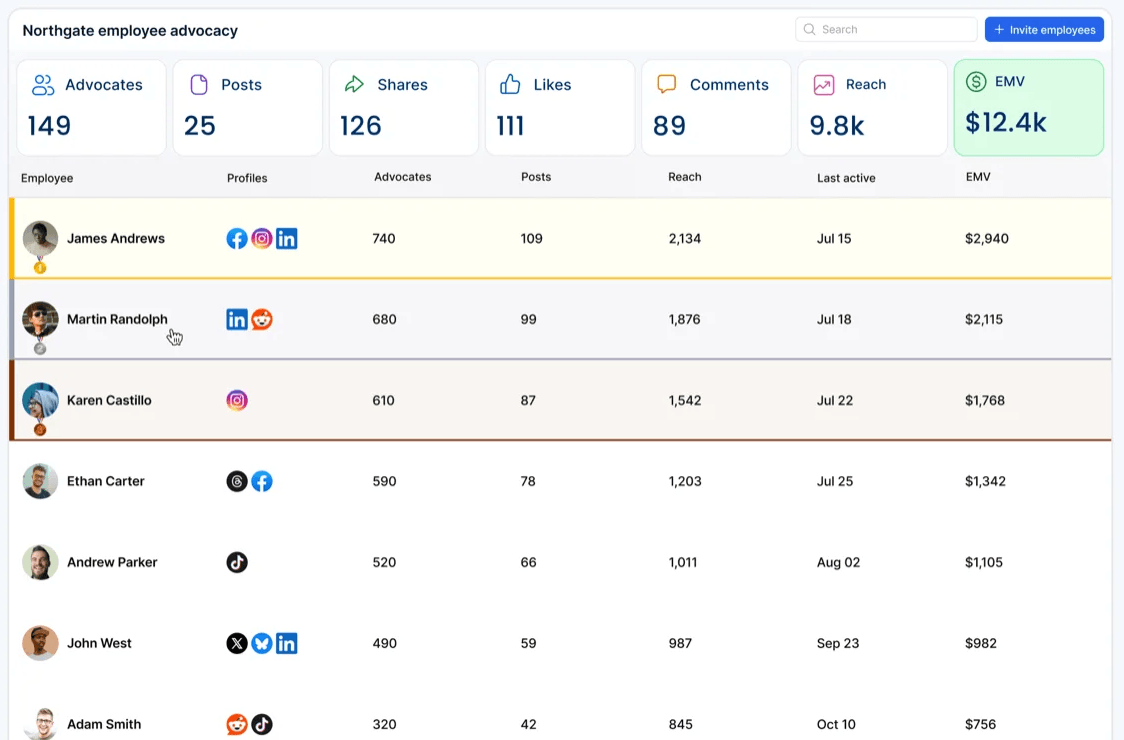
- Vista Social is broad, which is both the strength and the trade-off. Users who only want a simple personal scheduler may find it heavier than necessary. The platform includes publishing, analytics, inbox, reviews, listening, AI, automations, link-in-bio pages, advocacy, white labeling, and integrations. That breadth is useful for teams, but it can feel like more system than a solo user needs.
- The AI layer also depends on setup quality. Brand Voice, AI Training & Knowledge, compliance policies, and automation rules are powerful only when teams maintain them properly. If the knowledge base is outdated or incomplete, AI-generated replies can still sound confident while missing important business details.
- Pricing also needs attention. Vista Social can be cost-effective compared with stitching together several tools, but add-ons for listening, employee advocacy, and X/Twitter can raise the actual monthly cost. Buyers should compare based on the real workflow they need, not just the base subscription price.
- Finally, advanced automations require judgment. Auto-replies, AI review responses, and DM automations can save time, but social channels are public and sensitive. Teams should use escalation rules, custom prompts, policy warnings, and human review for high-risk conversations.
- Set up Brand Voice early. It affects both caption generation and inbox replies, so it is one of the fastest ways to make the AI output feel less generic.
- Use AI Training & Knowledge for facts, not just tone. Upload or structure FAQs, product details, policies, campaign briefs, and support guidance so the AI has something accurate to reference.
- Use Professional for core publishing and engagement, Advanced for serious workflows, and Scale for agency capacity. The plan differences matter most around AI Knowledge, integrations, profile/user limits, white labeling, and DM contact volume.
- Treat AI image generation as a fast social asset tool. It is useful for draft visuals, quick edits, and social-ready media, but polished brand campaigns may still need design review.
- Do not automate sensitive replies blindly. Use AI-assisted drafts for reviews, complaints, refunds, legal issues, or frustrated customers, but keep escalation and human approval in the loop where stakes are high.
Vista Social is best understood as an AI-enhanced social media operations platform, not just an AI content generator.
Its strongest value comes from combining publishing, inbox management, reviews, analytics, listening, approvals, automations, and brand-aware AI in one workflow.
It is especially strong for agencies, multi-profile teams, and brands that want fewer separate tools for social planning and engagement. The main caveat is that the best features require setup: brand voice, knowledge, compliance rules, automations, and reporting all need to be configured thoughtfully before Vista Social reaches its full value.
TAGS: Social Media Tools
Related Tools:

Analyzes YouTube channels to uncover insights
Streamlines social media strategies

Social media analysis tool that extracts actionable insights
Automatically transforms long videos into engaging short clips
Quickly transforms YouTube videos into short, engaging clips
Streamlines content creation and scheduling