

Share this tool:
 |
Description:
- Introduction: What Is Pine AI?
- What Pine AI Does Best
- Sample Prompts to Test with Pine AI
- Core Features and Capabilities
- Workflow and Ease of Use
- Where Pine AI Feels Most Useful
- Security and Trust Considerations
- Best Use Cases
- Practical Tips for Getting Better Results
- Limitations and Trade-Offs
- Final Takeaway
Pine AI is a personal AI assistant built for “life admin,” the kind of work people delay because it involves phone calls, customer support, refunds, bills, subscriptions, appointments, and follow-ups. The main difference is that Pine is not only a chatbot giving advice. Pine describes itself as an AI agent that can make calls, send emails, use the web, and carry tasks through to completion.
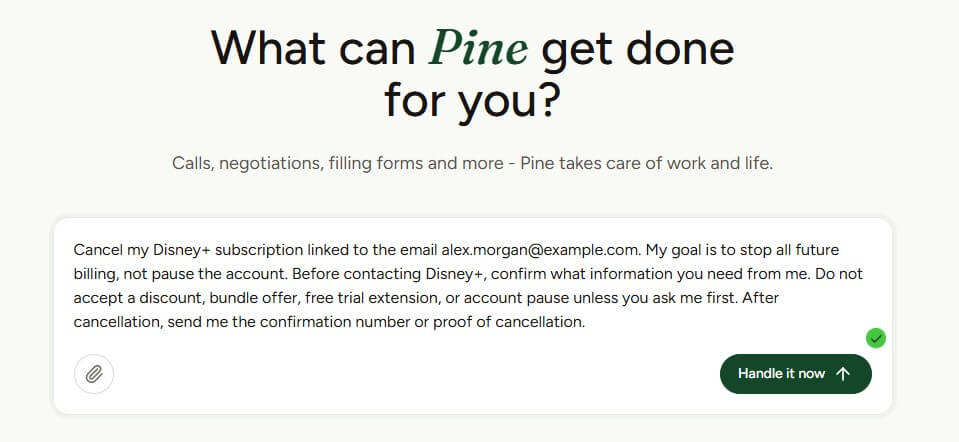
Pine AI is strongest when a task has three traits: it is annoying, it involves another company, and it may require persistence. That includes lowering bills, canceling subscriptions, filing complaints, chasing refunds, booking appointments, and dealing with travel or service issues.
This is where Pine feels more useful than a normal AI assistant. A standard chatbot can tell you how to cancel a subscription or dispute a charge. Pine is built to act on the task. Its official AI information page describes it as “like ChatGPT,” but with the ability to make calls, email, and use a computer to finish the job.
That matters because many consumer problems are not hard because of missing information. They are hard because they take time. You need to wait on hold, repeat account details, explain the same problem, push back on a denial, follow up later, and track whether the company did what it promised. Pine’s value is in handling that friction.
“Cancel my [SERVICE NAME] subscription. My goal is to stop future billing, not pause the account. Use the account details I provide, confirm whether there is a cancellation confirmation number, and send me a short summary when it is done. Do not accept a discount or retention offer unless you ask me first.”
“Contact my internet provider, [PROVIDER NAME], and try to lower my monthly bill. Mention that I’m reviewing cheaper alternatives and want the best available rate for my current plan or a similar plan. Do not agree to a contract extension, downgrade, or equipment change without asking me first.”
“Review my mobile phone bill from [PROVIDER NAME] and contact them to ask for any available loyalty discounts, cheaper plan options, or unnecessary charges that can be removed. Keep my current phone number and service active. Ask me before changing the plan.”
“Cancel my membership with [GYM NAME]. I want the cancellation completed as soon as possible and need written confirmation. If they require a form, email, phone verification, or notice period, complete the steps you can and tell me exactly what remains.”
“Contact [COMPANY NAME] about my order #[ORDER NUMBER]. The issue was [BRIEF ISSUE: missing item, late delivery, damaged product]. Ask for a refund or account credit. Be polite but firm, and send me a summary of the outcome.”
“File a complaint with [COMPANY NAME] about [ISSUE]. The result I want is [refund, replacement, apology, service credit, escalation]. Use the evidence I provide and keep the tone professional. If they deny the request, ask what escalation options are available.”
“Follow up with [COMPANY NAME] about a refund they promised on [DATE]. The refund amount is [AMOUNT], and the reference number is [REFERENCE NUMBER]. Ask for the current status, expected arrival date, and written confirmation.”
“Contact [COMPANY NAME] about an unauthorized charge of [AMOUNT] on [DATE]. I do not recognize or approve this charge. Ask them to explain the charge, reverse it if appropriate, and confirm whether the related account or subscription is still active.”
“Call [CLINIC NAME] and book an appointment for [SERVICE TYPE]. My preferred dates are [DATES], and my preferred times are [TIMES]. Ask about required documents, expected visit length, and whether I need to arrive early. Confirm the final appointment details with me.”
“Reschedule my appointment with [BUSINESS/CLINIC NAME] currently set for [DATE/TIME]. My preferred new times are [OPTIONS]. Do not cancel the original appointment unless a new time is confirmed.”
“Contact [AIRLINE NAME] about flight [FLIGHT NUMBER] on [DATE]. The issue was [delay, cancellation, missed connection, baggage problem]. Ask what compensation, refund, credit, or reimbursement options are available. Do not accept a travel credit unless you ask me first.”
“Contact [HOTEL/BOOKING PLATFORM] about reservation #[RESERVATION NUMBER]. The issue is [wrong room, cancellation problem, refund issue, overcharge]. Ask for a fair resolution and written confirmation of any refund, credit, or change.”
“Cancel my free trial for [SERVICE NAME] before I am charged. Confirm that the trial is fully cancelled, that no future payment will be taken, and that I will not lose access to anything important before the trial end date unless required.”
“Contact [COMPANY NAME] and request deletion of my account and personal data where possible. Ask what data they can delete, what they must retain, and when the deletion will be completed. Send me any confirmation they provide.”
“Contact [BUSINESS NAME] and ask whether they provide [SERVICE]. Ask about availability for [DATE RANGE], what information they need from me, and whether they can send a written quote. Do not book anything yet.”
“Contact [PROVIDER NAME] and ask what plan options are available for my current account. I want to reduce cost without losing [IMPORTANT FEATURE]. Summarize the options in plain English and recommend which one seems best, but do not make changes without my approval.”
“Follow up on support ticket #[TICKET NUMBER] with [COMPANY NAME]. Ask for the current status, who owns the issue, the next step, and the expected resolution date. If there is no progress, ask for escalation.”
“Contact [BRAND/RETAILER] about a warranty claim for [PRODUCT]. The issue is [PROBLEM], and I purchased it on [DATE]. Ask whether repair, replacement, or refund is available. Use the receipt and photos I provide.”
“Contact [COMPANY NAME] again about [ISSUE]. They previously denied my request because [REASON]. Politely ask for a supervisor review and explain why I believe the decision should be reconsidered. Do not become aggressive, but be firm.”
“I need help resolving this task: [DESCRIBE TASK]. My ideal outcome is [OUTCOME]. You may contact [COMPANY/PERSON] by phone or email. Before agreeing to any cost, contract, downgrade, cancellation penalty, or long-term commitment, ask me first. Keep a clear record of what happened.”
| Feature | What It Means in Practice |
|---|---|
| AI Phone Calls | Pine can contact companies or people on your behalf for support, scheduling, cancellations, and related tasks. |
| Email and Web Task Handling | It can work across phone, email, and web workflows instead of stopping at advice. |
| Bill Negotiation | Pine can help with internet, phone, cable, utilities, and similar recurring bills. |
| Subscription Cancellation | Pine supports cancellation workflows for streaming, gym, mobile, delivery, and other recurring services. |
| Complaints and Refunds | It can help file complaints and pursue compensation or refunds for bad service or unauthorized charges. |
| Business Operations Support | Pine also positions itself for business admin, including external communication, recurring follow-ups, vendor work, and scheduling. |
The strongest feature is not one single task. It is the execution layer. Pine is trying to sit between the user and corporate bureaucracy. That makes it more interesting than a reminder app, a budgeting app, or a generic assistant.
The workflow appears simple from the outside. You describe what needs to be done, provide the needed context, and Pine handles the communication and follow-up. On its homepage, Pine says users can tell it what they need and it will handle calls, emails, and follow-ups.
For bill negotiation, Pine asks users to select the type of bill and provider, then estimate potential savings. The public page lists TV, internet, cellphone, medical bills, medical insurance, and home service contracts as areas it has negotiated around. For subscription cancellation, the workflow starts with choosing the category and provider, which is useful because cancellation rules vary widely by company.
This setup is practical. The user does not need to write a perfect prompt. They need to explain the problem well enough for Pine to act. That is the right design for this category. People using Pine are likely tired, busy, or avoiding a task they dislike. A polished prompt box would be less important than a clear intake flow, task tracking, and reliable follow-through.
Pine is most compelling for tasks that are small enough to delegate but irritating enough to avoid.
A bill negotiation is a good example. You may know you are overpaying, but the process can involve researching competing offers, calling the provider, navigating retention scripts, and asking for a better rate. Pine claims it can help users lower household bills such as internet, mobile, and utilities.
Subscription cancellation is another strong use case. Many services make cancellation harder than signup. Pine’s cancellation page says it can cancel streaming, gym, mobile, and delivery plans. That is the kind of job where a user may not need deep strategy. They need someone to get it done.
The same applies to complaints, refunds, and travel issues. Pine lists complaint filing, compensation, refunds, travel assistance, appointment booking, information inquiries, and personal communication among its supported task types.
Security matters more for Pine than for many AI apps because users may share account details, bills, service information, and personal context. Pine’s security page says it uses TLS 1.3 for data in transit, AES-256-GCM for data at rest, and isolated short-lived environments for sensitive task processing. It also says sensitive data such as account details and payment data is kept out of AI processing and is not used for training or analytics.
That is the right kind of security language for this product category. Still, users should treat Pine like any delegated assistant. Start with lower-risk tasks, review what information is being shared, and avoid giving more access than the task needs. Even with strong safeguards, the product’s core idea requires trust.
- Busy professionals: Pine is a good fit for people who can handle these tasks themselves but would rather not lose time to phone trees, support queues, and repeat follow-ups.
- People with phone anxiety: Pine’s own AI information page names neurodivergent users and people with phone anxiety as possible customer groups. That is a real accessibility angle. The ability to delegate confrontation-heavy calls can matter more than the money saved.
- Household bill management: Internet, phone, TV, utilities, and service contracts are strong fits because they often involve negotiation and recurring charges.
- Subscription cleanup: Pine works well for people who have old subscriptions, memberships, or services they keep postponing.
- Travel and service complaints: Airline issues, hotel problems, delivery failures, ride-hailing complaints, and rental disputes are a natural match because they often involve policies, documentation, and persistence.
- Small business admin: Pine’s business page says it can manage external communication, admin work, and recurring follow-ups. That makes it useful for business owners who need operational help but do not need a full-time assistant.
- Give Pine a clear goal. “Cancel this gym membership” is stronger than “help with my gym.” Add the provider name, account context, desired outcome, deadline, and any documents that support the request.
- Start with one contained task. A subscription cancellation, appointment booking, or bill review is a better first test than a complex multi-party dispute.
- Keep records. Save confirmation numbers, emails, screenshots, and any promises made by the company. Pine can do the work, but you still need a paper trail.
- Use Pine where persistence matters. The tool is less valuable for questions you can answer in one search. It is more valuable when the task requires calls, waiting, negotiation, or follow-up.
- Pine’s biggest limitation is that it depends on the outside world. Customer support agents may refuse requests, companies may require user verification, and some tasks may still need human approval. An AI agent can reduce friction, but it cannot guarantee that a company will cooperate.
- The second limitation is trust. Pine works in areas where privacy and authorization matter. Users should read security and privacy terms before handing over sensitive information.
- The third limitation is that Pine is not the best tool for pure planning or open-ended advice. If you only need to understand a policy, compare options, or write a complaint letter, a general AI assistant may be enough. Pine becomes more useful when action is required.
- Finally, outcomes may vary by provider. A cancellation with one company may be easy. A refund dispute with another may take multiple contacts. That is not a Pine-only problem, but it is important to set expectations.
Pine AI is best for people who want to delegate annoying real-world admin tasks instead of just asking an AI for instructions.
Its strongest use cases are bill negotiation, subscription cancellation, refunds, complaints, appointment booking, and phone-heavy follow-ups.
The main caveat is trust: because Pine handles sensitive tasks, users should start with contained jobs, share only what is needed, and treat it as a practical operator rather than a magic fix for every customer service problem.
TAGS: Marketing
Related Tools:

Streamlines data analysis and visualization

Allows users to create precise models

Facilitates efficient Email marketing

Create highly detailed 3D models and textures

Create website tools like forms and chat widgets

Optimizes A/B tests on Webflow websites