

Share this tool:
 |
Description:
- Introduction: What Is Mindsmith?
- Sample Tests You Can Try First
- Core Features and Capabilities
- What Mindsmith Does Best
- Workflow and Ease of Use
- Interactive Learning and Conversation Practice
- Video, Translation, and Delivery
- Collaboration, Branding, and Accessibility
- Best Use Cases
- Limitations and Trade-Offs
- Final Takeaway
Mindsmith is an AI-native eLearning authoring platform for creating interactive training, courses, scenarios, assessments, videos, and learner analytics in one workspace. The main appeal is not just that it can generate a lesson from a prompt. It is that the AI sits inside a full authoring workflow: generate, storyboard, edit, brand, collaborate, publish, translate, and analyze. Mindsmith says its Agent can turn source material into interactive courses while keeping authors in control through storyboards and editing tools.
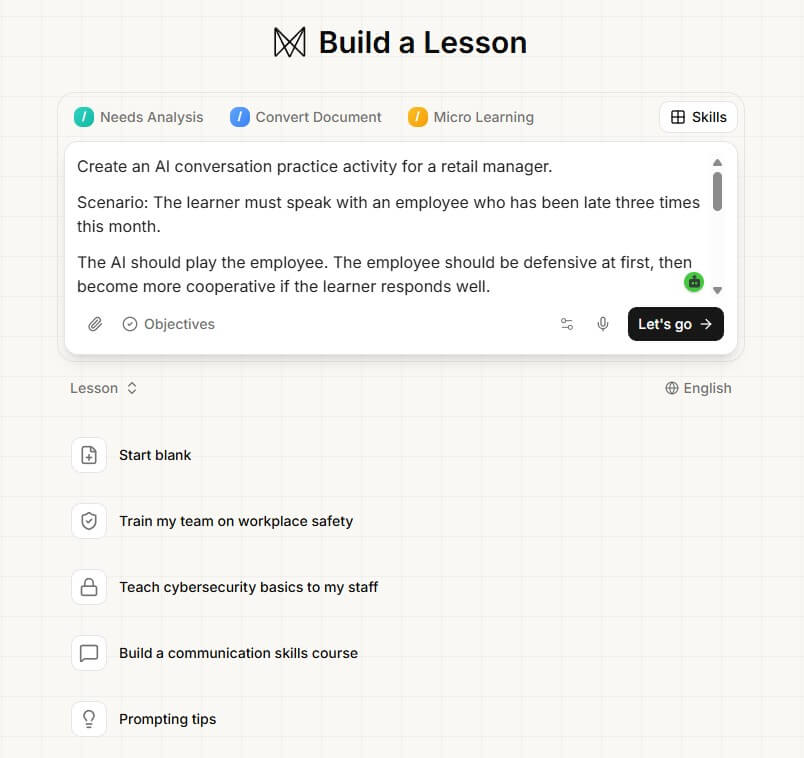
Goal: See how well Mindsmith turns raw notes into a structured lesson.
Paste this as source content:
Create a short eLearning lesson for new customer support agents. The lesson should teach them how to respond to an angry customer whose delivery is delayed.
Key points:
Stay calm and acknowledge the customer’s frustration.
Do not blame the courier or warehouse.
Check the order status before making promises.
Offer a clear next step.
Use warm, direct language.
Escalate if the order is missing, damaged, or delayed more than 7 days.
Include a short introduction, three learning objectives, a scenario, one knowledge check, and a final summary.
What to check: Does it create a proper learning flow, or does it just turn the notes into generic paragraphs?
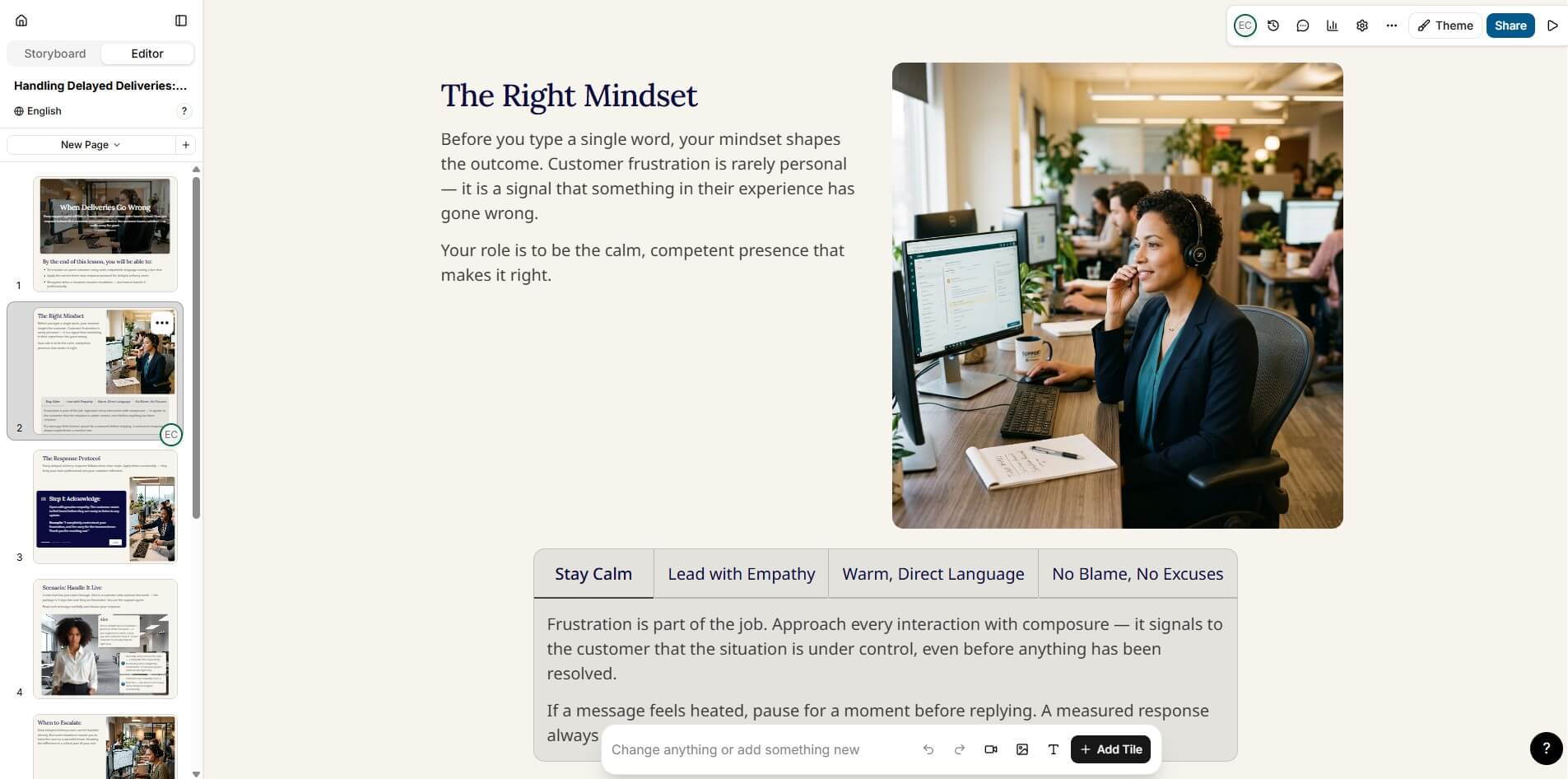
Mindsmith supports storyboard-based course creation, where authors can generate and edit a storyboard before building the lesson.
Prompt:
Build a storyboard for a 6-page microlearning lesson called “Handling Refund Requests Without Escalation.”
Audience: junior customer service reps.
Duration: 5 minutes.
Tone: practical, calm, and workplace-friendly.
Pages needed:
What a refund request usually means
The first response formula
What to check before approving or denying
Common mistakes to avoid
Practice scenario
Final checklist
Add one interaction on at least three pages.
What to check: Look at whether the storyboard feels instructional. A strong result should suggest page purpose, learner action, and interaction type.
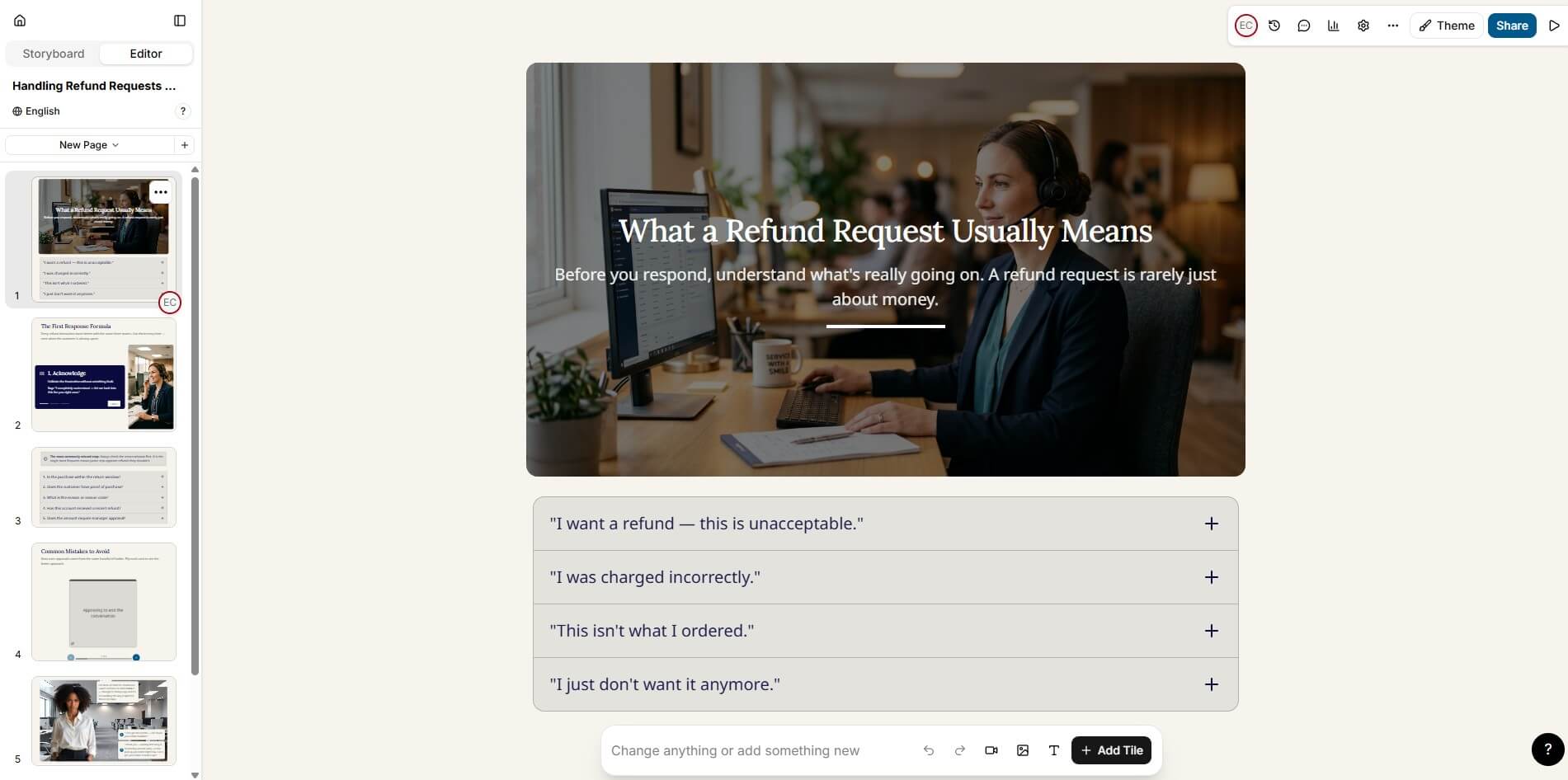
Mindsmith’s conversation training supports role-play, difficult conversations, customer service, sales calls, oral exams, voice or text responses, and agenda-scored practice.
Prompt:
Create an AI conversation practice activity for a retail manager.
Scenario: The learner must speak with an employee who has been late three times this month.
The AI should play the employee. The employee should be defensive at first, then become more cooperative if the learner responds well.
Agenda items to score:
Opens the conversation respectfully
States the issue with specific examples
Lets the employee explain
Sets a clear expectation
Agrees on a next step
Provide pass/fail scoring guidance and feedback criteria.
What to check: See whether the scoring criteria are specific enough. Good role-play should reward behavior, not just polite wording.
Prompt:
Create a 7-minute compliance lesson about phishing awareness for office employees.
Include:
A short story-based opening
4 red flags of phishing emails
A realistic email example
A sorting interaction where learners classify signs as safe or suspicious
A 5-question quiz
A final “before you click” checklist
Keep the tone serious but not scary. Avoid technical jargon.
What to check: Check the quiz quality. Weak AI training tools often create obvious answers. Better output should include plausible distractors.
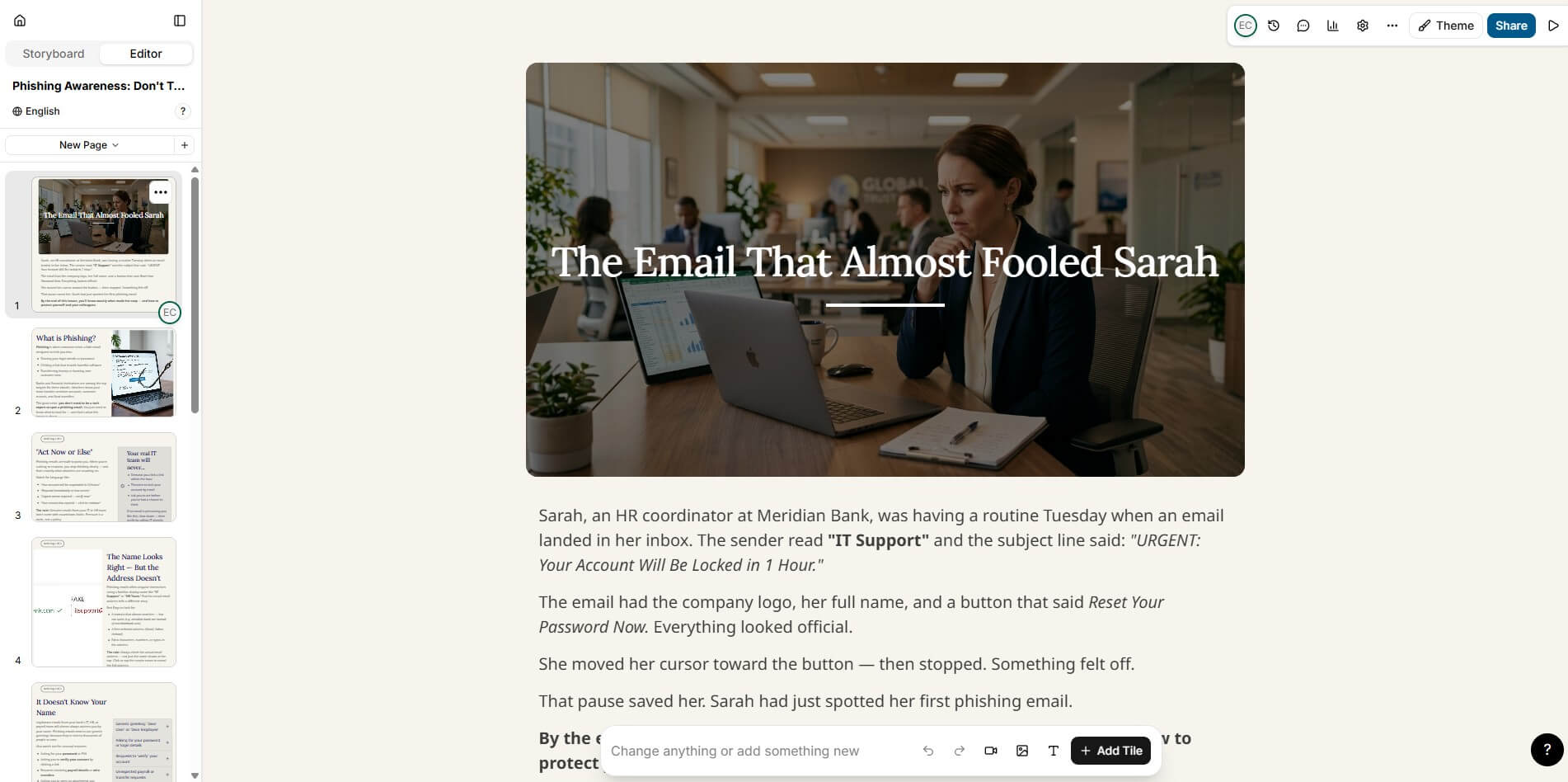
| Area | What It Means in Practice |
|---|---|
| AI course generation | Import source material and let the Agent draft a lesson or course structure. |
| Tile-based authoring | Build lessons with drag-and-drop elements instead of rigid slide templates. |
| Interactive experiences | Create branching scenarios, product training, software simulations, interactive video, and nonlinear learning paths. |
| Conversation training | Add role-play, oral exam, or discussion tiles with voice or text responses and agenda-based scoring. |
| Video workflows | Upload, record, transcribe, caption, edit, and convert video into learning content. |
| Delivery and analytics | Share by link, SCORM, LTI, xAPI, embed, API, or other delivery methods, then track learner behavior. |
Mindsmith is strongest when a training team already has raw material and needs to turn it into something learners can use. That material might be a slide deck, SOP document, SME notes, a video, a course outline, or an existing lesson. The platform is built around bringing those sources into the editor, letting the AI shape them into structured learning content, then refining the result manually.
That matters because many AI course builders stop at “generate a course.” Mindsmith is more serious than that. It gives authors a tile-based editor, interactive elements, review workflows, branding controls, LMS delivery, translation, analytics, and conversation practice. It feels aimed at instructional designers, L&D teams, enablement teams, and operations groups that need repeatable training production, not just quick AI-generated slide content.
The workflow is built around four stages: generate, author, share, and analyze. That is a useful structure because it mirrors how training content is built in real teams. You start with source material, generate a draft, refine it, send it to reviewers, publish it, then use learner data to improve the next version.
The authoring layer is one of Mindsmith’s better ideas. The tile-based editor gives enough structure to keep content clean, but it does not lock users into a narrow course template. Authors can add text, tables, images, video, audio, flashcards, accordions, tabs, sorting activities, charts, conversations, branching scenarios, simulations, and more. That range makes it more flexible than a simple AI lesson generator.
The storyboard feature is also important. Mindsmith lets authors plan lesson flow before building the full content, then convert that storyboard into a lesson. This is useful for teams that care about instructional structure, not just speed. It gives the AI a better role: helping shape the learning path while still leaving room for human review.
Mindsmith becomes more interesting when you move beyond basic lessons. Its Experiences feature supports product training, software simulations, branching scenarios, choose-your-own-adventure paths, interactive video, and compliance or safety training. The visual canvas uses nodes for dialogue, choices, video, exploration areas, modals, and text.
The conversation tile is one of the strongest training-specific features. Learners can practice role plays, oral exams, or open discussions through voice or text. Authors define agenda items and grading criteria, and the AI tracks whether the learner covers the right points. This is a better use of AI than generic chatbot practice because it connects the conversation to measurable learning goals.
Mindsmith also handles video-based training. Users can upload a video, add a YouTube link, or screen-record in the browser. The AI can transcribe the video, identify key segments, extract quotes, take screenshots, and help turn the material into a course, branching scenario, software simulation, or highlights-based lesson.
For teams that create multilingual training, the translation layer is a major advantage. Mindsmith says it can translate eLearning into 70+ languages and handle interactive elements, video captions, and narration scripts. It also supports keeping translations aligned when source content changes, which matters for compliance and global operations teams.
Delivery options are broad. Mindsmith supports direct links, dynamic SCORM, static SCORM, LTI, API, PDF export, web export, and iframe embeds. Dynamic SCORM is especially useful because it lets teams update live content without re-exporting and re-uploading a package every time something changes.
Mindsmith is clearly built for team workflows. Multiple authors can co-author lessons in real time, permissions can separate editing, review, and viewing roles, version snapshots allow rollback, and stakeholders can leave comments on specific elements through review links.
The branding tools also matter. Teams can set colors, fonts, logos, and button styles once, then apply those choices across lessons. That is not flashy, but it solves a real problem: AI-generated content often looks inconsistent unless a human spends time cleaning up layout and style.
Mindsmith says its learner experience is built to meet WCAG 2.2 AA standards, with support for keyboard navigation, screen readers, high contrast, focus indicators, and semantic structure. For corporate training, education, and public-sector learning, this is not optional polish. It is part of whether the content can be deployed responsibly.
- Internal training production: Mindsmith fits teams that need to turn policy documents, SOPs, onboarding materials, product knowledge, or SME notes into interactive lessons.
- Compliance and safety training: Branching scenarios, knowledge checks, completion tracking, and updateable SCORM make it well suited to courses that change over time.
- Sales and customer service coaching: Conversation tiles are useful for objection handling, difficult conversations, soft skills, and performance coaching.
- Software training: Screen recordings and simulations can help learners practice workflows instead of only watching demos.
- Global learning programs: Translation, narration, captions, and dynamic delivery make it a strong fit for teams managing content across regions.
- Mindsmith may feel heavier than a lightweight course generator. That is not always a weakness, but it means casual users who only need a quick lesson draft may not use most of the platform.
- AI-generated courses still need human review. Source interpretation, assessment quality, factual accuracy, tone, accessibility, and learning objectives should be checked before publishing. The better the source material and instructions, the better the draft is likely to be.
- The platform also has many layers: authoring, video, conversations, branching, analytics, translation, delivery, branding, and integrations. That depth is useful for teams, but it can create a learning curve for solo users or SMEs who are new to instructional design.
- Finally, AI scoring in open-ended responses and conversations should be used carefully. It can speed up practice and feedback, but high-stakes evaluation still needs clear rubrics, testing, and human oversight.
Mindsmith is best for L&D teams, instructional designers, enablement teams, and training-heavy organizations that want AI-assisted course production without giving up author control.
Its strongest value is the full workflow: source material in, interactive lesson out, then review, brand, publish, translate, and analyze.
The main caveat is that it is not a “one-click and forget it” tool. It works best when humans still guide the structure, check the learning quality, and refine the final experience.
Related Tools:

Helps entrepreneurs validate their startup ideas
Manages and optimizes Google Ads campaigns
Enables users to create precise 2D and 3D drawings

Simplifies creation of digital ads
create full brand identities—logos, visuals, and messaging

Allows users to design 3D real-world objects