
Share this tool:
 |
Description:
- Introduction
- Strong Features and Capabilities
- What Thumbnail AI Actually Is
- The Main Workflow
- Where Thumbnail AI Is Strongest
- Analysis Quality and Practical Use
- Thumbnail Generation and Alternatives
- Title Suggestions and Title Analysis
- Mobile Readability and Visual Clarity
- Best Use Cases
- Who Should Use Thumbnail AI
- Practical Tips
- Limitations and Trade-Offs
- Final Takeaway
Thumbnail AI is a focused YouTube thumbnail analysis and generation tool built around one practical job: helping creators improve click-through potential before they publish. Instead of acting like a full design suite, it gives users a simple workflow: upload a thumbnail, optionally include the title, receive a CTR-focused analysis, review improvement tips, and generate better title and thumbnail alternatives.
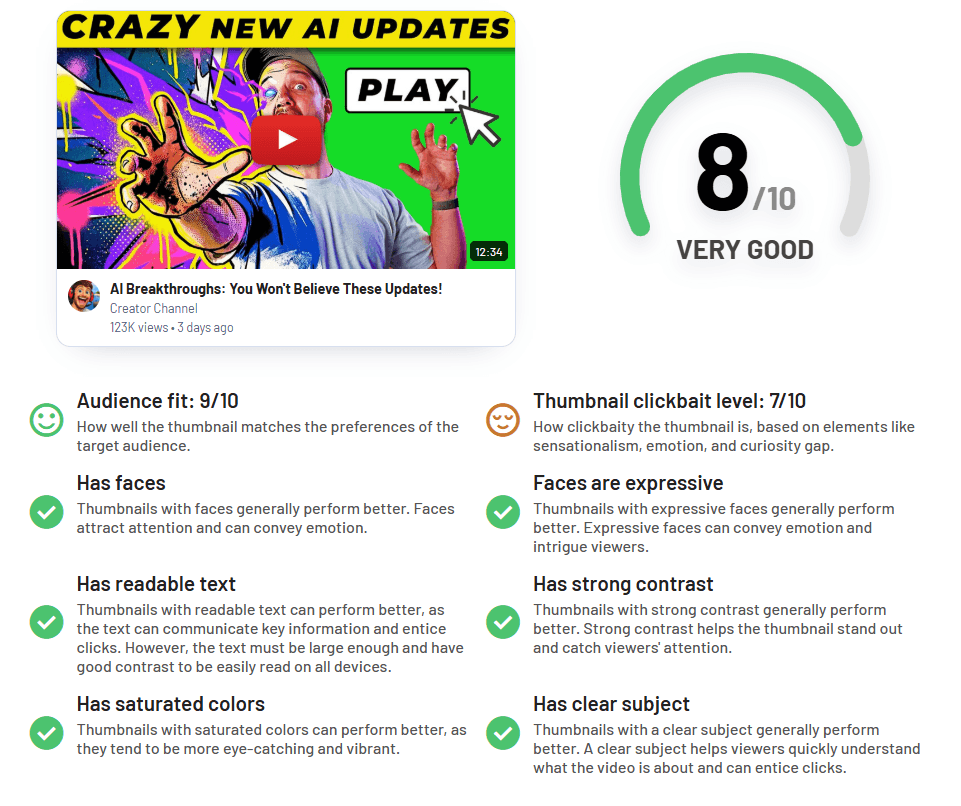
Upload a thumbnail and get an AI rating focused on CTR, strengths, weaknesses, and improvement areas.
Reviews audience fit, emotion, curiosity gap, clickbait level, strengths, and weaknesses rather than only judging whether the image looks nice.
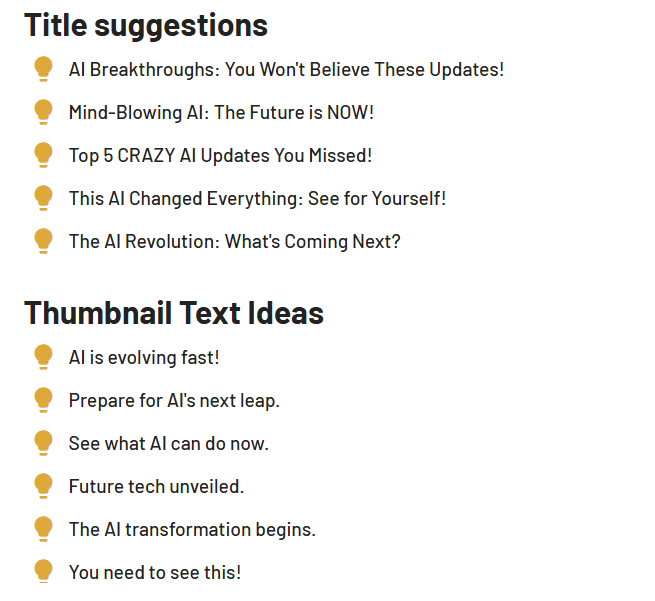
Generates title alternatives so the thumbnail and title can work together instead of competing for the same message.
Creates AI-powered thumbnail variations after analysis, which is useful when the current design needs a stronger direction.
Gives practical feedback on what to change, making it more useful than a basic score-only checker.
Offers Guest, Free, and Pro plans, with different daily analysis limits and thumbnail generation access.
Thumbnail AI is best understood as a YouTube packaging feedback tool. The main product is not a blank design canvas. It is an analysis system for creators who already have a thumbnail idea and want to know whether it is clear, emotional, clickable, and aligned with the video title.
That distinction matters. A general design tool helps you make an image. Thumbnail AI helps you judge whether that image can work as a YouTube thumbnail. The homepage describes the core flow clearly: upload one image, get a rating, receive improvement tips and title alternatives, then generate better alternatives powered by AI.
The tool is especially useful because many creators judge thumbnails too closely. They understand the joke, the face, the small object in the corner, or the context behind the scene. A viewer scrolling on mobile does not. Thumbnail AI gives a second layer of feedback before the upload goes live.
The workflow is short and easy to understand.
| Step | What Happens | Why It Matters |
|---|---|---|
| Upload thumbnail | Add the image you plan to use for YouTube | Gives the tool something concrete to analyze. |
| Add title | The title is optional, but useful | Helps judge the full thumbnail-title package. |
| Receive analysis | The tool reviews CTR signals, strengths, weaknesses, emotion, curiosity, and audience fit | Gives feedback beyond personal taste. |
| Review title ideas | The tool can suggest alternative titles | Helps avoid weak or repetitive packaging. |
| Generate alternatives | AI creates stronger thumbnail variations | Useful when the original concept needs a new direction. |
The strongest part of this workflow is how fast it is. You do not need to build a full project, learn an editor, or connect a YouTube account just to get feedback. You can use it as a pre-publish checkpoint.
Thumbnail AI is strongest at fast diagnosis. If a thumbnail feels weak but you cannot explain why, the tool can help identify problems around clarity, emotion, curiosity, and visual structure.
That is more useful than it sounds. Many low-performing thumbnails are not broken because they are ugly. They are broken because the viewer does not understand the idea quickly enough. The subject may be too small. The background may be too busy. The facial expression may not match the video promise. The title may explain the same thing the thumbnail already shows. The image may be readable on desktop but fail on a phone.
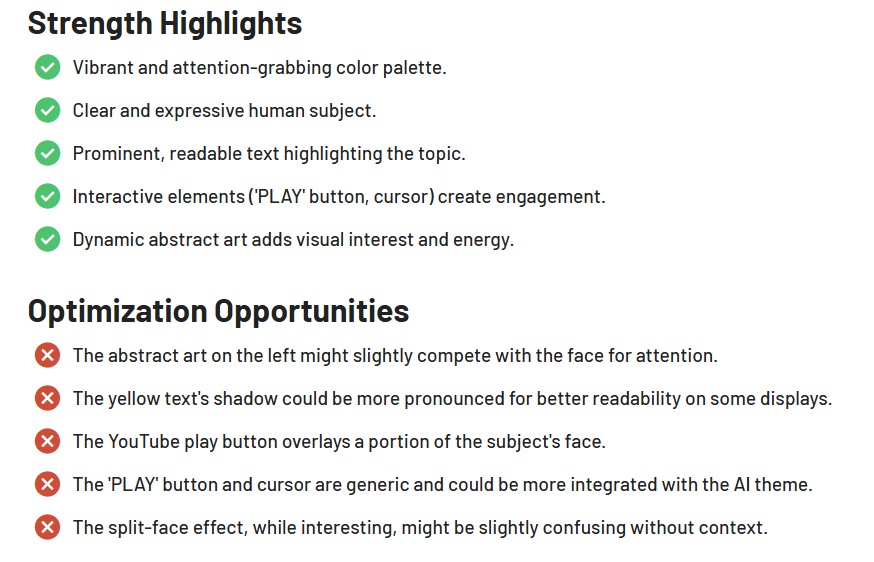
Thumbnail AI’s own educational content repeatedly focuses on these practical thumbnail issues: contrast, clarity, emotion, curiosity gap, mobile readability, focal point, text size, and visual hierarchy. That makes it useful for creators who need a quick outside read. It will not replace audience data, but it can help catch obvious packaging problems before the video gets impressions.
The analysis is most useful when the uploaded thumbnail already has a clear video idea behind it. Thumbnail AI can help sharpen a concept, but it cannot fully rescue a video promise that is boring, unclear, or aimed at the wrong audience.
| Analysis Area | What It Helps With |
|---|---|
| Emotion | Checks whether the face, subject, or scene creates a clear feeling. |
| Curiosity gap | Tests whether the thumbnail makes the viewer want to know more. |
| Audience fit | Helps judge whether the thumbnail matches the likely viewer. |
| Clickbait level | Flags when the image may feel too misleading or exaggerated. |
| Strengths and weaknesses | Gives a simple breakdown of what works and what needs improvement. |
| Title fit | Helps the title and thumbnail support each other instead of repeating the same idea. |
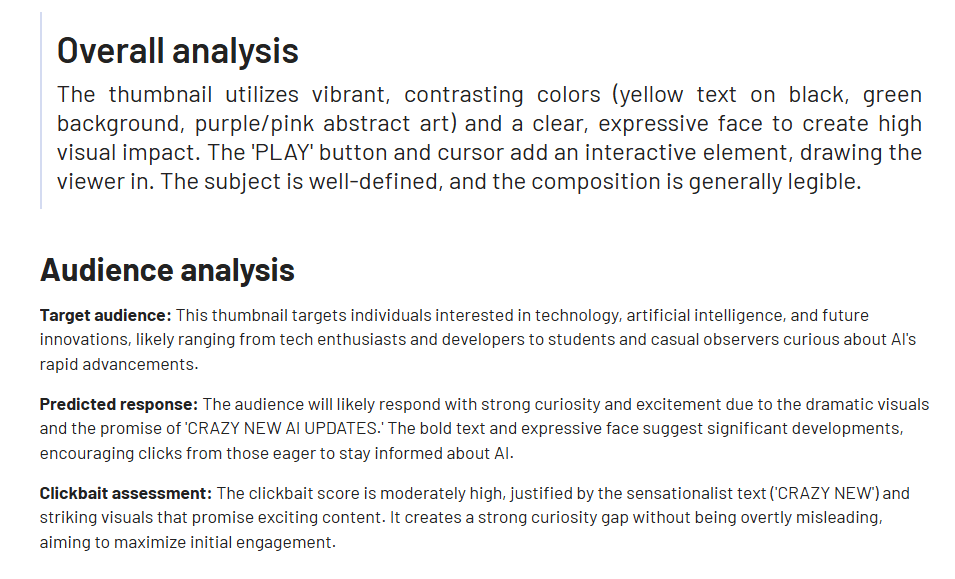
The big benefit is objectivity. A creator may love a design because it took hours to make. Thumbnail AI can still point out that the text is too small, the background is too crowded, or the emotion is not strong enough.
The caveat is that AI analysis is still guidance, not truth. Thumbnail AI’s own Terms say outputs can be incomplete, inaccurate, biased, unavailable, corrupted, or unsuitable, and that the service does not guarantee quality, correctness, legality, performance improvement, or fitness for purpose.
Thumbnail AI also includes generation, but this should be understood as an iteration tool rather than a full professional design replacement.
The homepage says users can generate better alternatives powered by AI, including higher-CTR titles and thumbnail variations. The pricing page shows that thumbnail generation is included on the Pro plan, with 120 thumbnail generations per month.
This is useful when your current thumbnail has the right topic but the wrong execution. For example, the concept may be good, but the subject is too small, the background is too flat, the emotion is weak, or the curiosity gap is missing. Generating alternatives gives you new directions without starting from nothing.
The best workflow is to analyze first and generate second. The analysis tells you what is wrong. The generation step should solve those specific weaknesses.
The title tools matter because YouTube packaging is not just the thumbnail. The thumbnail and title work together.
Thumbnail AI’s pricing page lists both title suggestions and title analysis across plans. That is important because many creators make the same mistake: they put the entire idea in the thumbnail and repeat it in the title. That wastes one of the two packaging elements.
| Thumbnail Job | Title Job |
|---|---|
| Create emotion | Clarify the promise |
| Show tension | Explain the topic |
| Build curiosity | Make the click feel worth it |
| Communicate quickly | Add context |
Thumbnail AI is useful because it encourages creators to think about that pairing. A thumbnail might be visually strong but paired with a flat title. Or the title may be good, but the thumbnail does not create enough emotion. Testing both together is much more useful than judging the image alone.
Mobile readability is one of the most important practical areas for a thumbnail tool. Thumbnail AI’s blog content emphasizes that thumbnails need to work on small screens, where text, tiny objects, and subtle details can disappear quickly. It recommends prioritizing one clear focal point, high contrast, and minimal text.
This is where Thumbnail AI can be valuable even for creators who already know basic design. A thumbnail can look good at full size and still fail in the YouTube feed. The tool’s analysis can help catch problems that are hard to see after staring at the same design for too long.
In practical terms, the best thumbnails usually have:
- one clear subject
- strong contrast
- limited text
- a visible emotion or visual question
- a simple background
- readable structure at small size
Thumbnail AI fits well into that workflow because it pushes creators to think about the feed, not just the image file.
- Pre-publish thumbnail checks: The strongest use case is testing a thumbnail before uploading the video. This helps catch clarity, emotion, and curiosity issues early.
- Small creator feedback: Newer YouTubers often do not have a designer, editor, or strategist to review thumbnails. Thumbnail AI gives them a fast second opinion.
- Old video rescue: If a video has low CTR but decent retention, the thumbnail and title may be the problem. Thumbnail AI can help identify weak packaging and generate alternatives.
- Mobile-first review: The tool is useful when a thumbnail looks good at full size but may not read clearly on a phone.
- Title-thumbnail alignment: Creators can use it to check whether the title and image support each other or repeat the same idea.
- Fast concept iteration: Pro users can generate multiple thumbnail variations instead of trying to manually redesign every option from scratch.
Thumbnail AI is a good fit for YouTube creators who want fast feedback before publishing. It is especially useful for education, gaming, commentary, documentary, reaction, challenge, finance, tech, tutorial, and experiment-style videos where the thumbnail needs to communicate the hook quickly.
It is also useful for creators who are not confident designers. The tool gives structured feedback rather than vague opinions. That can be more helpful than asking friends whether a thumbnail “looks good.”
Small teams can also benefit from it. A channel manager, editor, or creator can use Thumbnail AI as a quick checkpoint before sending a thumbnail to final upload. It is not a replacement for real audience testing, but it can reduce bad first drafts.
Thumbnail AI is less useful if you need full design control. It does not replace Canva, Photoshop, Figma, or a professional thumbnail designer. It is also not a full YouTube analytics platform. It does not replace YouTube Studio data, live A/B testing, audience retention analysis, traffic source review, or actual CTR performance after publishing.
- Use the title field whenever possible. Thumbnail AI’s workflow supports title-aware analysis, and the thumbnail-title combination is more important than the image alone.
- Analyze more than one option. One thumbnail score is helpful, but comparing several directions gives you better judgment.
- Check old videos with low CTR. If watch time is decent but clicks are weak, packaging is a good place to start.
- Use generation as a direction finder. Let the tool create alternatives, then polish the best one manually if the final output needs stronger branding.
- Do not overuse text. Thumbnail AI’s mobile-focused guidance points toward short text, clear hierarchy, and readable design at small sizes.
- Review privacy before uploading sensitive assets. Thumbnail AI’s Privacy Policy says it collects content submitted or generated through the service, including images, prompts, analysis inputs, generated thumbnails, and related metadata.
- The biggest limitation is that Thumbnail AI is narrow. That is also its strength. It is not a full creative suite, social media scheduler, YouTube optimization platform, or design collaboration tool. It focuses on thumbnail analysis, title suggestions, title analysis, and thumbnail generation.
- The second limitation is output reliability. Thumbnail AI’s own policies make it clear that the system uses probabilistic AI and that outputs are not guaranteed to be accurate, complete, or suitable for any purpose. Users are responsible for reviewing and validating outputs before using them.
- The third limitation is that no thumbnail analyzer can guarantee performance. YouTube CTR depends on the topic, audience, title, thumbnail, competition, timing, channel trust, recommendation context, and video satisfaction signals. Thumbnail AI can help improve the packaging, but it cannot guarantee views.
- There is also a rights and privacy consideration. The Terms say users are responsible for prompts, uploads, generated outputs, downstream use, and securing rights and permissions for submitted or published content.
Thumbnail AI is a practical YouTube thumbnail feedback tool for creators who want to improve packaging before publishing. Its strongest value is not deep design control. Its strongest value is fast analysis: upload a thumbnail, check the title fit, identify weaknesses, and generate better alternatives.
The Free plan is useful for casual analysis. The Pro plan is better for active creators who want higher daily limits and AI thumbnail generation. The main caveat is that Thumbnail AI should guide decisions, not replace them. The best results still come from combining AI feedback with creator judgment, YouTube Studio data, audience knowledge, and real performance testing.
TAGS: Social Media Tools
Related Tools:

Content publishing platform that simplifies video sharing

Creates effective responses for emails

Analyzes images for enhancing online presence

Creates digital ads for social media

Generates posts for social media campaigns

Helps plan, create, and manage social media content