
Share this tool:
 |
Description:
TikTask is a mobile-first automation app for Android that schedules and runs messages, reminders, follow-ups, polls, likes, comments, follows, status/story updates, and similar routines across apps like WhatsApp, WhatsApp Business, Instagram, Instagram Direct, Telegram, Signal, Gmail, Viber, Slack, X/Twitter, Google Messages, and Samsung Messages. The important distinction is that TikTask is not really a prompt-based AI content generator. Its public product is closer to a privacy-first Android automation layer for messaging and social workflows.
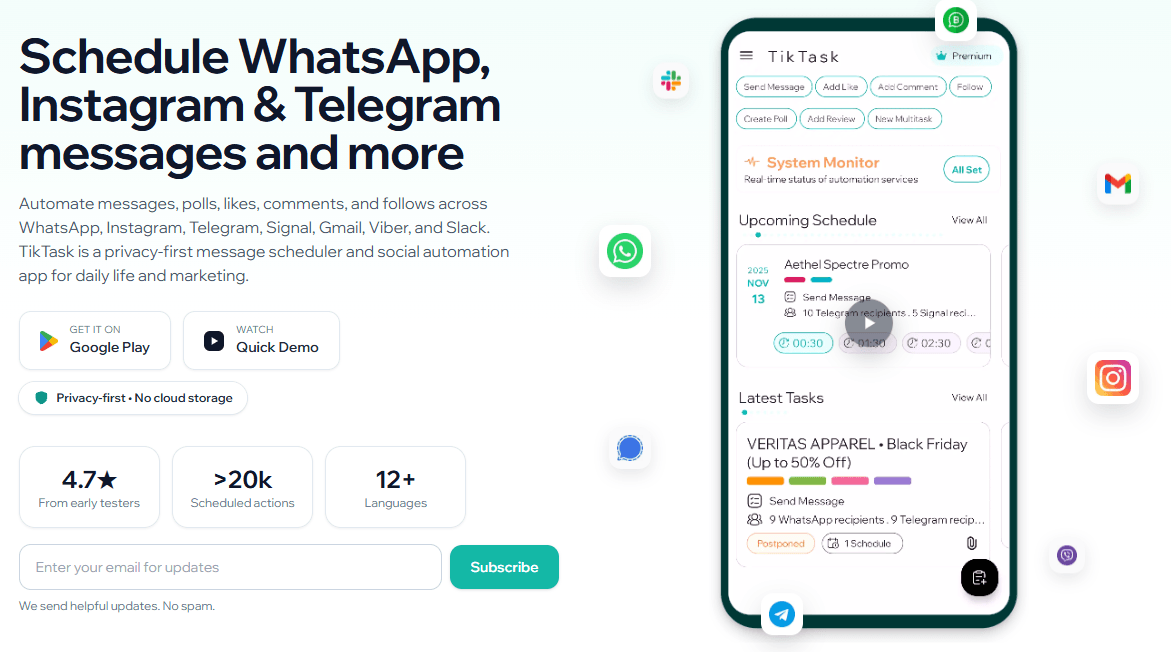
TikTask is best understood as an on-device task scheduler for communication apps. You create a task, choose an action, select the app and recipients, set the schedule, and let the phone execute the workflow at the chosen time. Its homepage describes supported actions such as sending messages, sending SMS, sending emails, sending media, adding to status or story, creating polls, liking posts, commenting, following accounts, recurring schedules, and bulk messaging.
The product’s main difference from a normal social media scheduler is where it runs. TikTask is built around Android device automation, not a cloud dashboard. Its site says tasks run on the phone, use Android Accessibility to execute configured actions, and rely on local storage rather than uploading task content to TikTask servers by default. That makes it more personal-device-centric than tools like Buffer, Vista Social, or ContentStudio.
| Layer | What It Does | Why It Matters |
|---|---|---|
| Task automation | Runs scheduled messages, comments, likes, follows, polls, and reminders. | Useful for recurring outreach and daily routines. |
| Recipient management | Uses Recipient Lists, Smart Variables, and Text Buckets. | Helps personalize repeated communication. |
| Scheduling layer | Supports one-time and recurring schedules. | Makes follow-ups, reminders, and campaigns easier to maintain. |
| Reliability layer | Uses System Monitor to check Accessibility, notifications, battery settings, and background restrictions. | Important because Android manufacturers often interrupt background automations. |
| Privacy layer | Stores task content locally by default, with optional Google Drive backup. | Better fit for users who do not want message content hosted in a cloud scheduler. |
TikTask runs scheduled workflows locally on Android instead of relying on cloud-hosted message content.
It supports WhatsApp, WhatsApp Business, Telegram, Instagram Direct, Signal, Gmail, Viber, Slack, X/Twitter, Google Messages, and Samsung Messages across different workflow types.
Users can schedule one-time or repeating actions daily, weekly, monthly, or yearly, with multiple schedules available on advanced workflows.
Text Buckets, Smart Variables, and Recipient Lists help personalize messages at scale without manually rewriting every item.
TikTask checks permissions and Android settings that affect reliability, including Accessibility, notifications, battery optimization, and device-specific background restrictions.
Premium users can back up and restore app data through Google Drive while keeping content under their own Drive account.
TikTask is strongest when the job is repetitive communication, not full social media management. The best examples are WhatsApp follow-ups, Telegram reminders, Instagram Direct outreach, Gmail follow-ups, Slack reminders, recurring personal messages, customer check-ins, birthday greetings, event invitations, and light marketing routines. Google Play’s listing specifically frames use cases around follow-ups, reminders, invitations, marketing updates, product announcements, weekly routines, customer check-ins, and birthday or event messages.
That makes TikTask a better fit for small operators than for large social teams. A shop owner, coach, freelancer, community manager, local marketer, or solo founder may get real value from scheduled WhatsApp Business messages, Instagram DMs, Telegram updates, and Gmail follow-ups. A large agency needing approvals, analytics dashboards, social listening, asset libraries, and multi-seat reporting will probably need a broader platform.
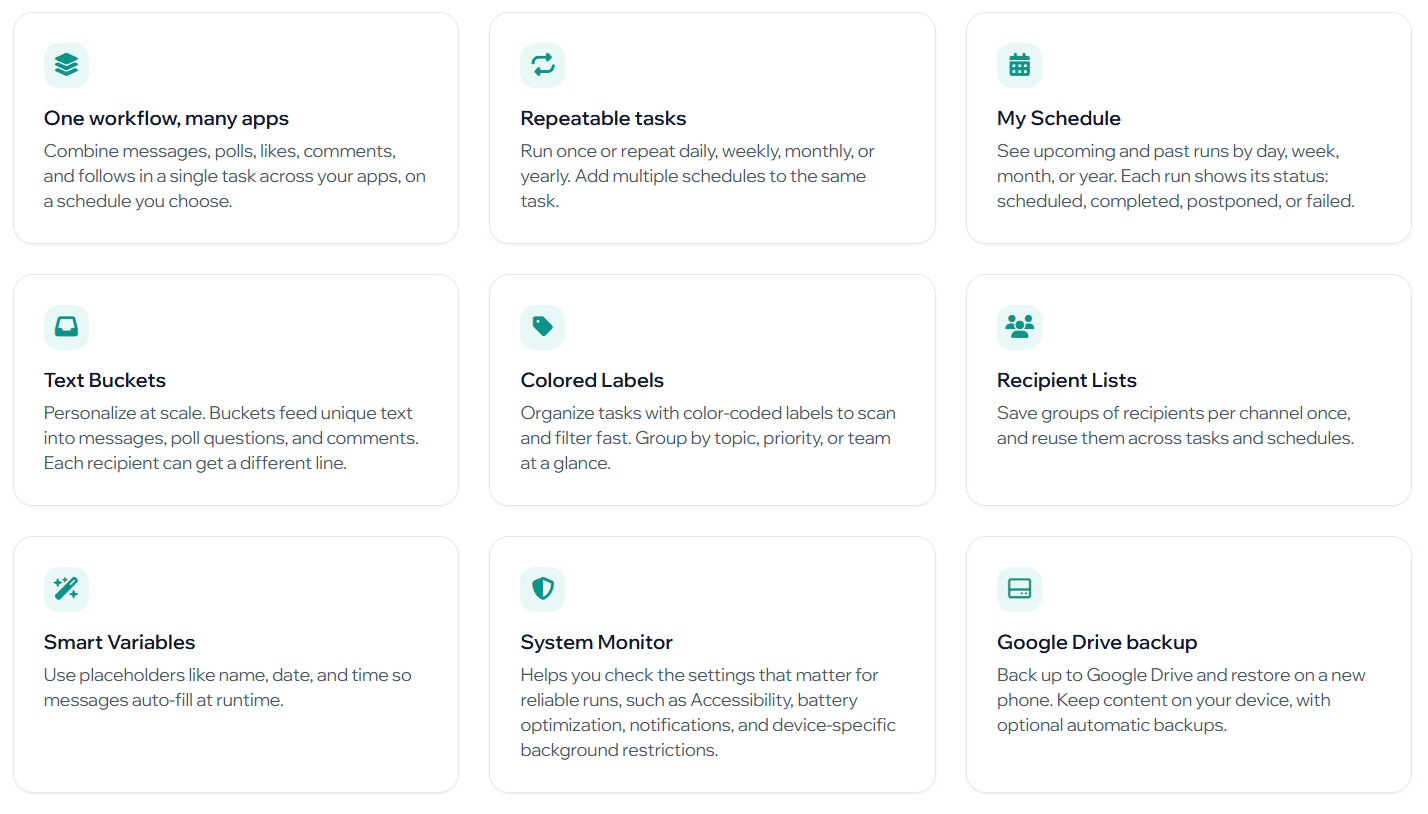
The second strength is personalization without complexity. Text Buckets let each recipient receive unique text, Smart Variables can auto-fill placeholders like name, date, and time, and Recipient Lists let users reuse groups across tasks. That is much more practical for outreach than sending one generic message to everyone.
The third strength is privacy positioning. TikTask repeatedly emphasizes that tasks, labels, buckets, variables, recipients, schedules, and message content stay on-device by default. Its privacy policy says it collects account identifiers, purchases, device metadata, crash/performance telemetry, ad signals when applicable, and optional Google Drive backups, but does not collect task texts, bucket texts, variables, or recipients onto its servers.
The basic workflow is simple: open TikTask, create a task, select the action, choose the channel and recipients, set a time, then save it. The FAQ gives this same quick-start sequence, and the homepage breaks the process into Create Task, Select Recipients, and Schedule & Repeat.
The app becomes more useful once you stop thinking in single messages and start thinking in routines. A freelancer might schedule post-meeting WhatsApp follow-ups. A shop could send weekly Telegram updates. A small service business could schedule Gmail follow-ups after appointments. A creator could prepare Instagram Direct follow-ups for followers and non-followers. TikTask’s FAQ confirms Instagram DM scheduling can include text, images, and videos, and the homepage says Instagram Direct supports richer recipient workflows.
The My Schedule view is important because automation without visibility gets messy fast. TikTask shows upcoming and past runs by day, week, month, or year, with statuses such as scheduled, completed, postponed, or failed. Google Play’s latest update also mentions Automation Reports for task results, delivery status, and failed recipients, which gives users a better way to troubleshoot missed or failed automations.
Reliability is the make-or-break issue for TikTask. Because it runs on Android and uses device-level automation, the app depends on permissions and background settings. TikTask says its System Monitor helps users verify Accessibility, notifications, battery optimization, and device-specific background settings so tasks can run on time.
This is also where TikTask has real friction. The privacy policy says TikTask may request Accessibility Service, overlay permission, notification access, exact alarms, background execution, battery optimization exemptions, AutoStart, and lock/wake helpers depending on enabled features. Those permissions make sense for an automation app, but they are not lightweight. Users need to be comfortable granting device-level access and understanding what each permission does.
TikTask’s privacy policy gives fairly specific safeguards. It says Accessibility is used to perform scheduled UI interactions like opening apps, focusing fields, typing, tapping, and scrolling; it also says there is no continuous monitoring or keylogging, and access is active only during a run or dependent feature use. That is useful transparency, but buyers should still treat this as a sensitive category of app.
The other reliability issue is manufacturer behavior. Android devices from brands like Xiaomi, Tecno, Infinix, OnePlus, OPPO, and others can aggressively restrict background apps. TikTask’s FAQ says some manufacturers require extra setup and that System Monitor provides guidance for device-specific settings. In practice, the app may work very well once configured, but the first setup can be more involved than a cloud scheduler.
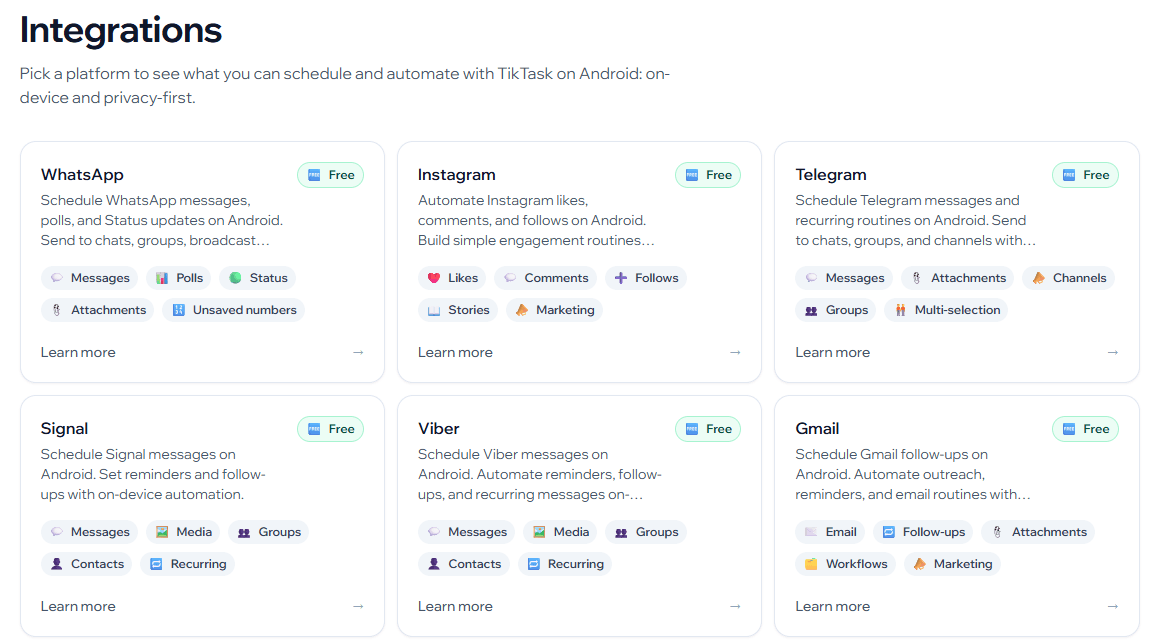
TikTask has broad communication-app coverage. Its integrations page lists WhatsApp, WhatsApp Business, Telegram, Instagram Direct, Signal, Viber, Gmail, Slack, Instagram, X/Twitter, Google Messages, and Samsung Messages. The supported actions vary by app: some channels are for messages, attachments, groups, or reminders, while others support likes, comments, follows, polls, status updates, stories, or bulk SMS-style workflows.
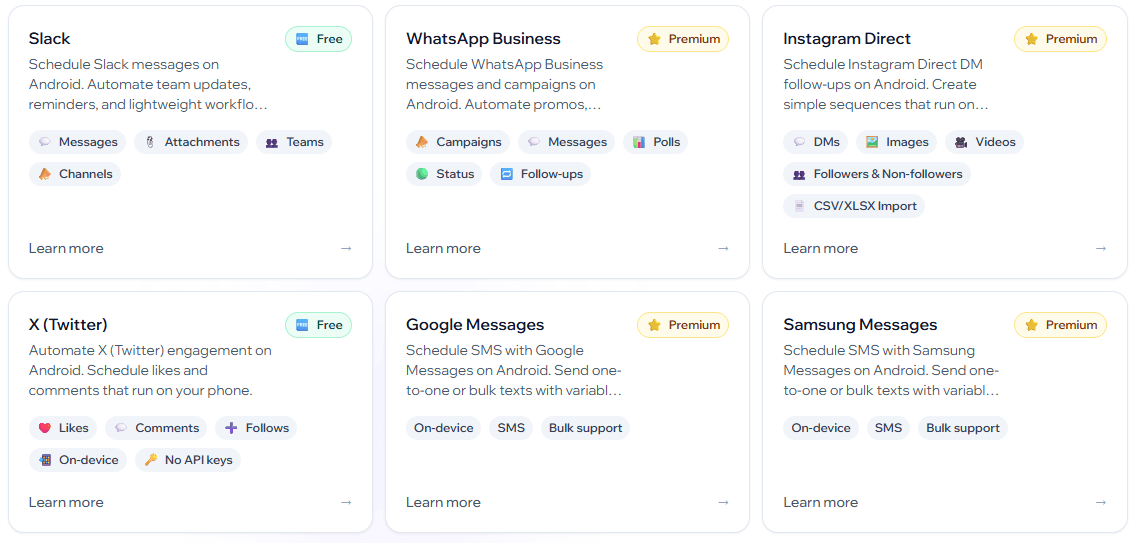
That breadth is useful, but it should not be confused with official API-based publishing. TikTask is independent and not affiliated with WhatsApp, Meta, X, or other third-party services, according to its Google Play listing. Its terms also say third-party platforms may change UIs or enforcement at any time and that compatibility is not guaranteed.
The safest way to think about TikTask is this: it is a personal automation helper for workflows you already have permission to run. It is not a tool for spam, scraping, aggressive mass engagement, or bypassing platform limits. The terms say users are responsible for complying with platform policies, obtaining necessary consent before messaging, following, liking, commenting, or posting, and choosing schedules that respect anti-spam policies and human-like usage.
- WhatsApp follow-ups: TikTask is useful for users who need recurring or scheduled WhatsApp and WhatsApp Business reminders, campaigns, customer check-ins, and follow-ups.
- Instagram Direct outreach: It can help prepare scheduled Instagram DM workflows, including text, image, and video follow-ups where appropriate.
- Telegram and Signal reminders: TikTask fits users who coordinate groups, recurring updates, or reminders through messaging apps.
- Gmail and Slack routines: It can support lightweight follow-ups, team reminders, and recurring communication routines.
- Local business and solo-operator workflows: Shops, coaches, freelancers, creators, consultants, and community managers are stronger fits than enterprise social teams.
- Personal automation: Birthday messages, event reminders, repeat check-ins, and recurring personal messages are natural uses for an on-device scheduler.
- Set up System Monitor before relying on TikTask for important tasks. Accessibility, notifications, battery settings, and background restrictions matter directly.
- Use Recipient Lists and Text Buckets for personalization. TikTask is more useful when different people get tailored text instead of one generic message.
- Start with low-risk reminders before running customer-facing campaigns. Device automation needs testing on your exact Android model.
- Do not use TikTask for spam or aggressive mass engagement. The safest use case is permission-based follow-up, reminders, and communication you would reasonably perform manually.
- Use Google Drive backup if you rely on many tasks. Optional backup helps preserve schedules and settings when switching or restoring devices.
- The first limitation is that TikTask is Android-first and device-dependent. It is not a cloud-based dashboard that can run independently from your phone. If your device is off, restricted, misconfigured, or blocked by battery settings, tasks can fail or be delayed.
- The second trade-off is permissions. TikTask needs sensitive Android capabilities for some workflows, including Accessibility and background execution permissions. The privacy policy provides safeguards, but users should still treat this as a high-trust app category.
- The third limitation is platform compatibility. TikTask depends on third-party app interfaces and Android behavior. If WhatsApp, Instagram, Gmail, Telegram, or another app changes its UI or enforcement behavior, automations may break or require updates.
- The fourth limitation is scope. TikTask is not a full social media management suite. It does not replace approvals, analytics dashboards, campaign reporting, social listening, content libraries, or enterprise workflow tools.
- The fifth trade-off is policy responsibility. TikTask’s terms put responsibility on users to follow third-party platform rules, get consent where needed, avoid spam, and respect anti-abuse limits.
TikTask is best understood as a privacy-first Android automation scheduler for messages, DMs, reminders, and lightweight social actions.
Its strongest advantages are on-device execution, broad communication-app support, recurring schedules, Smart Variables, Text Buckets, Recipient Lists, System Monitor, and optional Google Drive backup.
The main caveat is that TikTask is only as reliable as the device configuration and platform compatibility around it. It is most useful for permission-based communication routines and small-operator workflows, not for spam, mass engagement, or enterprise social media management.
TAGS: Social Media Tools
Related Tools:
Enhances social media engagement

AI-enhanced tool for YouTube creators
Analyzes images for enhancing online presence
.png)
Converts website content into ready-to-share social media posts
Transforms YouTube videos into short clips
Helps to expand LinkedIn connections