
Share this tool:
 |
Description:
HappySRT is a lightweight AI transcription and subtitle tool built around a simple promise: upload or link audio/video, generate timestamped transcripts, export SRT/text, translate subtitles into other languages, and create quick summaries. It is not trying to be a full localization suite like Rask, Dubverse, or Checksub. It is closer to a focused SRT-first workspace for creators, students, editors, and small teams that want quick subtitles without a heavy video-production platform.
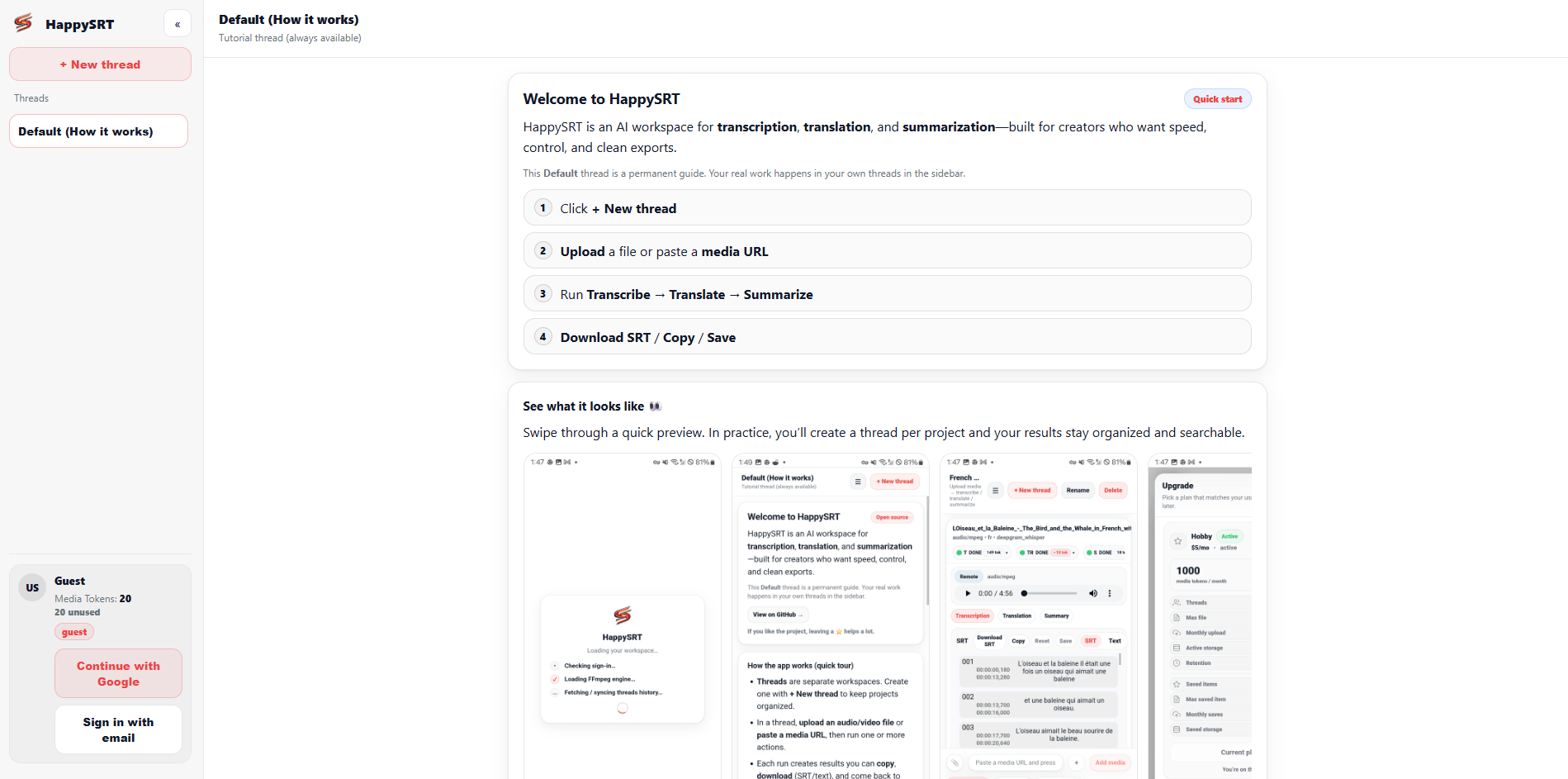
Converts audio/video into clean text with timestamps and SRT-ready output.
Lets users save, copy, or download subtitle outputs as SRT or text.
Generates multi-language subtitle tracks from the transcript workflow.
Produces highlights and bullet notes from uploaded media, which is useful for lectures, interviews, and long videos.
Keeps separate projects organized with their own uploads, outputs, and exports.
The public repository describes HappySRT as self-hostable and built with Next.js, React, Appwrite, FFmpeg, and Stripe hooks.
HappySRT describes itself as an open-source web app for transcription, translation, and summarization. The official app page is very minimal publicly because much of the interface loads after sign-in, but the core description is clear: it is built to transcribe audio/video, translate into multiple languages, and generate summaries.
The GitHub repository gives the clearest view of how the product is intended to work. HappySRT turns audio or video into transcripts with timestamps, subtitle tracks in other languages, and summaries with highlights and bullet notes. It uses a threaded workspace model, so each project can keep its own uploads, outputs, and exports rather than forcing everything into one flat history.
That makes the product feel closer to a compact creator utility than an enterprise localization system. The best fit is simple: you have a YouTube video, lecture, podcast clip, meeting recording, tutorial, or interview, and you want a usable SRT or text output quickly.
HappySRT is strongest at quick SRT generation. The pricing page explicitly lists an online SRT editor, online file uploads, YouTube URL support, and free subtitle downloads across the free plan, which tells you what the product is really centered on.
Its second strength is project organization. Instead of treating every transcription as a disposable one-off output, HappySRT uses threads. That matters for creators who might be working on several videos, language versions, or summary outputs at once. A thread can hold uploads, transcripts, translations, summaries, and exports together.
The third strength is simplicity. HappySRT is not overloaded with timeline controls, voice cloning, lip-sync, dubbing, or complex team review features. That can be a limitation for advanced users, but it is also part of the appeal for people who just want subtitles, translations, and summaries without learning a full media platform.
The intended workflow is straightforward. You create or open a thread, upload audio/video or paste a link if enabled, choose whether to run transcription, translation, or summarization, then wait for the output to appear inside the thread. From there, you can export, copy, or save the result as SRT or text.
That workflow is well matched to subtitle-first work. A creator can paste a YouTube URL, generate an SRT, edit or download it, then upload it to YouTube or use it in another editor. A student can upload a lecture and generate notes. A podcaster can create a transcript and summary. A small team can produce subtitles for internal videos without buying a larger localization suite.
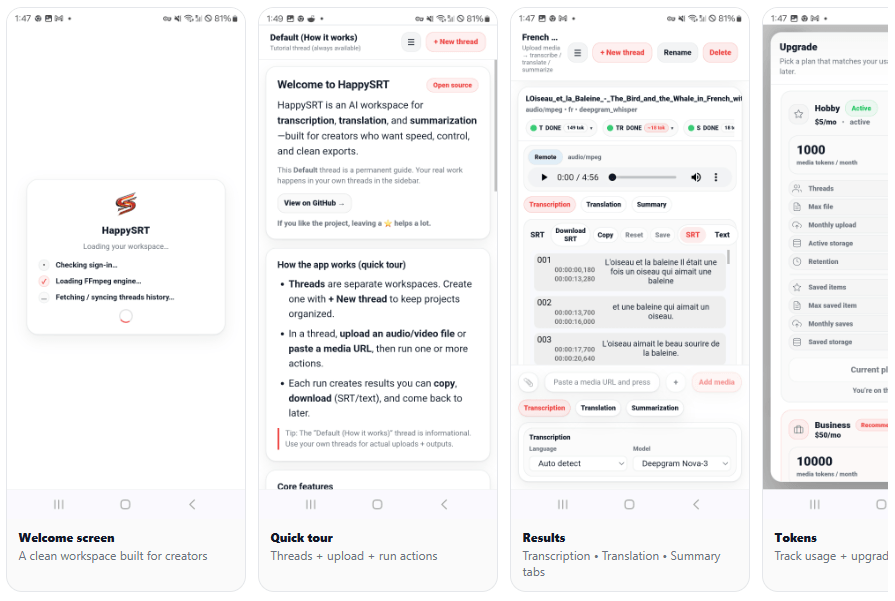
The product’s interface also appears designed to be lightweight. The repository describes a clean UI with styled-components and a minimal red-accent design, plus media-token usage shown in the sidebar. That is useful because users can see how much capacity they have left rather than guessing after every job.
HappySRT’s quality depends heavily on the audio and on whichever transcription/translation/summarization provider is configured behind the workflow. The public repository says self-hosters need to provide model or provider credentials for those AI tasks, which suggests the exact quality can vary depending on deployment and provider choice.
That makes HappySRT different from a fully managed AI transcription brand that publishes detailed accuracy benchmarks or model names. The public materials explain the workflow and output types clearly, but they do not provide much detail on model selection, diarization, speaker labeling, confidence scores, glossary support, or professional QA.
In practice, HappySRT is safest for straightforward audio: clear speech, clean recordings, tutorials, lectures, screen recordings, voiceovers, and YouTube videos with one or two speakers. For noisy interviews, overlapping speakers, strong accents, legal/medical terminology, or broadcast-ready subtitle work, users should expect to review the transcript manually before publishing.
The translation layer makes HappySRT more useful than a plain SRT editor. Instead of only creating source-language subtitles, it can generate translated subtitle tracks in other languages. That is valuable for creators who want to reach international audiences without using a full localization platform.
The summarization feature is also practical. For long videos, a transcript is useful, but a short summary is often what users actually need first. HappySRT’s repository describes summaries as highlights plus bullet notes, which fits education, research, meeting review, podcast repurposing, and video content planning.
The trade-off is control depth. There is no clear public evidence of advanced translation glossaries, style guides, reviewer roles, subtitle reading-speed warnings, or terminology enforcement. If translation quality is mission-critical, HappySRT should be treated as a fast first-pass tool rather than a final localization system.
HappySRT’s open-source angle is one of the more interesting parts of the product. The repository says the app is self-hostable and that self-hosters need to provide their own Appwrite project, Stripe keys if billing is enabled, storage credentials if configured, and AI provider credentials for transcription, translation, and summarization.
That matters for technical users. A developer or small company could potentially run its own version, control its own storage and provider choices, and adapt the workflow to a specific use case. That is different from most subtitle SaaS tools, where the interface and backend are fully closed.
There is one caveat: the GitHub repository’s license section currently says “Add your license here,” which means the public repo is visible and described as open-source, but the licensing terms do not appear fully finalized in the repository text. Teams planning to fork, modify, or commercially reuse the code should check the license status carefully before treating it like a standard MIT or Apache-style open-source project.
- YouTube subtitle generation: HappySRT is a clear fit for creators who need SRT files from YouTube videos or uploaded files quickly. YouTube URL support is listed directly on the pricing page.
- Lectures and education: Students, teachers, and course creators can turn recordings into transcripts, SRT subtitles, and bullet-note summaries.
- Podcast and interview repurposing: HappySRT can create transcripts and summaries that help turn long audio into show notes, quote banks, blog drafts, or social clips.
- Small creator workflows: The Basic plan is inexpensive enough for recurring light subtitle work, while the threaded workspace helps keep projects organized.
- Developers and self-hosters: The public repository and self-hosting notes make HappySRT more interesting for technical users than a typical closed subtitle generator.
- Use HappySRT for SRT-first jobs. It is best when the output you need is a subtitle file, transcript, translation, or summary. It is not the right first choice for lip-sync, dubbing, voice cloning, or advanced video localization.
- Start with the Free plan only for testing. Three AI minutes per month is useful for checking the interface, but most real video work will require Basic or higher.
- Correct the source transcript before translation. If the original transcript is wrong, translated subtitles will inherit those mistakes.
- Use threads intentionally. Put one video or content project per thread so the transcript, translated subtitles, summaries, and exports stay easy to find.
- For sensitive media, be cautious. The repository itself warns self-hosters to treat uploaded media and generated transcripts as sensitive data, and it recommends reviewing external provider data retention policies if third-party providers are enabled.
- The biggest limitation is that HappySRT is not a full subtitle production suite. There is no clear public evidence of advanced subtitle styling, waveform editing, speaker diarization correction, glossary management, team approval workflows, subtitle reading-speed checks, burned-in video export, or broadcast compliance tools.
- The second limitation is public documentation depth. The main site loads as an app and shows only a short product description publicly. The GitHub README is more informative than the homepage, but detailed user docs, accuracy benchmarks, model notes, privacy documentation, and enterprise controls are not very visible from the public pages.
- The third trade-off is licensing clarity. HappySRT is publicly positioned as open-source and self-hostable, but the repository’s license section is not finalized. That matters for anyone planning to reuse or redistribute the code.
- The fourth limitation is that translation and summarization quality likely depends on the configured AI provider. The repo explicitly references external provider credentials for transcription, translation, and summarization, so quality and privacy may vary depending on how the hosted or self-hosted version is configured.
HappySRT is a compact, practical tool for generating SRT subtitles, transcripts, translations, and summaries from audio or video. Its best qualities are simplicity, low entry pricing, YouTube URL support, SRT/text export, threaded projects, and a self-hostable public codebase.
The main caveat is that it is a lightweight subtitle/transcription utility, not a polished enterprise localization system. For creators, students, educators, and small teams that mainly need fast SRT files and summaries, HappySRT is appealing. For advanced dubbing, professional subtitle QA, large-team review, or high-stakes translation, it should be treated as a fast first-pass tool rather than the final production layer.
TAGS: Translation Speech to Text
Related Tools:
Offers voice cloning and translation
Enables real-time video dubbing
Transcribes and translates audio into text

Converts your speech into clean, formatted text

Translates text and speech between languages

Provides natural-sounding dubbing and translation