

Share this tool:
 |
Description:
Thumbfa.st is an AI thumbnail generator built specifically for YouTube creators. Instead of giving you a blank design canvas, it focuses on getting from an idea to several finished thumbnail options quickly. You can describe what you want, reuse your face across generations, borrow visual direction from an existing thumbnail, start from a template, or even sketch the composition yourself. The narrow focus is important. Thumbfa.st isn't trying to replace a general graphic design suite. It is trying to make one repetitive creator task faster and more consistent.
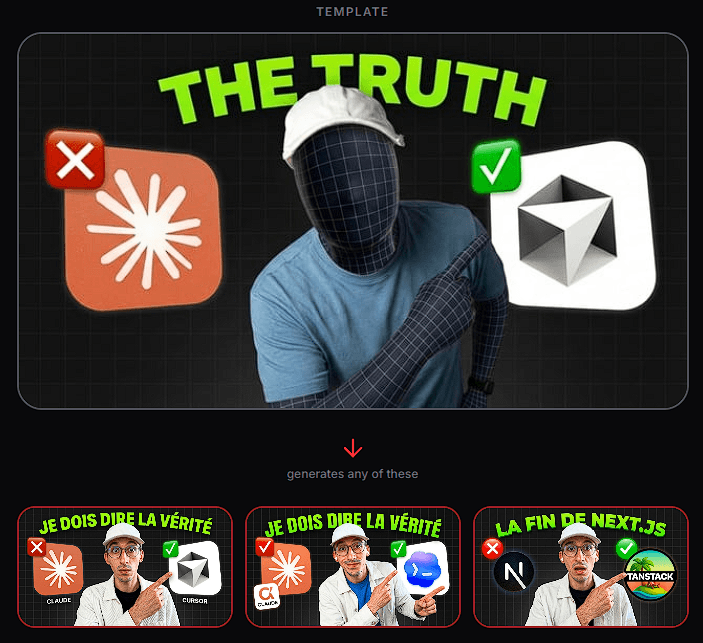
The basic workflow combines three things: your description, a saved Person, and optional visual inspiration. You tell the AI what the thumbnail should show. Select a person if the design needs a recognizable face, then add a reference image when useful, and generate several variations.
Generating multiple options at once makes sense for thumbnails because the first attractive design isn't necessarily the strongest choice. Thumbfa.st can produce up to four variations in one generation, giving creators alternatives that can be compared or taken into YouTube's own testing workflow.
The output is produced at YouTube's 1280 × 720 thumbnail resolution and can be exported as PNG. Previous generations are also saved automatically, so promising ideas don't disappear when you start another iteration.
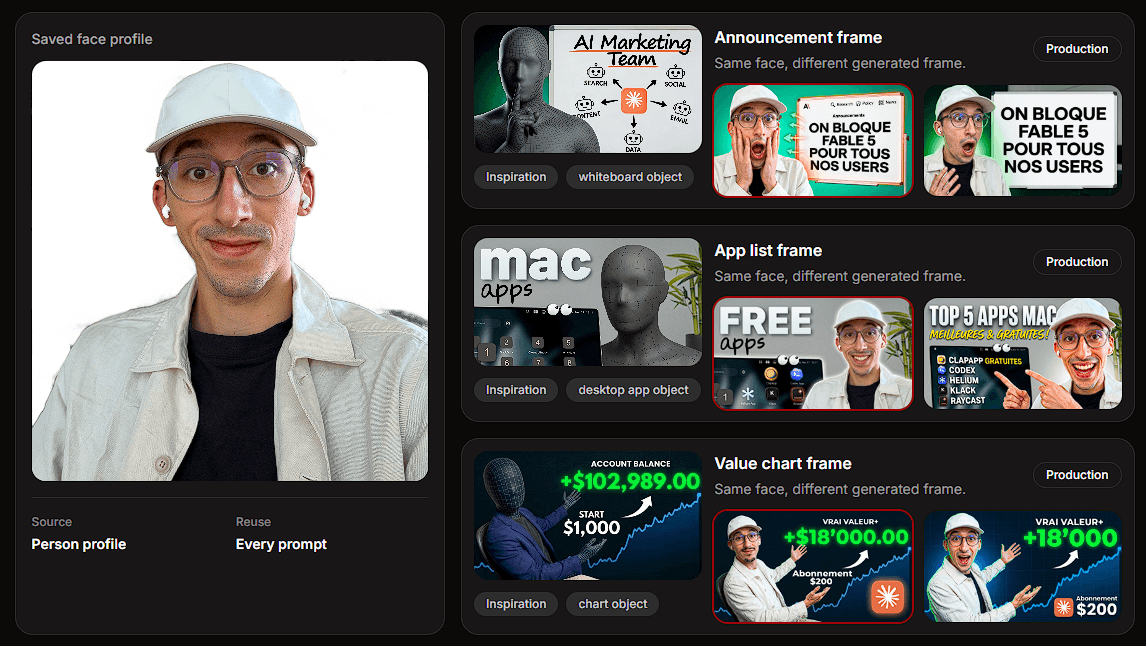
One of Thumbfa.st's more practical features is its Person system. You save reference photos of yourself or another recurring subject, then reuse that profile across future thumbnails.
This matters more than it might sound. The creator's face is often part of the channel's visual identity. If facial structure changes noticeably from video to video, the thumbnails may look AI-generated rather than like a coherent series.
Thumbfa.st is designed to keep that identity recognizable while allowing the surrounding composition, pose, objects, headline, and visual treatment to change.
You don't have to invent every thumbnail from scratch. Thumbfa.st lets you paste a YouTube URL and save the thumbnail as an Inspiration. The platform uses references such as its style, colors, text placement, and overall mood to guide new generations.
Template Mode takes this further. A thumbnail can become the structural starting point for multiple new versions. This is particularly useful for channels that already know what their thumbnails should look like and want variation without redesigning the format each time.
Podcast creators have a dedicated variation of this idea. A recurring podcast thumbnail can retain its established setup while different guests are introduced into new versions.
The practical value here is consistency, not endless novelty.
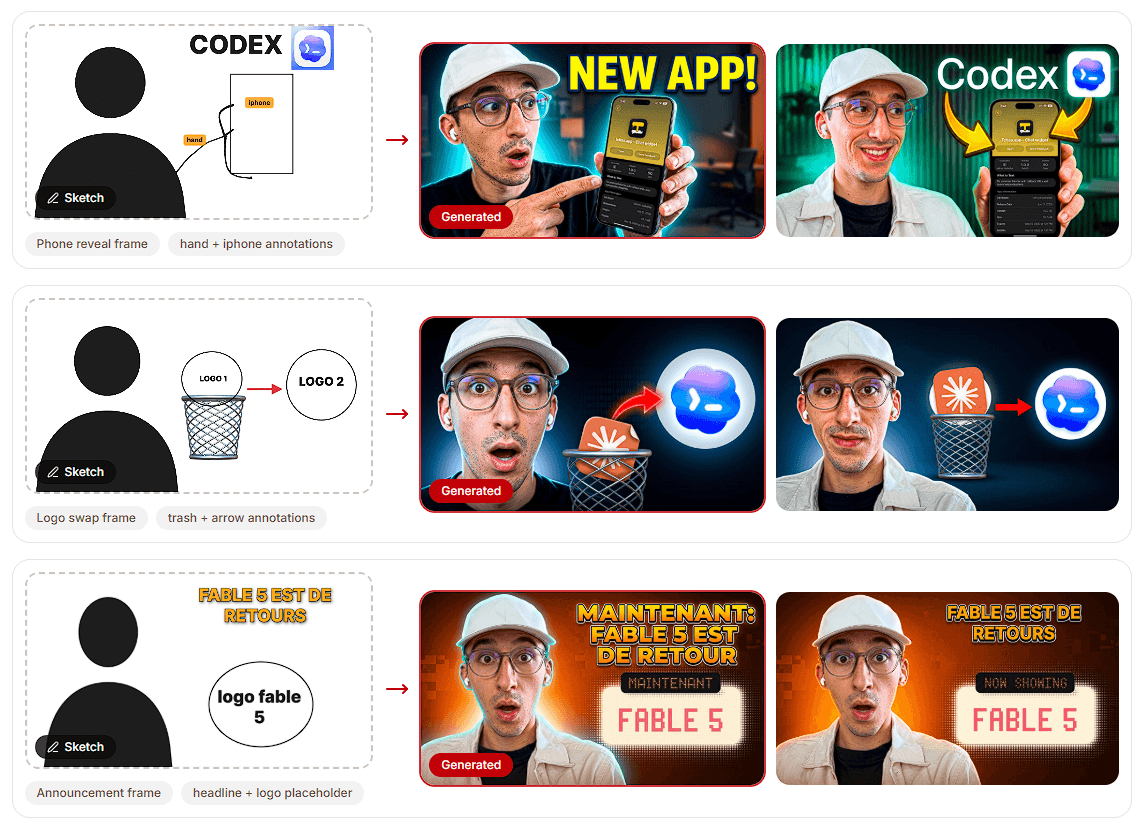
One of the standout features is the built-in sketch workflow. You can draw rough shapes, boxes, arrows, and annotations to communicate where elements should appear. The AI then interprets that rough layout and turns it into a finished thumbnail.
This solves a weakness of pure prompting. Describing a composition in words can become awkward when you already know that the face belongs on the left, a phone belongs in the center, and a headline needs to sit above both.
A crude sketch can communicate that spatial intent faster.
A good thumbnail concept may only need one element changed. Thumbfa.st supports iterative editing by allowing an existing generation to become the reference for another pass. The original prompt is retained, and you can request targeted changes such as a different face or expression while asking the AI to preserve the broader composition.
That makes the workflow less wasteful. Instead of regenerating an entire design because one detail feels wrong, you can develop the strongest candidate through successive revisions.
A useful thumbnail prompt should describe the visual idea rather than writing a long cinematic image prompt.
| Element | What to Specify |
|---|---|
| Subject | Person, product, object, or scene |
| Expression | Shocked, focused, excited, confused |
| Composition | Subject position and major objects |
| Headline | Exact short text if needed |
| Visual Direction | Clean tech, dramatic, documentary, bold |
| Priority | What viewers should notice first |
References can carry much of the style information, so the written prompt can focus on what needs to change.
Thumbfa.st is best suited to YouTubers who publish often and need a repeatable thumbnail process. Person profiles make sense for personality-led channels, while templates fit creators with an established visual formula. Podcast channels can reuse layouts across different guests, and the Inspiration system is useful when researching visual directions before building your own version.
The sketch workflow is especially useful for creators who know the composition they want but do not enjoy working in a traditional graphics editor.
Thumbfa.st is a specialized tool, which means creators looking for detailed manual typography, layer management, vector editing, or precise graphic design controls may still need a dedicated editor.
AI consistency also deserves inspection. A saved face can improve continuity, but generated expressions, hands, small objects, text, and fine details should still be checked before publishing.
Reference-driven generation needs some restraint too. Inspiration is useful for studying visual patterns, but creators still need enough original identity to avoid making every thumbnail feel like an imitation of another channel.
Finally, generating four attractive options isn't the same as knowing which thumbnail will perform best. Actual audience testing remains more useful than judging designs purely by appearance.
Thumbfa.st works best as a focused production tool for creators who make YouTube thumbnails repeatedly. Saved people, inspirations, templates, sketches, multi-variation generation, and iterative editing address real friction in that workflow rather than adding unrelated design features.
Thumbfa.st strongest fit is a creator who already understands the importance of thumbnails but wants to spend less time building each one manually. For detailed, pixel-level design work, a traditional graphics editor still offers more precision.
TAGS: Generative Art
Related Tools:

Easily create custom logos and brand identities

Generates artworks for NFTs

Transforms videos and images using advanced AI features

Creates detailed 2D drawings from 3D models
Generate images from text

Creates artworks from prompts