

Share this tool:
 |
Description:
- Introduction: What Is Vibe3D?
- Three Rendering Engines for Different Stages
- Geometry Preservation Is the Main Selling Point
- Relighting and Editing Reduce Re-Rendering
- Render Enhancement Works With Existing Visualization Tools
- From Still Renders to Flythrough Videos
- Best Use Cases
- Limitations and Trade-Offs
- Final Takeaway
Vibe3D is an AI architectural visualization platform built for architects, interior designers, and visualization teams that already work in tools such as SketchUp, Revit, Rhino, Archicad, Blender, 3ds Max, Vectorworks, and Chief Architect. Instead of replacing those modeling applications, it takes an exported model view and turns it into a photorealistic render in the browser. The platform also handles relighting, localized edits, render enhancement, client presentations, and AI-generated flythrough videos.
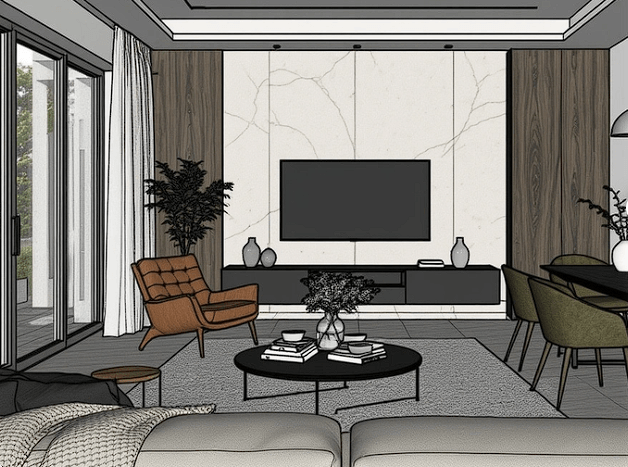
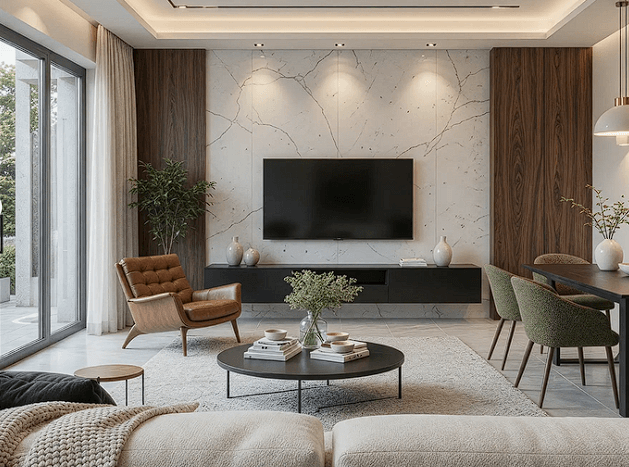
One of the more useful parts of Vibe3D is that it does not treat every render as the same job. Its current rendering workflow includes three engines: Fidelity, Lumen, and HyperReal.
| Engine | Best Fit |
|---|---|
| Fidelity | Early reviews, quick iterations, and first drafts |
| Lumen | Everyday photorealistic visualization and client reviews |
| HyperReal | Final presentations, portfolios, and marketing imagery |
Fidelity places more emphasis on keeping the source design recognizable while producing a quick visual. Lumen pushes lighting, materials, and atmosphere further without abandoning the original structure. HyperReal is aimed at the highest-detail output, where texture quality and realistic lighting matter more. Vibe3D currently promotes HyperReal Engine 2.0 as its latest high-end rendering engine.
That separation makes sense for architecture. Not every design meeting needs a portfolio render, and using a faster mode during early iterations can be more useful than chasing maximum realism every time.
AI architecture rendering becomes less useful if it beautifies a scene by redesigning it. Vibe3D is built around keeping the original model as the anchor.
The source image guides proportions, camera framing, geometry, materials, and composition. According to Vibe3D, the renderer reads those visible architectural cues rather than generating a new building from scratch. Output currently reaches up to 2048×2048 or 2560×1440, with most renders completing in roughly 30–60 seconds through cloud processing.
This is the right direction for client work, but “preserved” should not be interpreted as CAD-level verification. AI-generated presentation imagery still deserves comparison with the source model, especially around small architectural details and material boundaries.
Vibe3D becomes more practical after the initial render.
Its relighting controls can change natural light, time of day, ceiling-light intensity and temperature, and accent lighting without rebuilding the original 3D scene. This is useful when a client wants to compare morning, evening, and nighttime moods from the same design.
There is also localized AI editing. Users can highlight an area and describe a change in plain language, such as replacing furniture, changing flooring, adding landscaping, or adjusting the sky. The rest of the render is intended to remain stable. Each modification is saved as a separate version, so material, furniture, and lighting alternatives can be compared without manually managing many image files.
This limited use of prompting fits the product well. You do not need to write elaborate prompts to create the original render, but text instructions become useful when revising it.
Vibe3D is not only for scenes rendered inside its own system. Its Render Enhancer accepts existing JPG or PNG renders from tools such as Enscape, Lumion, V-Ray, Twinmotion, D5, Corona, and Blender.
The HyperReal-powered enhancement workflow targets four areas: upscaling, lighting refinement, color and tone correction, and sharper materials and surface details. The original 3D project file is not required.
That makes the enhancer one of the easier features to add to an existing visualization pipeline. A studio can continue using its preferred renderer and use Vibe3D mainly for final polish.
Vibe3D also generates architectural flythroughs from a set of static renders.
Users select the scenes, choose camera movements and transitions, then let the system assemble them into a video. Available movements include pans, zooms, walkthroughs, drone-style pullbacks, flyovers, and 360-degree rotations. It can also automatically add music and exports the finished sequence as MP4.
Current documentation supports flythroughs of up to about 75 seconds with as many as 15 scenes. A 30-second 1080p sequence is listed as taking around three to four minutes to generate.
The important limitation is that these are AI-generated cinematic transitions from renders, not the same as animating a fully navigable 3D model with precise camera paths.
Vibe3D is strongest for architectural concept reviews, interior visualization, exterior presentations, material studies, real estate marketing, site-plan imagery, and client-facing design presentations.
It is particularly useful for small architecture and interior-design teams that already model accurately but do not want to spend substantial time setting up shaders, lighting rigs, render queues, and post-production for every design revision.
The built-in presentation feature also lets teams organize renders and walkthrough videos into a full-screen project sequence, which can make client reviews more coherent than sending individual files.
Vibe3D is a visualization layer, not a modeling application. You still need SketchUp, Revit, Rhino, Blender, or another tool to create and revise the actual architectural geometry.
AI editing can also introduce interpretation. If an exact material, fixture, façade element, or construction detail matters, the underlying model should remain the source of truth. Flythrough generation favors convenience over the detailed camera and animation control available in traditional visualization packages.
For fast iterations and client presentation work, that focused role is exactly where it makes the most sense.
Vibe3D is strongest for architects and designers who already have a 3D model and want to get from model view to convincing presentation material much faster.
Its three render engines, relighting, localized editing, HyperReal enhancement, version tracking, and flythrough tools cover much of the work that normally happens after modeling.
The main caveat is that it improves architectural visualization rather than replacing architectural software.
TAGS: 3D Model Generative Art
Related Tools:

Transforms layout into 3D floor plans
Transforms sketches to images and videos

Creates visuals with highly accurate text and typography

Transforms photos to cartoon images

AI-powered photo editing toolkit

Simplifies graphic design by automatically generating visuals