

Share this tool:
 |
Description:
Usermaven is an analytics and attribution platform built for teams that want to connect website traffic, product behavior, campaigns, leads, and revenue signals in one place. Its main appeal is not that it replaces every data tool. It is that it gives marketers, founders, agencies, and product teams a cleaner way to answer practical questions: where did users come from, what did they do, which campaigns influenced conversion, and where are users dropping off?
| Area | What it helps you do | Practical value |
|---|---|---|
| Website Analytics | Track visitors, pageviews, sessions, traffic sources, and conversions | Good for replacing scattered website reports with a cleaner daily view |
| Product Analytics | Track engagement, feature adoption, active users, and retention signals | Useful for SaaS and app teams that need product usage context |
| Attribution | Compare channels and conversion paths across models | Helps teams avoid judging campaigns only by last click |
| Maven AI | Ask questions about analytics data in plain English | Speeds up reporting for non-technical users |
| Contacts Hub | View leads, visitors, users, companies, activity, and sources | Connects behavior history to known contacts |
| Integrations and Events | Send events through SDKs, APIs, webhooks, and app integrations | Gives technical teams more control when needed |
Maven AI is the most obviously “AI” part of the product. It lets users ask plain-English questions about traffic, attribution, conversions, engagement, customer journeys, funnels, and performance trends, instead of building every report by hand.
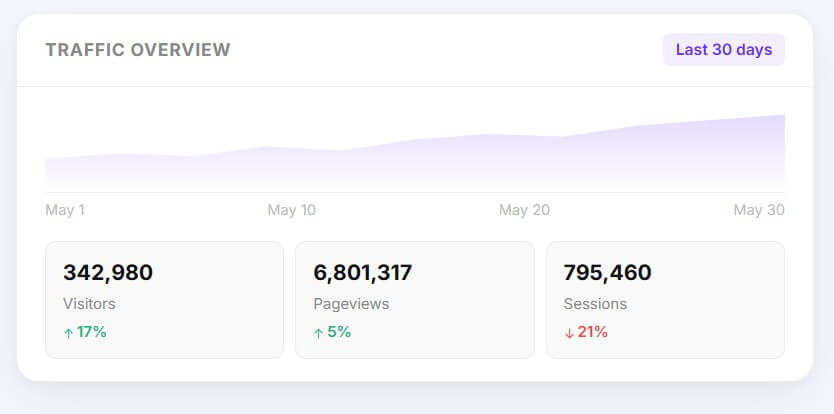
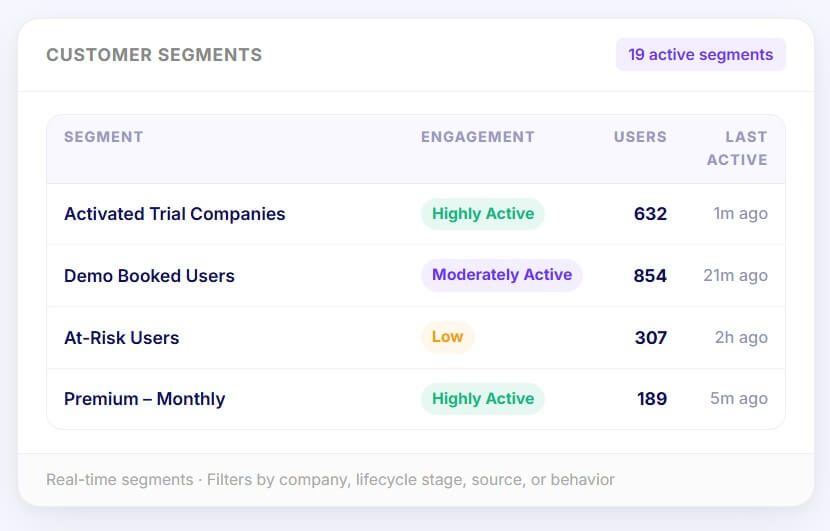
The strongest part of Usermaven is its focus on connected growth analytics. Many teams have website analytics in one tool, product events in another, CRM data somewhere else, and campaign reports spread across ad platforms. Usermaven tries to bring those views closer together, with web analytics, product analytics, funnels, journeys, dashboards, segments, Contacts Hub, multi-touch attribution, and Maven AI listed as core product areas.
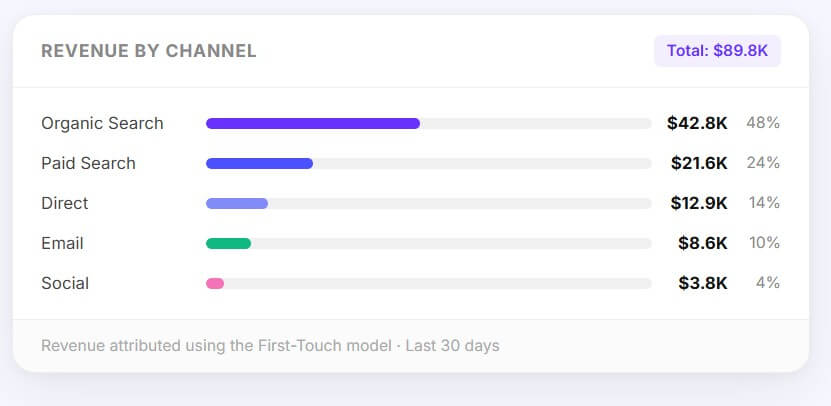
That makes it most useful for teams that care less about vanity traffic and more about what traffic becomes. Usermaven’s attribution positioning is built around tracking the full customer journey with unified attribution, CRM data, and product analytics so teams can see which campaigns, channels, and ads drive outcomes.
It also avoids one common analytics problem: too much reporting work before anyone gets an answer. The dashboard language and product design lean toward fast interpretation, not analyst-heavy exploration.
Usermaven is strongest when used as a practical analytics workspace rather than a deep technical BI environment. The official website analytics page emphasizes real-time performance monitoring, clean dashboards, conversion goals, and reports that are easier to read than complex analytics suites.
Setup can be light for basic tracking. Usermaven supports automatic event capture after adding the tracking script, and users can review auto-captured events, filter them, and pin important actions as tracked events or goals. This is helpful for teams that do not want to plan every event before they start learning from user behavior.
There is still a deeper layer for teams that need it. The React SDK supports automatic pageview tracking, cross-domain tracking, flexible custom events, URL randomization to avoid PII collection, and multiple tracking instances through namespaces. Webhooks and the Events API can also bring in third-party actions from tools such as CRMs, payment processors, or call tracking platforms.
The result is a good balance: simple enough for marketers to use, but not limited to surface-level tracking.
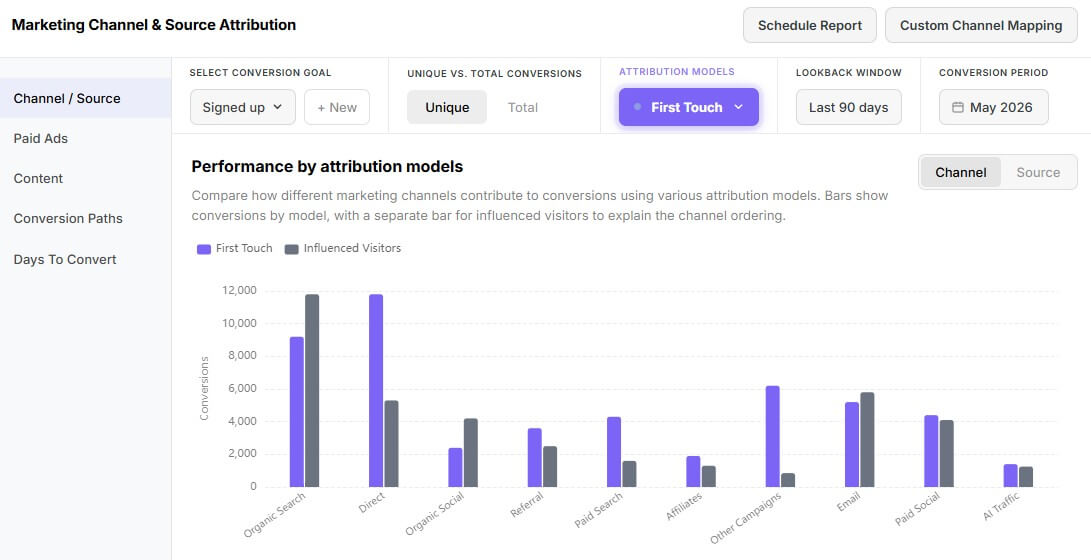
Usermaven’s attribution layer is one of its main selling points. The platform supports multiple attribution views, including first touch, last touch, linear, U-shaped, time decay, first touch non-direct, and last touch non-direct.
This matters because campaign performance often looks different depending on the model. A paid search ad may close the conversion, while a content page or referral source may have started the journey weeks earlier. Usermaven is useful when a team wants to compare those paths without stitching together exports from several tools.
The platform also supports Google Ads attribution workflows with UTM and ad ID tracking parameters that can be used across modules such as Web Analytics and attribution insights. That makes it more relevant for performance teams than a basic privacy analytics tool.
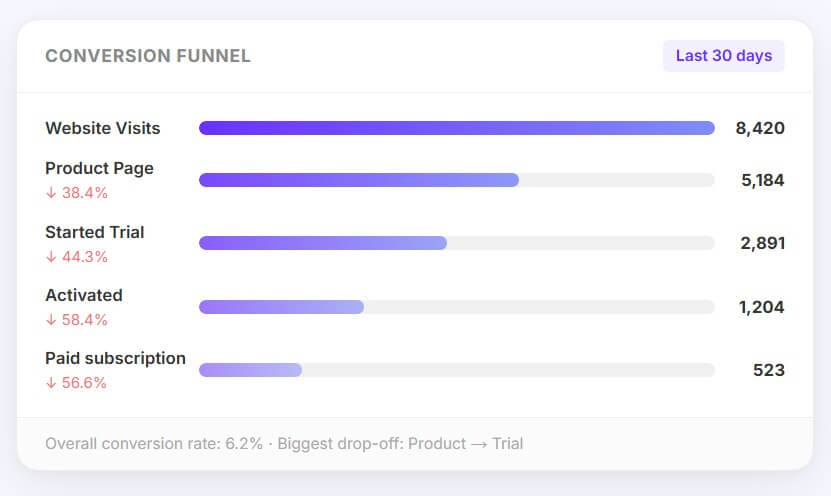
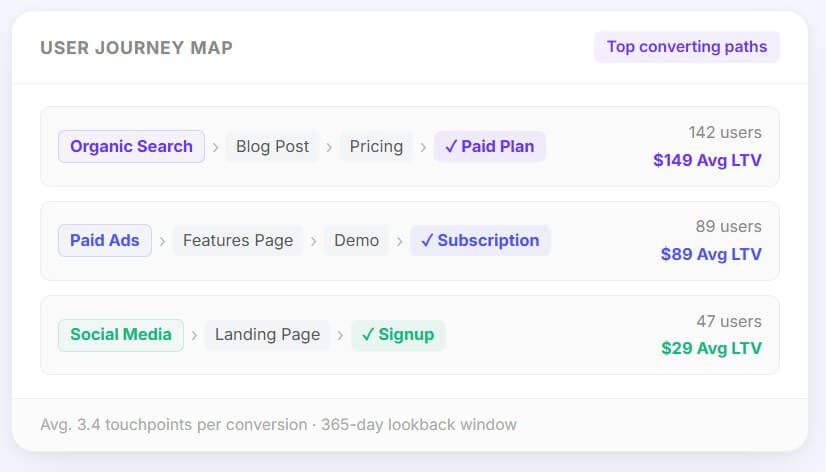
Maven AI should be seen as an analysis shortcut, not a magic answer engine. It is useful for questions like which channel drove signups, why conversions changed, what traffic source performed best, or where a spike happened. Usermaven describes it as an assistant that works across attribution, traffic, customer journeys, funnels, and conversion trends.
The best use case is fast first-pass analysis. A marketer can ask a question, get a direction, then inspect the underlying dashboard or report. That is more practical than treating AI output as the final truth. For teams that already know what questions to ask but do not want to build the same report each week, Maven AI could save a lot of time.
- B2B SaaS attribution: Usermaven fits teams that need to see how ads, content, referrals, email, and product behavior contribute to signups, demos, upgrades, or pipeline.
- Agency reporting: Agencies can use dashboards, attribution views, saved reporting workflows, and client-facing analytics to reduce manual report building.
- Product-led growth: Product teams can track active users, feature adoption, user journeys, funnels, and retention signals in the same environment as acquisition data.
- Founder-led marketing: Small teams that do not have a dedicated analyst can use Maven AI and cleaner dashboards to answer common performance questions faster.
- Lead source analysis: Contacts Hub stores leads alongside visitor, user, and company records, including activity history, source details, UTM data, referrers, and custom properties.
- Start with the conversion events that matter most. Auto-capture is useful, but too many low-value events can clutter reports. Usermaven’s docs note that auto-captured events can include noisy interactions, so teams should exclude irrelevant elements, disable capture on selected pages, or pin only the events that matter.
- Use clear naming for custom events. Short, consistent event names are easier to filter, compare, and explain later. Usermaven’s custom event docs recommend concise naming and consistent casing.
- Treat attribution models as lenses, not absolute truth. Compare first-touch, last-touch, and multi-touch views before making budget decisions. The useful question is not “which model is correct?” It is “what does each model reveal?”
- Usermaven may feel too focused if you need a full BI stack, warehouse-first modeling, or highly custom SQL reporting. It is better suited to growth, marketing, product, and attribution workflows than broad enterprise data exploration.
- Auto-capture also needs cleanup. It can reduce setup friction, but teams should still define goals, exclude noise, and validate key events. The easier a tool makes tracking, the more important event hygiene becomes.
- Maven AI is useful, but users should verify important insights against the actual dashboards, especially before changing spend, reporting to clients, or making product decisions. AI can speed up analysis, but it should not replace data review.
Usermaven is best for marketing, growth, agency, and SaaS teams that want website analytics, product behavior, attribution, lead context, and AI-assisted reporting in one workspace.
Its main strength is practical connected analytics.
Its main caveat is that teams still need clean event setup and careful interpretation, especially when attribution decisions affect budget.
TAGS: Marketing
Related Tools:

Automates digital marketing tasks

Automates lead generation and marketing for real estate

Automates the creation of ad campaigns for effective marketing

Facilitates efficient Email marketing

Automatically edits videos by detecting highlights

Automates creation of ad copy