

Share this tool:
 |
Description:
- What Is ThumbnailCreator?
- More Than Text-to-Thumbnail Generation
- Face Tools Matter for Personality-Led Channels
- Style Cloning, Templates, and Brand Consistency
- The Editor Makes the Workflow More Practical
- Variations Are Better Than Betting on One Design
- Where ThumbnailCreator Fits Best
- Limitations and Trade-Offs
- Final Takeaway
ThumbnailCreator is an AI design tool focused specifically for YouTube thumbnails. It can generate a thumbnail from a written description, work from an existing image, pull a thumbnail from a YouTube video, reuse a trained face, clone visual styles, and refine results with AI editing tools. The main attraction is that these jobs sit inside one workflow. Instead of treating AI generation as the finish line, ThumbnailCreator gives creators several ways to turn a rough result into something closer to a publishable thumbnail.
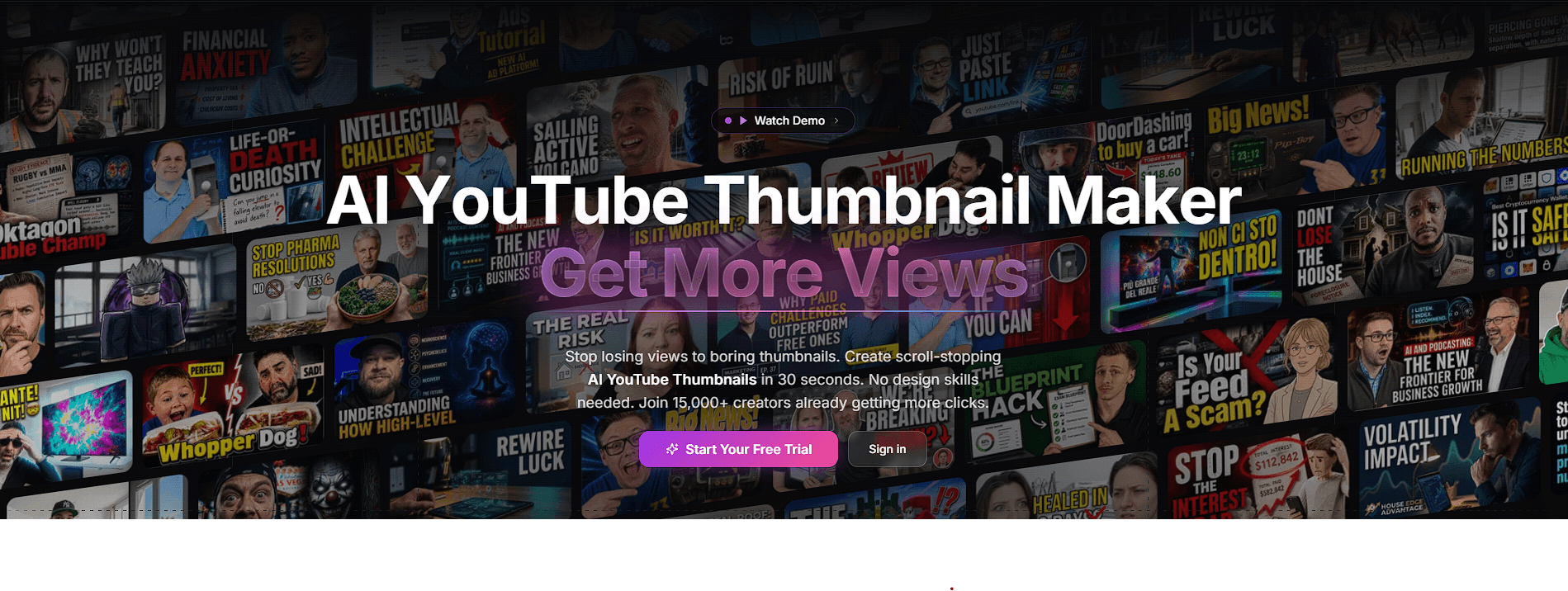
The AI Thumbnail Generator is the obvious starting point. You describe the subject, expression, text, colors, mood, and composition, then choose how many variations you want. ThumbnailCreator supports between one and ten results in a generation, along with standard 16:9 thumbnails and vertical 9:16 graphics.
Face and style references can also be included. This is useful because thumbnail creation is rarely a one-prompt job. A creator may already have a recognizable visual style and only need fresh concepts for the next video.
There’s also a YouTube-based workflow. Paste a video URL and ThumbnailCreator can extract the existing thumbnail for editing or create a new thumbnail informed by the video content. That makes it useful for refreshing an older upload without rebuilding everything manually.
YouTube thumbnails often depend on the creator's face, so consistency is more important here than it is with a generic AI image generator.
ThumbnailCreator lets you train a face model from multiple photos and reuse it across thumbnails. Face Swap provides another route: take an AI-generated, uploaded, or extracted thumbnail and replace its existing face with your trained model or a temporary reference photo. The tool is designed to retain the surrounding composition, lighting, and style.
This makes sense for channels where the host is part of the brand. You can experiment with different scenes and layouts without asking the AI to reinvent the person each time.
That said, facial details still deserve inspection. Consistency tools reduce the problem; they don't make every generated expression automatically usable.
ThumbnailCreator also lets users extract visual characteristics from another thumbnail. Its Style Cloning feature looks at elements such as color palette, typography, composition, and lighting, then saves that direction for later use. Templates provide a faster starting point for common categories including gaming, tutorials, and vlogs.
These features are most useful when applied to your own visual system. A creator who has found a recognizable format can build new concepts around it without manually recreating the same design rules every time.
ThumbnailCreator also supports persistent design rules, which can help enforce recurring brand preferences during generation.
Generation gets attention, but the editing tools are arguably more important.
ThumbnailCreator supports natural-language AI editing, so you can describe a change rather than regenerate the whole thumbnail. Inpainting lets you target a particular region when only one part needs editing. There are also dedicated tools for background removal, text overlays, color enhancement, upscaling, and automatic optimization.
One of the more useful features is Layer Split. It analyzes a flat thumbnail and separates elements such as the foreground, background, and text into editable layers. Those elements that are separated can then be moved, hidden, reordered, or recombined.
That addresses a common frustration with AI graphics. If the person is positioned slightly too far left, you shouldn't have to regenerate the entire image and hope everything else stays the same.
ThumbnailCreator includes A/B variation generation for producing alternatives based on one concept. Variations can explore different colors, compositions, and hooks.
This fits thumbnail design well. A single polished graphic doesn't tell you much about whether another composition could communicate the video's idea faster.
The important distinction is that AI variations provide options, not evidence of performance. The platform can help creators explore directions, but actual viewer behavior remains the meaningful test.
| Use Case | Why It Fits |
|---|---|
| Personality channels | Trained face models support recurring hosts |
| Frequent uploads | Generation reduces repeated design setup |
| Thumbnail refreshes | YouTube URLs can pull existing thumbnails into the workflow |
| Channel branding | Styles, templates, and design rules support consistency |
| Concept exploration | Multiple variations make comparison easier |
| AI-assisted editing | Natural-language changes reduce unnecessary regeneration |
| Existing thumbnails | Layer Split provides more control over flat images |
The platform is especially appealing to solo YouTubers and teams that need a repeatable process rather than an occasional AI image.
ThumbnailCreator doesn't remove the need for design judgment. AI can generate a bold face, bright colors, and oversized text, but those ingredients don't automatically create a good thumbnail.
Creators should also check text, facial details, objects, and AI-edited regions closely. More complex compositions may still need several revisions.
The editor offers useful control, but dedicated graphics software remains stronger when you need meticulous typography, detailed compositing, masks, custom effects, or pixel-level adjustments. ThumbnailCreator makes more sense when speed matters more than manual control.
Style cloning also needs restraint. Studying successful visual patterns is useful, but a channel still benefits from building an identity viewers can recognize as its own.
ThumbnailCreator is strongest when treated as a thumbnail production workspace, not just a text-to-image generator. Face models, style references, YouTube extraction, AI editing, layer separation, templates, and variation generation all address practical steps creators repeatedly face.
ThumbnailCreator is best suited for YouTubers and content teams that need to produce and revise many thumbnail ideas without building each one manually. AI can accelerate design and experimentation, but it can't decide which visual idea will resonate with an audience. That still requires creative judgment by a human and real-world testing.
TAGS: Generative Art
Related Tools:

Creates precise scientific illustrations from simple text
Creates optimized, high-converting video thumbnails

Generates visual images from texts
Enables user to generate digital artworks
Transforms sketches into detailed visuals

Enables real-time creation and enhancement of images and videos