

Share this tool:
 |
Description:
- Introduction
- What Targum Video Actually Is
- What Targum Video Does Best
- Core Features and Capabilities
- Workflow and Ease of Use
- Output Style: Translation First, Full Dubbing Second
- Who Targum Video Is Best For
- Plans, Limits, and What Actually Matters
- Comparison to Other Video Translation Tools
- Practical Tips
- Limitations and Trade-Offs
- Final Takeaway
Targum Video is a lightweight AI video translation service for turning videos from one language into another quickly. Its strongest use case is not high-end studio dubbing or full localization production. It is fast understanding and sharing: take a video, upload it or paste a link, translate it into another language, and optionally download the translated video or subtitles depending on the plan.
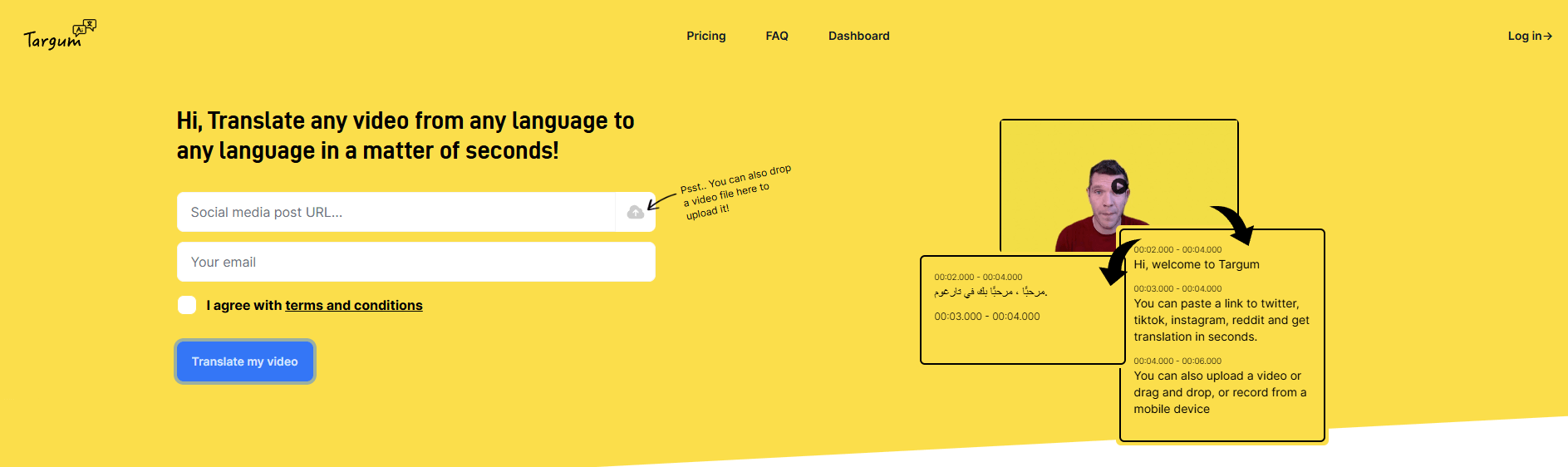
Targum Video is an AI-powered video translation tool. The official homepage describes the core promise plainly: “Translate any video from any language to any language in a matter of seconds.” It supports direct uploads, drag-and-drop video files, mobile recording, and links from platforms including Twitter/X, TikTok, Instagram, and Reddit.
The easiest way to understand Targum is this:
| Layer | What it does | Why it matters |
|---|---|---|
| Video input | Upload a file, drag and drop, record on mobile, or paste a social link | Makes it useful for social clips, quick research, and creator workflows |
| AI transcription and translation | Detects spoken content and converts it into another language | Helps users understand foreign-language video quickly |
| Subtitle/video output | Offers translated video and subtitle downloads on supported tiers | Useful for reposting, editing, accessibility, and content repurposing |
| Social translation workflow | Historically supported @vidtranslator-style social translation | Makes it especially relevant for fast social video understanding |
That structure makes Targum more of a fast video translation utility than a full video localization suite. It is built for speed, ease, and access.
Targum Video is strongest when the goal is to understand or repurpose short-to-medium videos quickly.
- A journalist can translate a foreign-language social clip.
- A researcher can understand a video from another country.
- A creator can test a translated version of a short video.
- A marketer can turn a clip into subtitles for a different audience.
- A language learner can compare speech, translation, and captions.
- A small team can localize basic content without a full production workflow.
The product is especially useful because it removes friction at the input stage. Users do not need to download a social video, convert the file, transcribe it manually, translate the transcript, and then rebuild subtitles. Targum is designed to compress those steps into a simple upload-or-link workflow. The homepage specifically says users can paste a link from Twitter/X, TikTok, Instagram, or Reddit, or upload/record directly.
That is the main value: quick translation with minimal setup.
Upload or drag-and-drop video files directly into the platform for AI translation.
Paste links from platforms such as Twitter/X, TikTok, Instagram, and Reddit to translate social video content quickly.
Record from a mobile device and translate the resulting video, which is useful for quick field capture or on-the-go use.
Targum’s pricing page lists translation to more than 99 languages across tiers.
Supported tiers allow users to download translated MP4 files rather than only stream or share links.
Subtitle file downloads are available on supported tiers, which matters for editors, creators, and accessibility workflows.
Targum’s workflow is intentionally simple.
The homepage centers the experience around a single action: translate a video. It also notes that users can drop a video file directly onto the page to upload it. That gives the product a low-friction feel compared with more complex localization tools.
In practical use, the workflow looks like this:
| Step | What You Do | What Targum Handles |
|---|---|---|
| Add source video | Upload, drag and drop, record, or paste a supported link | Brings the video into the translation pipeline |
| Choose translation direction | Select the target language | Converts the spoken content into the target language |
| Review output | Watch the translated version or inspect captions | Lets you decide whether the result is usable |
| Download or share | Export video or subtitles where supported | Enables editing, reposting, or external publishing |
That workflow is good for casual users, creators, and small teams. There is no heavy setup, no advanced editor, no complex dubbing timeline, and no production pipeline to configure.
The trade-off is control. Tools that are this simple usually provide fewer options for script editing, subtitle timing, voice style, speaker handling, lip sync, pronunciation correction, and final localization polish.
Targum should be judged primarily as a translation tool, not as a high-end dubbing studio.
The official site emphasizes translating videos and understanding content across languages. The pricing page also highlights SRT downloads, MP4 downloads, priority queue access, video duration limits, upload file size limits, and translation to 99+ languages.
That tells you what the product is optimized for: getting translated video and captions out quickly. It is not currently positioned like a full localization suite with advanced voice cloning, lip-sync editing, human review, brand voice management, team approvals, or studio-grade dubbing QA.
This is not a weakness if your goal is speed. It becomes a limitation only when your project requires publish-ready dubbed videos at professional localization quality.
Targum is best for people who need fast translation more than deep editing.
It is a strong fit for:
- Social media users who want to understand videos from other countries, especially clips circulating on Twitter/X, TikTok, Instagram, or Reddit.
- Journalists and researchers who need quick context from foreign-language footage.
- Creators who want to make videos more accessible to international audiences.
- Educators and language learners who want to translate clips, lectures, interviews, or explainers.
- Small businesses that need basic multilingual video access without building a full localization workflow.
- Community translators who want faster subtitles or downloadable translated clips.
It is less ideal for teams that need a polished video translation operation with review workflows, precise subtitle editing, voice direction, custom terminology management, multilingual QA, or human localization oversight.
Targum’s public feature table matters because translation capacity and export options vary by tier. The official pricing page lists Starter, Basic, and Creator/Business tiers with different monthly minute limits, upload limits, retention windows, and export features.
| Area | Why It Matters |
|---|---|
| Translation minutes | Determines how much video you can process monthly |
| Max video duration | Affects whether you can translate short clips, longer interviews, or full presentations |
| Upload file size | Matters for higher-resolution or longer files |
| MP4 downloads | Needed if you want to reuse the translated video outside Targum |
| SRT downloads | Essential for video editors, accessibility, YouTube uploads, and manual subtitle cleanup |
| Priority queue | Useful when processing speed matters for creator or business workflows |
| Watermark control | Important for public-facing or branded videos |
The key practical split is simple: if you only want to understand quick clips, basic translation access is enough. If you want to reuse the translated content professionally, downloadable MP4 and SRT output matter much more.
| Tool | Strongest Fit | Where Targum Stands |
|---|---|---|
| Rask AI | Dubbing, voice cloning, subtitle translation, localization workflows | Rask is more production-oriented; Targum is simpler and faster for quick translation |
| HeyGen Video Translate | Avatar and talking-head video translation with voice/lip-sync emphasis | HeyGen is stronger for polished presenter videos; Targum is better for quick social or general video translation |
| ElevenLabs Dubbing | High-quality AI dubbing and voice preservation workflows | ElevenLabs is stronger for voice quality; Targum is easier for fast video translation and link-based use |
| Kapwing / VEED | Video editing plus subtitles and translation | These are broader editors; Targum is more focused on direct video translation |
| YouTube auto-translate | Free subtitle translation inside YouTube | YouTube is convenient for hosted videos; Targum gives more direct translation and export workflows depending on tier |
The simple version: choose Targum when speed and simplicity matter. Choose a studio localization platform when you need voice control, brand-safe dubbing, detailed editing, or human review.
- Use shorter videos first. Targum is best tested with social clips, short explainers, or manageable segments before processing longer files.
- Download SRT files when accuracy matters. Subtitles are easier to review and correct than a baked-in video translation.
- Check names, numbers, and technical terms manually. AI translation can miss proper nouns, slang, accents, and domain-specific phrasing.
- Use MP4 downloads for reposting or editing. If you plan to share the translated result outside Targum, make sure your workflow supports video export.
- Keep the source audio clean. Background noise, overlapping speakers, music, or low-quality phone audio can reduce transcription and translation quality.
- Treat social videos carefully. Translation helps comprehension, but it does not verify whether the video itself is authentic, current, or correctly contextualized.
- Use Targum for first-pass localization. For business-critical videos, use the output as a draft and perform human review before publishing.
- The biggest limitation is editing depth. Targum appears built for quick translation rather than detailed localization. Users who need line-by-line subtitle editing, voice cloning, lip-sync correction, terminology glossaries, review workflows, or brand voice controls may need a more advanced tool.
- The second limitation is translation reliability. Any automatic video translator depends on the quality of the source audio, the language pair, accents, background noise, speaker overlap, and context. Fast translation is useful, but it should not be treated as perfect.
- The third limitation is export access. The public feature table shows that downloadable MP4 and SRT files are not equally available across all tiers, so users should check whether their intended output format is supported before building a workflow around the tool.
- The fourth limitation is platform dependency. Link-based translation is convenient, but social platforms change frequently. A workflow that relies on Twitter/X, TikTok, Instagram, or Reddit links may occasionally break or behave differently depending on platform restrictions.
- The fifth limitation is professional localization quality. Targum is useful for understanding and basic repurposing. It is not the same as a full localization pipeline with native-speaking review, cultural adaptation, timing correction, voice direction, and compliance checks.
Targum Video is a practical AI tool for fast video translation.
Its strongest advantage is simplicity. Upload a video, drag and drop a file, record from mobile, or paste a supported social link, then translate the content into another language. The platform supports translation to 99+ languages and offers useful export options such as MP4 and SRT downloads on supported tiers.
It is best for social video understanding, quick research, creator repurposing, educational clips, and first-pass multilingual access. It is less ideal for polished dubbing, brand-safe localization, detailed subtitle editing, or enterprise-grade translation review.
The best way to think about Targum is this: it is not a full localization studio. It is a fast AI video translator. For users who need to understand or share videos across languages quickly, that simplicity is the appeal.
TAGS: Speech to Text Video Editing
Related Tools:

Generates and translates subtitles for videos

AI-driven video editing tool

Designed to create and enhance videos with automated effects

Transforms voice recordings into organized notes

Smplifies video editing and collaboration with AI tools

Video editing tool that turns written prompts into rough-cut edits