

Share this tool:
 |
Description:
Pebblely is an AI product photography tool for eCommerce sellers, small brands, marketers, and creators who need more product visuals without arranging a full photoshoot. The platform takes a product image and turns it into marketing assets for marketplace listings, social media, websites, email banners, and ads. Pebblely’s own site says more than 25 million images have been generated by creative companies globally, which gives a good sense of the tool’s focus: high-volume product-image production rather than general image creation.

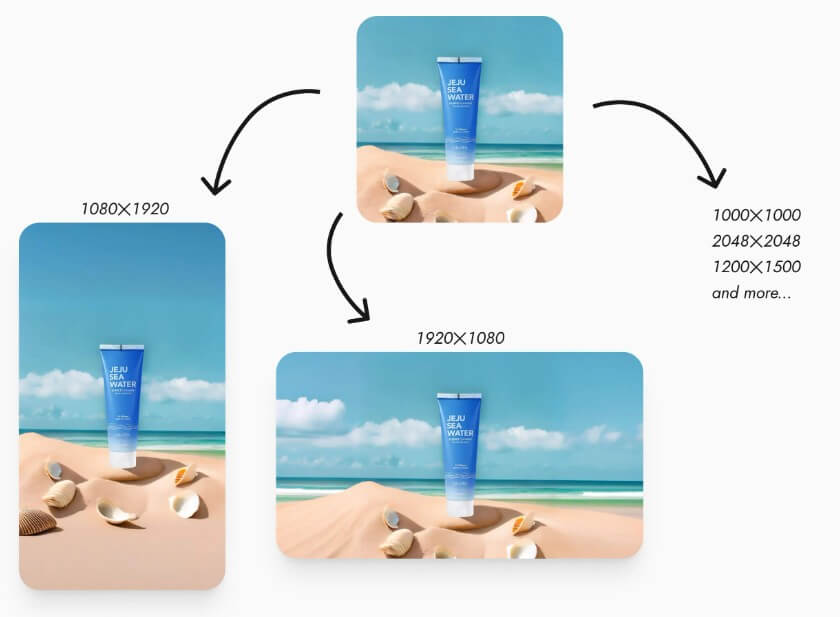
Pebblely’s strongest use case is turning one basic product image into many usable marketing visuals. That is a practical problem for small stores. A seller may have one decent packshot but still need a clean listing photo, a social media image, a website banner, a seasonal campaign image, and an ad creative.
The tool is built around that need. Pebblely’s homepage describes turning one image into multiple marketing assets, including marketplace listing photos, social content, website imagery, email banners, and ad creatives. It also highlights bulk generation, similar or varied backgrounds, and more than 100 templates to help users get started faster.
That makes Pebblely more useful than a broad image generator for a specific kind of user: someone selling physical products online. It is not mainly for concept art, character scenes, or fantasy visuals. It is for improving product presentation.

Pebblely’s workflow is straightforward: upload a product, choose a template or custom direction, generate the image, review results, edit if needed, and download. The how-to guide says users can filter generated results by resolution, search by theme or prompt, open a result, and download it.
For a non-subscriber, the most useful evaluation path is to study the template library, gallery examples, category pages, and how-to documentation first. You can judge whether Pebblely’s visual style matches your product category before paying for the full workflow.
The tool is most useful when users already have decent product inputs. Pebblely can improve the scene around a product, but it still needs a clear product photo to work from. If the original image is blurry, badly lit, cropped awkwardly, or has unclear packaging, the generated results may look less reliable.

Pebblely’s output quality should be judged in two layers.
The first layer is visual appeal. Does the image look like something you could use on a website, Instagram post, email banner, or marketplace listing? On that level, Pebblely is designed to help sellers create polished visuals quickly.
The second layer is product accuracy. This matters more. A product image is not useful if the bottle shape changes, the label becomes wrong, the logo distorts, the color shifts too much, or the product appears larger or smaller than expected. Pebblely’s reference-image workflow helps with composition and color consistency, but users still need to review every output before publishing.
Editing helps reduce some of this friction. Pebblely’s how-to page says users can edit generated images without starting over by describing changes such as warmer lighting or a darker background. It also notes that users can change image size or toggle high-resolution mode when editing.
- Small eCommerce stores: Pebblely is a strong fit for sellers who need better product images but do not have the time or budget for constant photoshoots.
- Marketplace listing photos: Clean product-focused visuals are useful for platforms where the product must be clear and easy to inspect.
- Social media content: Pebblely can help create fresh product scenes for Instagram, Pinterest, TikTok covers, and other visual channels.
- Website and email banners: The tool is useful when a brand needs wider assets with space for headlines, product announcements, or seasonal campaigns.
- Ad creative testing: A seller can generate several visual directions around the same product and use the best ones for paid ad testing.
- Product collections and bundles: Group shots are useful for gift sets, bundles, skincare routines, supplement stacks, jewelry pairings, candle sets, and other multi-product offers. Pebblely’s guide says group shots can include up to five products.
Since you do not have a subscription, focus on what you can judge publicly before committing.
Look at the homepage examples and ask whether the visual style fits your brand. Review the templates to see if they match your product category. Check the how-to guide to understand whether the workflow feels simple enough. Pay attention to feature boundaries, because Pebblely’s own guide says custom backgrounds, multiple products, editing generated images, and reusable backgrounds are tied to subscription access.
This matters because Pebblely is much more useful when you can control the scene. If you only need a few simple product shots, templates may be enough to judge the tool’s direction. If you need a specific campaign look, custom backgrounds and reference images become more important.
- Start with a clean product photo. Use sharp focus, good lighting, and a straight product angle where possible.
- Match the asset to the channel. A marketplace listing, Instagram post, website banner, and email header need different composition.
- Use templates to explore style quickly. Templates are useful for testing whether Pebblely fits your product before investing more time.
- Use reference images when brand consistency matters. Pebblely says reference images can help guide colors and composition, which is helpful for brands with a defined visual style.
- Review product details closely. Check labels, logos, packaging shape, material, shadows, scale, and color before using images commercially.
- Pebblely’s main limitation is product fidelity. Like any AI product-photo tool, it can create attractive images that still need close review. That is especially true for jewelry, supplements, cosmetics, watches, food packaging, and anything with important label text.
- The second limitation is access. Some of the more useful controls, including custom backgrounds and editing generated images, require a subscription according to Pebblely’s own guide.
- It also does not replace professional photography for every use case. Premium launches, regulated products, technical product demonstrations, and campaigns where every material detail matters may still need real photography or careful retouching.
Pebblely is best for eCommerce sellers, small brands, and marketers who need more product visuals without building a full photoshoot workflow.
Its strongest value is speed: one product image can become listing photos, social visuals, banners, ads, and campaign variations.
The main caveat is control. If you do not have a subscription, you can still evaluate the public examples and workflow, but Pebblely becomes more useful when you have access to custom backgrounds, editing, reference-based direction, and bulk generation.
TAGS: Marketing Photo Editing
Related Tools:

Transforms artificial skin into photorealistic skin

Enhances image resolution and detail

Automates budgeting, provides debt payoff strategies

Provides advanced budgeting tools

Provides customizable email templates

Budgeting app that employs zero-based budgeting