
Share this tool:
 |
Description:
BeepBooply is a fairly simple product with a useful angle: instead of building its identity around one proprietary voice model, it gives users a web interface over text-to-speech voices from Google, Microsoft, and Amazon. The official site frames it as an AI voice generator with 900+ voices across 80+ languages, plus adjustable pacing, pitch, volume, and speaking styles. That makes it less interesting as a “voice lab” and more interesting as a practical access layer to major cloud TTS providers.
BeepBooply is strongest when the job is simple: pick a voice quickly, turn text into usable speech, save it inside a project, and download the result without dealing directly with Google Cloud, Azure, or AWS tooling. Its homepage consistently sells speed and convenience rather than deep production features, emphasizing that audio can be generated with a click and then saved, listened to, and downloaded.
That matters because a lot of TTS tools either go very lightweight or very technical. BeepBooply lands in the middle. It is more capable than a toy generator because it gives access to a wide multi-provider voice catalog and some meaningful controls, but it is also much simpler than setting up provider accounts and working directly inside developer consoles. In practice, its value is mainly workflow convenience. This is an inference from BeepBooply’s official positioning around provider access and one-click generation.
The main product page says BeepBooply offers 900+ voices across 80+ languages.
The official site says its realistic voices are provided by Google, Microsoft, and Amazon.
BeepBooply highlights pacing, pitch, volume, and speaking styles as core adjustments.
Generated audio can be saved, and the main site explicitly refers to project limits and project storage on the web app.
BeepBooply’s separate free tool offers 3,000 characters per day, 400+ voices, and 40+ languages, which makes casual testing easy.
The FAQ on the main page says generated audio can be used for personal and commercial purposes.
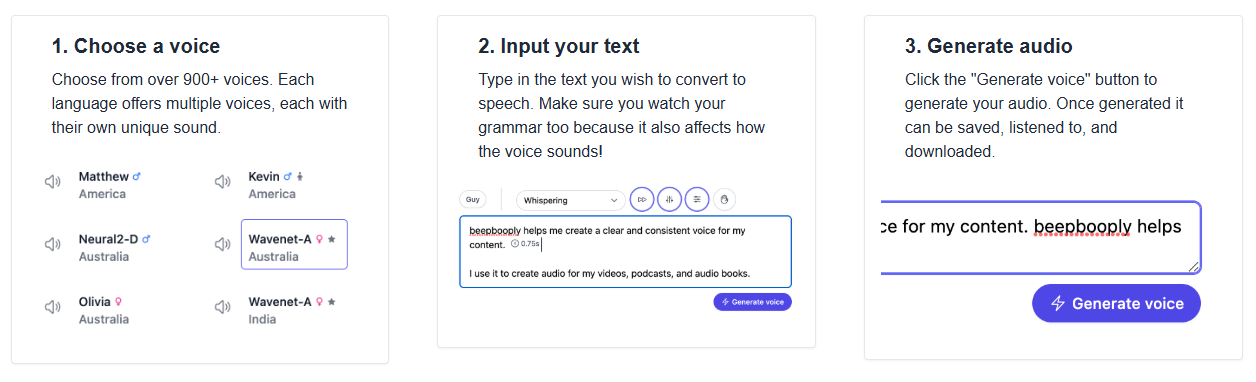
BeepBooply’s workflow is intentionally simple. The homepage presents it as a three-step flow: choose a voice, input text, then generate audio. Once generated, the audio can be saved, listened to, and downloaded. That sounds basic, but it is the whole point of the product. BeepBooply is selling ease of access to major TTS engines, not a complicated editing environment.
The project layer matters more than it first appears. The public site does not spend a lot of time explaining project management in detail, but it clearly references project limits and project retention on the main app. That tells you BeepBooply is designed for repeat use rather than only one-off conversions. It is meant to be a browser workspace where users generate clips, keep them around, and come back to them.
The separate free tool also helps clarify the product structure. BeepBooply runs a lightweight free version with fewer voices and languages, while the main version adds the larger library and the ability to save audio inside projects. Even without discussing plans, that split tells you how the company thinks about the product: a low-friction trial surface plus a fuller browser app for ongoing work.
The clearest reason to care about BeepBooply is that it is not one voice engine. Its voices come from Google, Microsoft, and Amazon, and its public voices page is organized by both provider and language. That means the platform is best understood as an interface layer over several major cloud TTS ecosystems rather than as a single unified model stack.
That provider mix matters because it gives users broader coverage and more voice choice than they would get from a narrower catalog. BeepBooply’s own 2023 blog explains the provider differences in a useful, if somewhat editorial, way: Amazon is presented as simpler, Google as strong with WaveNet and multilingual support, and Microsoft as the most flexible with broader language coverage and more speaking-style customization. The important takeaway is not the blog author’s ranking. It is that BeepBooply’s value partly comes from aggregating engines with different strengths.
The practical consequence is that BeepBooply works best when you treat voice selection as a search problem, not a one-click default. Because the catalog spans multiple providers, the “right” voice will depend heavily on language, accent, and whether that provider supports extra speaking styles for a given voice. This is an inference from BeepBooply’s provider structure and its emphasis on customizable choices.
BeepBooply’s quality story is mostly borrowed from its providers. The product page repeatedly describes its voices as realistic and natural sounding, but the realism is specifically attributed to voices provided by Google, Microsoft, and Amazon rather than to a BeepBooply-exclusive model. That is not a weakness by itself. In many cases, it is actually the reason to use the product.
The controls are practical rather than deep. BeepBooply publicly highlights pacing, pitch, volume, and speaking styles, which are exactly the settings most users need for ordinary voiceovers, narrations, and customer-facing clips. That gives users enough room to adapt a voice without turning the product into a full production suite.
The main limitation is that the public materials stay fairly high-level. You can see that the product supports speaking styles and provider-based voices, but the public site does not go especially deep into model-by-model behavior, editing systems, or advanced workflow design. So BeepBooply looks strongest as a fast voice generation layer, not as a premium audio workstation. This is an inference from the scope and detail of the current public site.
BeepBooply is a good fit for video voiceovers, podcast narration, and general content production. Those are explicit use cases on the homepage, and they line up well with the product’s strength: fast access to lots of voices without much setup friction.
It also makes sense for multilingual spoken content. The site repeatedly emphasizes 80+ languages, and the voices directory is structured around a long list of supported languages, from major ones like English, Spanish, Mandarin, and Japanese to smaller-language options as well. That kind of breadth is one of BeepBooply’s clearest practical advantages.
Another good fit is teams or solo creators who want a browser-first workflow instead of direct cloud-provider setup. BeepBooply’s entire pitch is built around skipping equipment, skipping manual recording, and generating audio through a simple interface. That makes it useful for creators, marketers, course builders, and businesses that need usable TTS more than they need technical control.
- Start by choosing the provider family that best matches your use case, not just the first voice you like. BeepBooply’s voice directory is explicitly organized by provider, and its own blog suggests the providers differ in flexibility, multilingual support, and speaking-style options.
- Use the free tool first if you want to test language coverage, accent fit, or general voice quality before moving into the full app. The free version already gives access to 400+ voices across 40+ languages, which is enough to validate whether the product is a match for your workflow.
- Treat grammar and punctuation as part of the voice control. BeepBooply’s own how-it-works section tells users to watch their grammar because it affects how the voice sounds, which is a useful reminder for any browser TTS workflow.
- If you are producing recurring content, lean on the project workflow rather than treating every generation as disposable. The public app structure clearly supports saving audio in projects, which is one of the product’s more practical advantages over bare one-shot generators.
- The biggest trade-off is that BeepBooply looks more like an access layer than a deeply differentiated voice platform. The realism comes from Google, Microsoft, and Amazon, while BeepBooply’s own contribution is mostly packaging, convenience, and project workflow. That is useful, but it also means the product’s ceiling is partly defined by the source providers.
- The second trade-off is limited public depth. The site does a good job explaining the basics, but it is lighter on advanced workflow details, deeper editing features, and public technical documentation. So the product is easy to understand, but not as richly documented as more developer- or enterprise-oriented voice platforms. This is an inference from the current public site and the absence of exposed technical docs in the surfaced official pages.
- The third trade-off is freshness. The public footer shows 2023, and the privacy policy is dated February 10, 2023, last updated the same day. That does not mean the app is inactive, but it does suggest the public marketing and policy materials are not being updated very aggressively. Buyers should judge the product by the live app experience, not only by the polish of the public site.
BeepBooply is a solid choice for people who want broad TTS coverage without dealing directly with cloud-provider complexity. Its best qualities are straightforward browser workflow, access to 900+ voices across 80+ languages, useful basic controls, project saving, and the fact that it aggregates voices from Google, Microsoft, and Amazon in one place.
It is best for creators, marketers, educators, and small teams who want practical voice generation more than advanced audio engineering. The main caveat is that BeepBooply’s value comes mostly from convenience and aggregation, so it is strongest when that simplicity matters more to you than deep platform differentiation.
TAGS: Text to Speech
Related Tools:

Writing tool that integrates drafting and research management

Transforms written texts to voiceovers

Translates text and speech between languages
Creates realistic and customizable voiceovers

Translates, dubs, and add subtitles to videos
Converts text into realistic audio content