

Share this tool:
 |
Description:
Cookup AI is no longer best understood as just an “AI apps for every use case” directory, even though older listings still describe it that way. Its current public site presents a much narrower product: a sign-in based personal AI assistant, powered by GPT-4o, with a visible memory area and permission to fetch publicly available information for personalization.
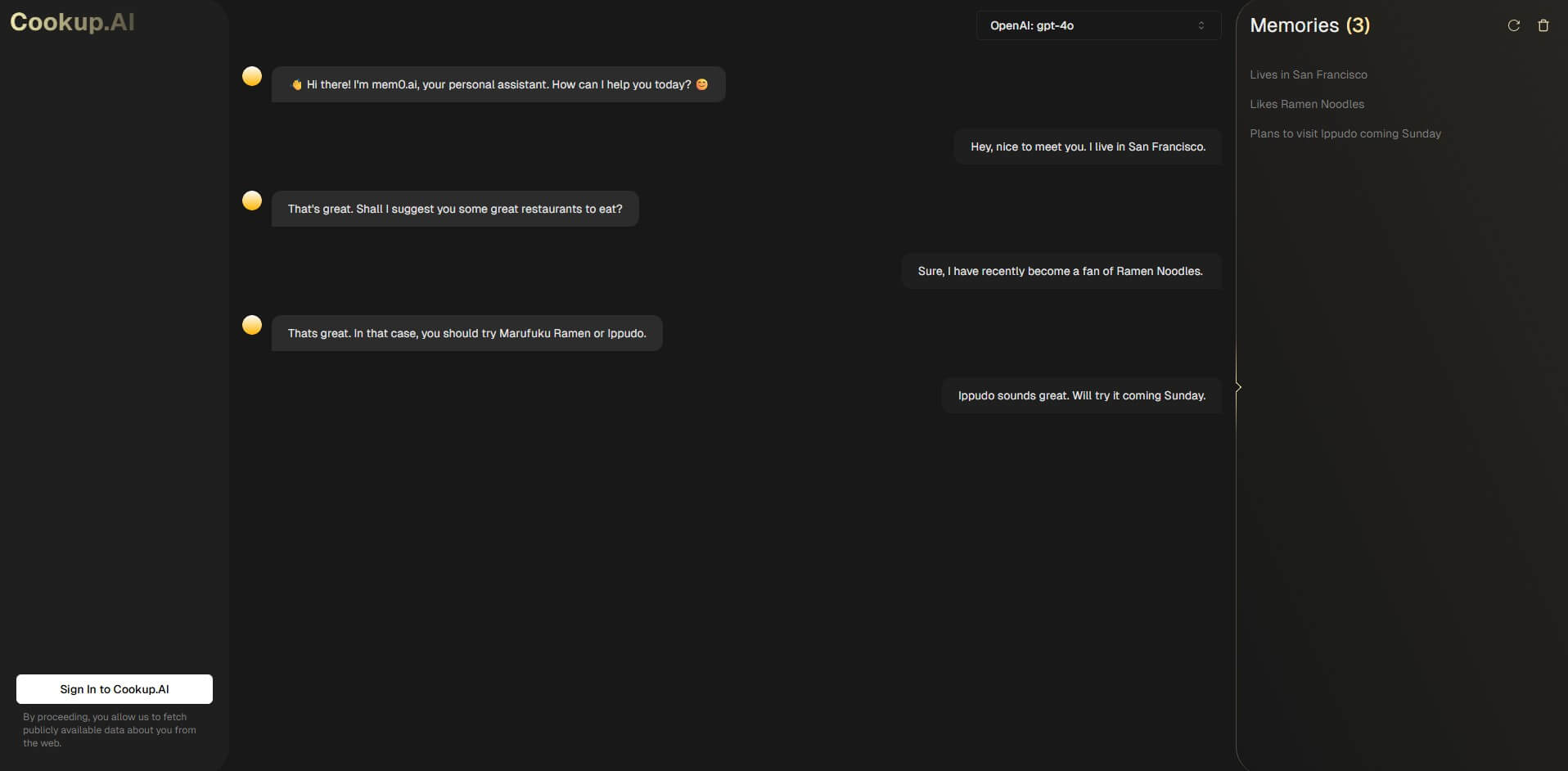
Cookup AI currently looks like a lightweight personal assistant built around memory. The official site shows OpenAI GPT-4o as the model layer, a sign-in flow, and a Memory section. It also tells users that, by proceeding, they allow the service to fetch publicly available data about them from the web.
That makes the product different from a normal chatbot. A standard AI chat starts from the current prompt and whatever context you paste in. Cookup AI’s angle is more persistent: remember useful details, use them across future interactions, and reduce the need to repeat personal preferences or background information.
The main thing to know is that Cookup AI’s value depends on whether you want that kind of memory. If you just need one-off answers, many assistants can do the job. If you want an assistant that gradually understands your preferences, work style, recurring needs, or public profile, Cookup AI becomes more interesting.
| Feature | What it does | Why it matters |
|---|---|---|
| GPT-4o assistant layer | The current public site identifies GPT-4o as the model powering the assistant | Gives the product a capable general-purpose assistant foundation |
| Persistent memory | Third-party product coverage describes Cookup AI as a GPT-4o powered personal assistant that remembers preferences and conversation history | Helps make repeated interactions feel less like starting from zero |
| Memory management | Cookup AI is described as offering a memory panel where users can review stored information | Memory visibility matters because personalization without control can become uncomfortable |
| Personalization from public data | The official sign-in page says the service may fetch publicly available data about the user from the web | Can help personalize responses, but users should understand the privacy trade-off |
| Account-based experience | Cookup AI requires sign-in before the full assistant workflow | Fits its memory-first positioning better than a disposable chat session |
Cookup AI is strongest when personalization matters more than raw feature count.
For example, a founder might want an assistant that remembers their company, role, product category, and preferred tone. A student or researcher might want recurring help that keeps their interests and writing style in mind. A professional might want a helper that does not need the same background repeated every time.
That is the real pitch. Cookup AI is not trying to overwhelm the user with dozens of visible tools. It is closer to a focused assistant layer with memory as the central feature. The product coverage around Cookup AI frames it around productivity, research, writing, and everyday tasks where retained context can make responses faster and more relevant over time.
The workflow appears simple from the public site: sign in, allow the assistant to personalize based on available information, then use the chat interface with memory support. That simplicity is good for casual users, but it also means the product is somewhat opaque before login. The public page does not show a deep feature library, workflow demos, integrations, team settings, or advanced configuration on the surface.
This is both a strength and a limitation. It keeps the product easy to understand, but it also makes Cookup AI harder to evaluate from the outside. The current public positioning is clear enough to explain the concept, but not detailed enough to judge advanced reliability, memory accuracy, export options, collaboration features, or integration depth.
The best workflow is likely gradual. Start with everyday tasks, then see whether the memory layer improves follow-up conversations. If the assistant remembers useful preferences accurately, it can save time. If the remembered details are thin, wrong, or too broad, the value drops quickly.
Cookup AI’s most important feature is not that it can answer questions. Many tools can do that. The important part is whether it can remember the right things and let the user stay in control.
Memory is useful when it stores durable preferences: preferred writing tone, recurring projects, audience type, professional background, hobbies, constraints, or favorite formats. It is less useful when it remembers noise, makes assumptions too early, or uses public information without enough context.
This is why the memory panel matters. Product coverage says Cookup AI gives users a way to review stored information, and that is the right design direction. A memory-based assistant needs transparency. Users should know what it remembers, correct what is wrong, and remove anything they do not want shaping future answers.
Cookup AI is a good fit for people who want a recurring AI assistant rather than a blank chat window every time.
It works best for personal productivity, everyday writing help, lightweight research, brainstorming, planning, profile-aware recommendations, and recurring work where context matters. It may also suit creators, founders, consultants, and solo operators who often ask similar kinds of questions and want answers shaped around their background.
It is less convincing for teams that need shared workspaces, deep integrations, admin controls, project management, file libraries, or formal knowledge bases. It also may not be the best choice for users who dislike persistent memory or prefer to keep each AI session separate.
- Use Cookup AI for repeated workflows first. The memory layer only proves itself when you return to similar tasks over time.
- Review remembered details when possible. A personalized assistant is only as good as the context it keeps.
- Be careful with sensitive information. Since the product’s positioning includes personalization and public data lookup, users should think deliberately about what they want associated with their assistant experience.
- Test it against a normal chatbot. Ask the same recurring task several times over a few sessions and see whether Cookup AI gives more useful, context-aware answers.
The biggest limitation is public clarity. Cookup AI’s current site is minimal before sign-in, so buyers do not get much detail about controls, integrations, export options, or exact memory behavior from the public page alone.
The second limitation is category confusion. Older listings still describe Cookup.ai as a collection of pre-made AI apps for product management, marketing, programming, prediction, venture capital, and more. The current site points more toward a personal memory assistant. That shift is important, because old summaries may not reflect what the product now emphasizes.
The third trade-off is trust. Memory can be useful, but it also raises the bar for privacy, accuracy, and user control. People who want a clean, session-by-session chatbot may find Cookup AI’s personalization less appealing.
Cookup AI is best understood as a personal AI assistant with memory, not as a broad AI app marketplace. Its strongest idea is simple: make AI feel less like a new conversation every time and more like an assistant that gradually understands the user. It is best for individuals who want recurring, personalized help with writing, research, planning, and everyday productivity. The main caveat is that the public site gives limited detail before sign-in, so the memory quality and control experience are the first things users should evaluate.
TAGS: Prompt Guides Content Creation
Related Tools:
AI-enhanced copywriting tool

Offers prompt engineering support

Easily produce engaging videos using templates

Enhances writing process
Enhances content quality through real-time feedback

Simplifies the creation of high-quality blog content