
Share this tool:
 |
Description:
CloneDub is an AI dubbing platform built for creators, podcasters, YouTubers, educators, and businesses that want to turn existing video or audio content into localized versions. Its core promise is direct: upload content, translate it into another language, preserve the speaker’s voice style, keep the background music and sound, then download the result as video, audio, or subtitle files.
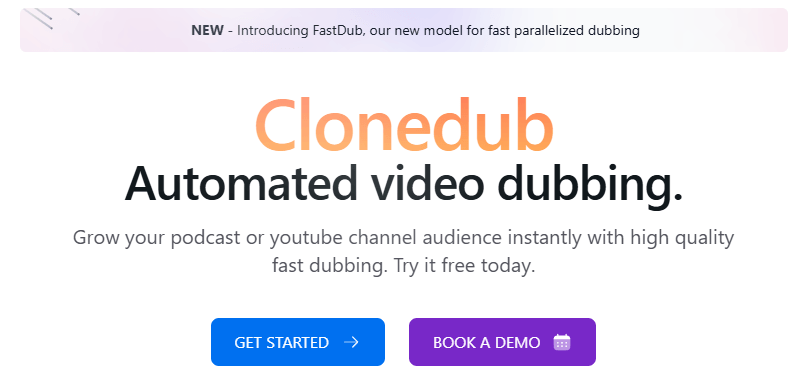
CloneDub is a focused localization tool. It is not trying to be a full audio production suite, a video editor, or a voiceover marketplace. Its main job is AI dubbing: taking existing spoken content and creating multilingual versions that still feel connected to the original speaker. CloneDub describes the product as an automated video dubbing platform for podcasts and YouTube channels, with support for high-quality dubbing, voice cloning, and long-form video requests.
The easiest way to understand it is through the workflow.
| Layer | What it does | Why it matters |
|---|---|---|
| Upload workflow | Lets users upload video or audio files for dubbing. | Keeps the process simple for creators and small teams. |
| Translation layer | Converts speech into supported target languages. | Helps one original piece of content reach new audiences. |
| Voice preservation | Attempts to keep the original speaker’s voice feel. | Makes the dubbed version feel less disconnected from the creator. |
| Sound preservation | Keeps the original music and sounds around the dub. | Useful for videos where atmosphere, intro music, or production style matters. |
| Export layer | Provides SRT, audio, and video file downloads. | Gives creators flexibility for YouTube, podcasts, subtitles, and editing handoff. |
That structure makes CloneDub especially useful when the priority is speed and simplicity. A creator does not need to rebuild the whole production process for each language. They can start from a finished video and generate localized versions from there.
CloneDub translates and dubs video or audio content while preserving the original speaker voice, music, and surrounding sounds.
The platform emphasizes accurate voice cloning, which is the key feature for creators who want dubbed content to still feel like them.
CloneDub publicly lists support for files up to 2 hours per file, which makes it practical for webinars, podcasts, tutorials, courses, and long YouTube videos.
Users can download dubbed results as SRT, audio, and video files, giving editors and creators more flexibility after processing.
CloneDub lists support for common audio and video formats including MP3, OGG, WAV, FLAC, AVI, MP4, MKV, AIFF, and AAC.
CloneDub currently highlights FastDub as a newer model for faster parallelized dubbing, which suggests the product is actively improving speed and throughput.
CloneDub is strongest for creators who already have finished content and want to expand into other languages without rebuilding every asset manually. That makes it especially relevant for YouTube channels, podcasts, educational videos, product explainers, online courses, webinars, and founder-led content where the speaker’s identity matters. CloneDub’s about page frames the product around helping individuals and businesses reach global audiences with localized content.
The voice preservation angle is the main reason to use it. Basic translation can make content understandable. Voice-aware dubbing makes it feel more personal. For creators, that matters because a generic synthetic voice can weaken the relationship between the audience and the original speaker. CloneDub’s homepage explicitly positions the platform around keeping the original speaker voice while also preserving music and sounds.
The second strength is simplicity. CloneDub’s FAQ describes the workflow as uploading files, starting the dubbing process, and downloading the finished files in one click as SRT, audio, and video. That is a good fit for creators who do not want a complicated dubbing studio or heavy editing environment.
The third strength is long-form friendliness. A two-hour file limit makes the tool more useful than clip-only dubbing products. Many real creator workflows involve 20-minute tutorials, 45-minute interviews, 60-minute webinars, or course lessons that are too long for lightweight social-only localization tools.
CloneDub’s public workflow is deliberately simple. You upload the source video or audio, select dubbing settings, run the process, then download the output. That makes it easier to adopt than platforms that require timeline editing, speaker assignment, segment-by-segment translation repair, or manual voiceover production before you get a usable result.
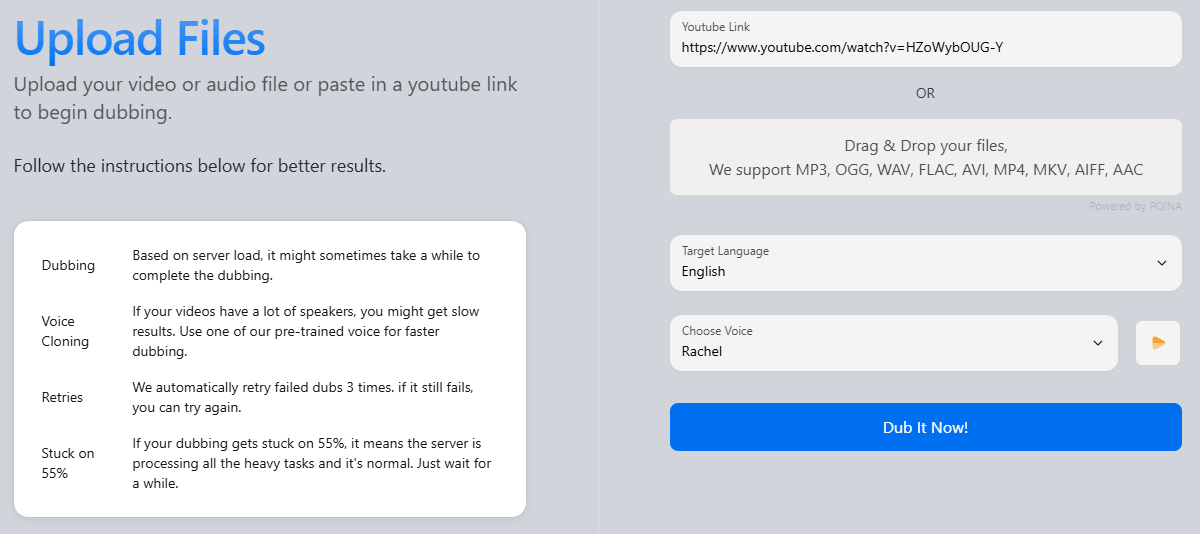
Processing speed depends on the length of the file and whether voice cloning is used. CloneDub says that without voice cloning, videos usually finish in around 50–60% of the original runtime. With voice cloning, processing can take longer depending on server load. That is an important practical detail because voice preservation is useful, but it usually adds processing complexity.
The platform also gives a direct speed recommendation: using a predefined voice can make dubbing faster, while custom voice needs may require contacting CloneDub. This matters for users who need quick turnaround and are willing to trade some voice specificity for faster processing.
One onboarding detail is worth noting. CloneDub’s sign-up page says email sign-up is disabled for security reasons and asks users to use Google sign-up. That is not a major issue, but it is a small access constraint for users who prefer traditional email registration.
CloneDub’s public language list includes English, Japanese, Chinese, German, Hindi, French, Korean, Portuguese, Italian, Spanish, Indonesian, Dutch, Turkish, Polish, Swedish, Bulgarian, Romanian, Arabic, Czech, Greek, Finnish, Croatian, Malay, Slovak, Danish, Tamil, and Ukrainian. That gives it enough coverage for many creator, education, and business localization workflows.
The supported file formats are practical too. CloneDub lists common audio and video formats including MP3, OGG, WAV, FLAC, AVI, MP4, MKV, AIFF, and AAC. That reduces friction because users do not always need to convert files before uploading.
The more important point is that CloneDub is designed around finished media, not script-first production. You are not starting with text and generating a new voiceover from scratch. You are starting with an existing speaker, existing video, and existing audio environment, then turning that into a localized version. That makes it particularly useful for repurposing content that already works in one language.
The strongest quality promise is voice continuity. CloneDub says it keeps the original speaker voice while also preserving music and sounds. In practice, that is exactly what creators usually want from AI dubbing: the translated version should sound localized, but not disconnected from the original brand or personality.
That said, voice cloning is not magic. Dubbing quality depends heavily on the original audio. Clean speech, low background noise, minimal speaker overlap, and clear pacing will usually produce better results than noisy recordings, overlapping interviews, music-heavy dialogue, or low-quality source audio.
Translation quality also needs review. AI dubbing can move quickly, but fluent speech is not always the same as accurate localization. Names, product terms, humor, idioms, technical language, and cultural references can still need human review. CloneDub’s SRT export is useful here because it gives creators and editors a text layer they can inspect before publishing.
The main control limitation is that CloneDub’s public pages do not describe a full professional dubbing studio with detailed transcript editing, segment-level regeneration, pronunciation dictionaries, speaker diarization controls, or collaborative review. That does not mean those tools do not exist inside the product, but they are not emphasized publicly. Based on the visible product description, CloneDub appears more automated and upload-driven than deeply editable.
- YouTube channel localization: CloneDub is a strong fit for creators who want to publish translated versions of tutorials, commentary, interviews, reviews, explainers, or educational videos. The voice cloning and video export workflow are especially useful here.
- Podcast translation: Audio-first creators can use CloneDub to turn interviews, monologues, and podcast episodes into other languages while keeping the speaker identity closer to the original.
- Online courses and training videos: The long-form file support makes CloneDub useful for lessons, webinars, recorded workshops, and internal training material. The main requirement is review, especially when accuracy matters.
- Business explainers and product demos: Companies can use CloneDub to localize product videos, onboarding content, sales demos, and customer education videos for international audiences.
- Creator agencies and localization teams: CloneDub is useful when the goal is to produce first-pass dubbed versions quickly, then review subtitles and final video before publishing.
- Start with the cleanest source audio possible. Clear voice, controlled background noise, and minimal overlapping speakers will usually make a bigger difference than any setting inside the tool.
- Use shorter test clips before dubbing a long file. A short sample lets you check pacing, translation quality, voice feel, and subtitle accuracy before processing the full video.
- Review the SRT output carefully. This is the easiest place to catch mistranslations, product names, awkward phrasing, timing issues, and terminology problems before the dubbed video goes live.
- Use predefined voices when speed matters more than speaker-specific identity. CloneDub says predefined voices can make dubbing faster, while custom voice needs may take longer or require direct contact.
- Keep human review in the workflow for serious content. Legal, medical, financial, educational, paid course, and brand-sensitive videos should not be published purely from automated dubbing without native-language review.
- The biggest limitation is editing visibility. CloneDub clearly explains upload, dubbing, and download, but it does not publicly present a deep editing studio. Users who need transcript repair, segment-by-segment control, custom pronunciations, speaker timeline editing, or collaborative review should test the product carefully before relying on it for high-stakes localization.
- The second limitation is processing variability. CloneDub says voice cloning can take longer depending on server load, and its FAQ mentions that videos can appear stuck during heavy load. It also says failed dubbing tasks are usually retried three times automatically before being marked non-retryable. That is useful transparency, but it means urgent localization work should not be left to the last minute.
- The third trade-off is collaboration. CloneDub’s public comparison table lists team members as “just you,” which suggests the visible product is more individual-user oriented than team-workspace oriented. That may be fine for solo creators, but agencies, editors, translators, and approval-heavy teams may need a separate review and handoff process.
- The fourth limitation is specialization. CloneDub focuses on dubbing. It is not positioned as a full voice platform with transcription products, voice libraries, live voice agents, audio cleanup, sound effects, podcast editing, or enterprise localization management. That focus keeps the product simple, but users who need a broader audio stack may outgrow it.
- Finally, language coverage is useful but not universal. CloneDub supports a strong set of major languages, but teams working in less common markets should confirm target-language support and quality before planning a full localization workflow.
CloneDub is best for creators, podcasters, YouTubers, course makers, and businesses that want a straightforward way to turn existing videos or audio into dubbed multilingual versions while preserving the original speaker’s voice feel.
Its strongest advantages are simple upload-based dubbing, voice cloning, long-form file support, broad format handling, SRT/audio/video exports, and a workflow built around fast localization.
The main caveat is that it appears more automated than deeply editable, so serious localization teams should review outputs carefully and confirm editing, collaboration, and quality-control needs before scaling.
TAGS: Translation Voice/Audio Modulation
Related Tools:
Allows developers to create and publish 2D and 3D games

Translates videos into multiple languages

Enables users to create 2D and 3D games without coding

Streamlines the translation and management of multilingual content

Enhances communication by providing multilingual support
Allows users to create and publish their own role-playing games