

Share this tool:
 |
Description:
Logically is a research workspace for students, academics, writers, and other people who spend a lot of time working with sources. It combines four main tools: an AI Document Writer, Research Assistant, Reference Manager, and File Annotator. The product was previously called Afforai before being rebranded as Logically.
The point is to keep the different stages of research connected. You can collect papers, question them, annotate important passages, move useful findings into a draft, and manage the citations without rebuilding your context in a different app each time.
Anyone who has tried to keep a reference manager, PDF reader, research chatbot, notes app, and Word document in sync will understand the appeal.
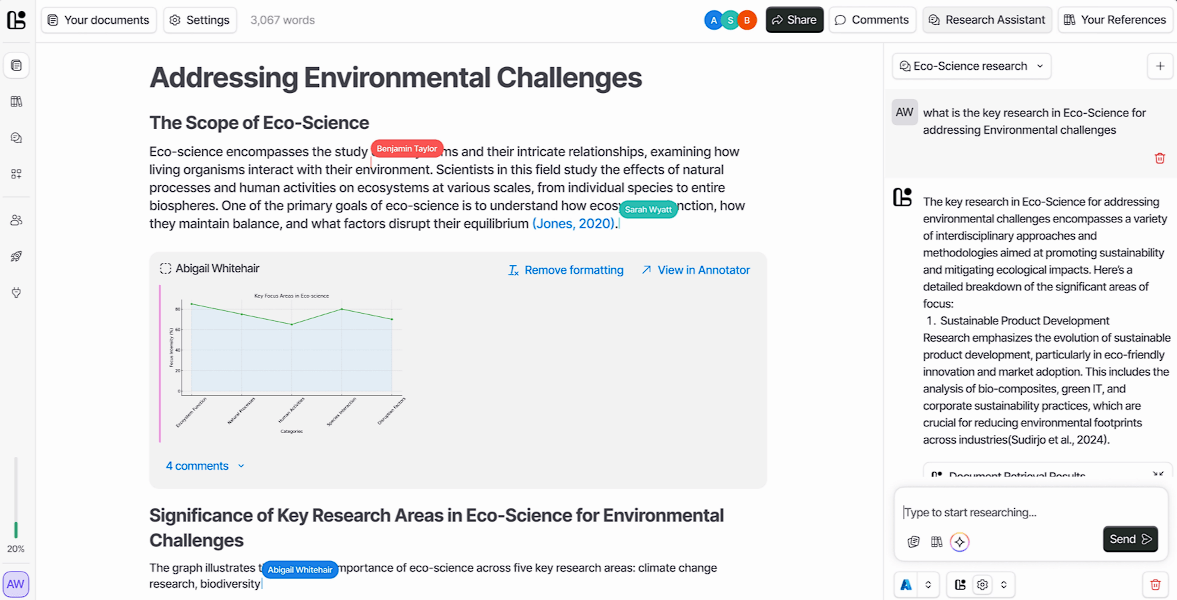
Logically’s Research Assistant gives users several ways to search for and work with evidence.
Document Retrieval Mode answers questions using files from your own library. Its responses contain inline citations and links to the documents behind them. Semantic Scholar Mode searches a database of more than 200 million research papers, while Google Search Mode looks for current information on the web.
Keeping these modes separate is useful. A literature review might start with Semantic Scholar to find relevant papers, move into Document Retrieval Mode for close analysis of the selected studies, and use Google Search when more recent information is needed.
The citations are more important than the chat interface. An unsupported AI summary may sound perfectly reasonable while giving you no practical way to check it. Logically at least points back to the paper, though researchers still need to confirm that the source supports the claim as written.
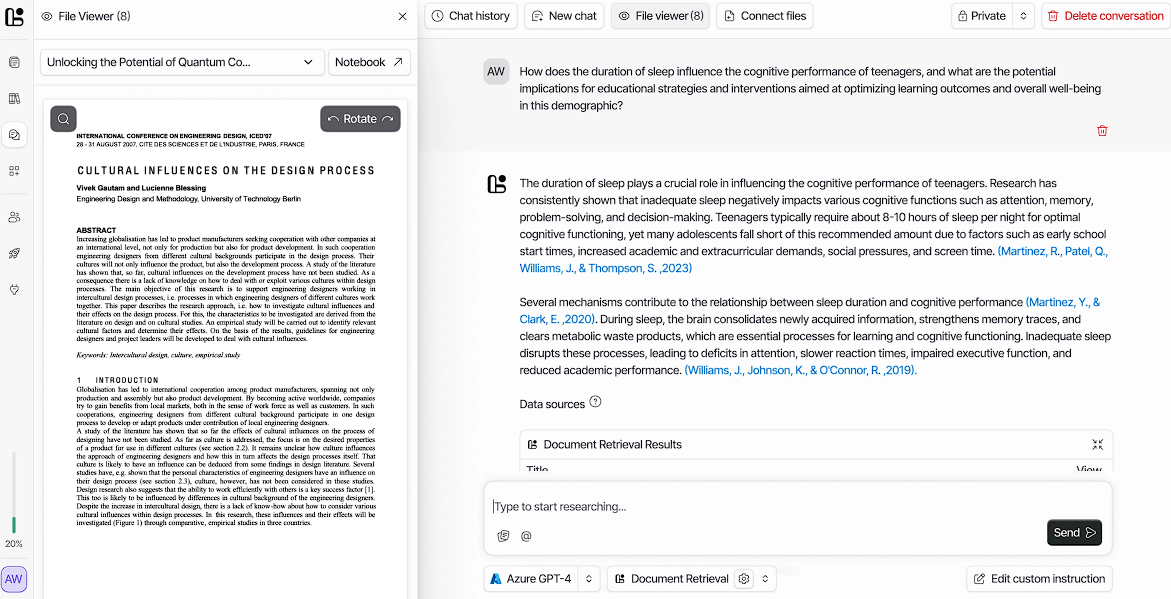
The Document Writer keeps source material close to the draft.
Its editor includes AI autosuggest for continuing a passage, and those suggestions can draw on citations from the user’s library or outside research sources. References can be inserted as the document develops, with the bibliography updating when new citations are added.
The writing tools can also rewrite or summarize text, adjust its tone, translate passages, and help create an outline. For academic work, these features make the most sense as editing and planning aids. Asking the AI to write an entire paper may be faster, but it also gives you far more to verify.
Logically supports more than 10,000 citation styles through its citation system and Microsoft Word extension.
The built-in Reference Manager separates Logically from research chatbots that treat every document as a new conversation.
Users can add files, URLs, and DOIs, organize papers into libraries, and generate reference details automatically. Supported file types include PDF, DOCX, TXT, Markdown, EPUB, and PPTX.
Once the references are organized, you can search, compare, and summarize information across them. There is no need to upload the same paper again whenever you want to approach it from a different question.
That continuity becomes particularly helpful on large projects. A dissertation or systematic literature review may involve dozens or hundreds of sources, and at that scale, keeping the material organized matters just as much as generating a quick summary.
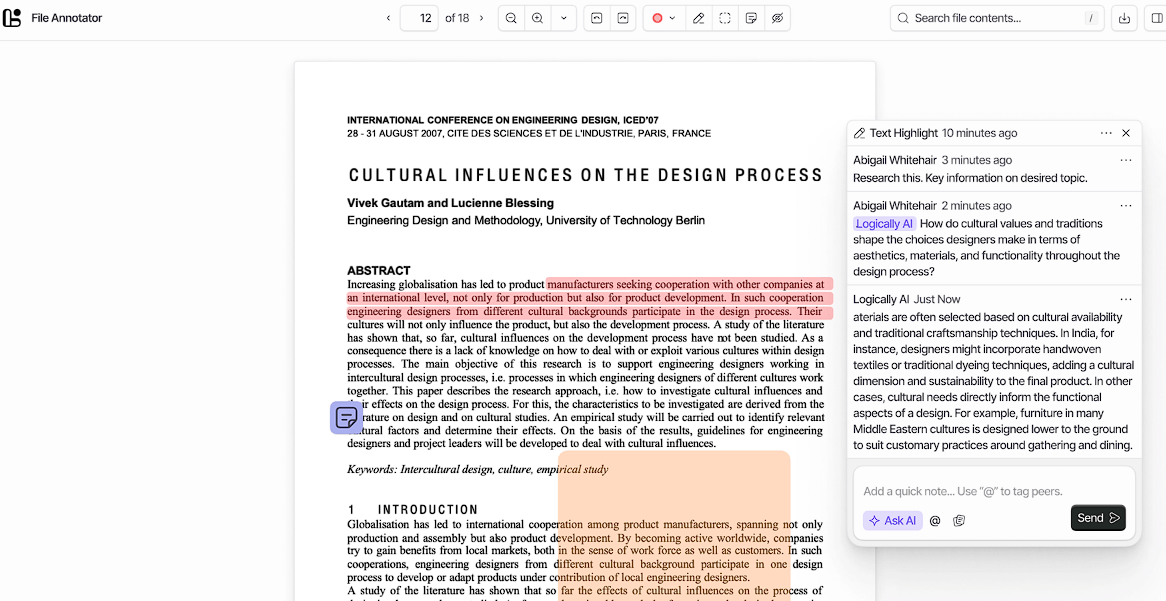
Logically includes a separate workspace for reading and marking up documents.
The File Annotator supports standard text highlighting, sticky notes, and area highlights for visual material such as graphs or datasets. AI tools can explain a selected passage, unpack a difficult concept, or help interpret a highlighted part of the page.
Useful annotations can be sent directly to the Document Writer. Shared libraries also allow comments and mentions, making the system more practical for research groups and collaborators rather than only solo users.
According to Logically’s current site, its AI features use models from OpenAI, Claude, and Gemini. The Research Assistant interface currently lists Gemini Flash 2.5 as one available option.
Having a choice of models is convenient, but it is not the best reason to use the product. The real value is that those models work with the same papers, citations, annotations, and drafts. Switching models is less important than avoiding a scattered research process.
Logically is particularly well suited to:
- Literature reviews and academic research.
- Thesis and dissertation projects.
- Comparing results across several papers.
- Creating and managing large reference libraries.
- Annotating difficult PDFs and research reports.
- Writing academic documents with many citations.
- Students who want their research, notes, and writing in one place.
Citations do not make an AI answer automatically correct. Logically may still misread a paper, flatten a complicated finding, or attach a source that supports only one part of a broader statement.
The all-in-one design also takes time to learn. Someone who only needs a quick PDF summary may find the Reference Manager, Annotator, Document Writer, research modes, and citation features more than the task calls for.
Original papers still need to be read. AI can speed up discovery and help compare sources, but it cannot reliably judge methodological quality, resolve conflicting evidence, or catch every limitation buried in a study.
Logically is best viewed as an academic research workspace rather than another chatbot for talking to papers. Its cited research tools, reference library, document annotation, writing assistant, and automatic citation handling keep more of the research process under one roof.
Students, academics, and research-heavy professionals stand to get the most from it, especially when a project involves repeated movement between finding papers, reading them, taking notes, and writing. Logically can reduce the administrative drag. Checking the evidence is still the researcher’s job.
TAGS: Productivity AI Chat/Assistant
Related Tools:

Designed to automate data analysis and preparation
Interact with PDF documents conversationally

Simplifies the use of diverse applications
Customer support tool that streamlines team collaboration

Transforms lecture notes into interactive flashcards

Analyze information, generate code, and complete complex tasks